

Can you change the featured image size on a front page in the Motif theme?
-
I’d like to make the height of the featured image on my main (front) page smaller, is this possible? I’m new to CSS, etc, etc. so I need some guidance. Thanks!
The blog I need help with is: (visible only to logged in users)
-
Hi there!
Can you give this CSS code a try and let me know if it accomplishes what you’re looking for?
.attachment-motif-hero-thumbnail {
	height: 400px;
}
Just insert it at Appearance -> Customize -> CSS.
Let me know if that works!
-
Cool, thanks – that’s getting somewhere. That works to shorten the height of that section, but it resizes the image by squashing it. If I recreate the image to fit the new dimensions, do you think it will solve that problem? Or is there another way around that?
I’ve been playing w/CSS a little on some other features on the page – it’s kind of fun, I had no idea I’d think that was fun. :)
-
CSS is fun once you start getting the hang of it! To answer your question, yes, you would need to upload a new image with the dimensions that will be set by the CSS. So, if you upload a new image that is intended to be 400px in height, it should look better. Can you give that a try and let me know what you think?
-
Still having trouble it seems. I tried several different ratios, but they all squish or chop the image. The one I have as the featured image on the front page right now was created at 500×1140, (I changed the height to 500, and 1140 was recommended as the minimum width for featured images.) I do like the 500px height as far as looks go. Not sure how to keep it from altering the images, though. Any more ideas?
-
Hi!
Currently, the file set on your home page is still a bit larger than 500×1140 as shown here:

Under the Edit Media page, the image appears to be 2375 × 1042. Can you explain a bit about how you’re cropping/resizing the image?
-
Umm…..I blame that on my professional designer friend being really busy and out of town this week, therefore not around to help catch my silly errors in exporting from ID. :) I had the document set up correctly, but was exporting at the wrong dpi. I re-exported at 72dpi and the size should be ok now, 1140×500. It’s better, but it’s still stretching it a bit, side to side. If I can’t figure it out, I may try to make it work at the original size. Any more ideas?
Thanks SO MUCH for your help with this.
-
No problem! Currently, the size of the image and the size of the window appear to be matched up pretty closely as shown here:
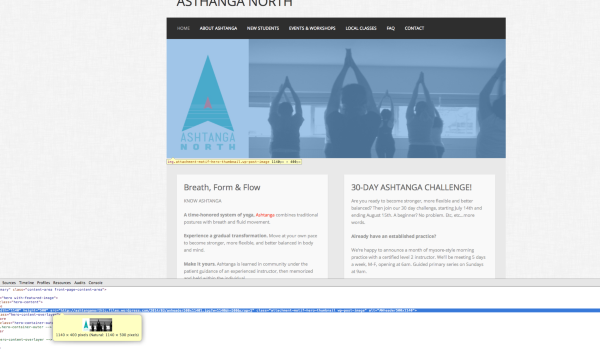
The image appears to be pretty close to the uploaded image seen here:
http://ashtanganorthtc.files.wordpress.com/2014/03/anheader500x11401.jpg?w=1140&h=500&crop=1
Are you still seeing a difference in size/resolution on your side?
-
Yeah, I was still seeing the image squashed a bit, it makes the logo shorter than it is, altering it’s proportions. Also, I noticed the mobile views didn’t look great with the changes, and made the altered featured image no longer responsive. So, it may be best to just deal with the size as-is and move on. No biggie if so. Thanks again for your help, I’m still learning how it all works despite not being able to get it to do exactly what I want it to do! :)
Another question, (if I may) is there a way to remove the custom header, (above the image) entirely as in get rid of the space where the site title is bringing the menu closer to the top?
-
Hi!
Yeah, I think the current setup may be the best option for the front page image. The more we keep messing with the dimensions and layout, we may eventually damage how the site displays on mobile.
Another question, (if I may) is there a way to remove the custom header, (above the image) entirely as in get rid of the space where the site title is bringing the menu closer to the top?
Yep! Navigate to Appearance -> Customize -> Site Title. Uncheck the box for “Display Header Text” and save the changes. That should do the trick!
Let me know if you need anything else!
-
Yes – I’m happy with what I have going now. Thanks so much again for your friendly help!
-


- The topic ‘Can you change the featured image size on a front page in the Motif theme?’ is closed to new replies.


 WordPress.com Forums
