

Canard Theme: Featured photos appear black on mobile
-
Hi
I have an issue with the way the featured photos/featured posts appear on the mobile version of my blog, on the main page. They appear completely black. I suspect this is because featured photos on the Canard theme have a dark shading – does anyone know how to remove this dark shading? And if not, is there anyway to ensure the featured posts don’t appear black on mobile? As soon as people land on my site all they see is 5 giant black squares :/ not really the welcome I had in mind! lolMy blog: http://www.alawaiki.com
Thank you!
The blog I need help with is: (visible only to logged in users)
-
Hello @waikiharnais,
I think what you are seeing is the image loading slowly. Until it loads, you get the black block(s). This is what I see as I visit your site from my laptop with a speedy Internet connection.
On mobile, the connection can be a lot slower. This causes the images to load more slowly on mobile devices, prolonging the display of the black blocks.
One remedy is to reduce the file size of the images so they display faster. Here is a link that will take you in that direction:
Good luck!
-
Hi, thanks for taking the time to reply.
I initially thought this was the issue but I left my phone on the main page for about 45min just to see what would happen and the photos stay dark, nothing happens at all – this is just the way they are displayed. I have great Internet connection on my device and have never had any issues loading photos. This is a theme I installed today for the very first time, so I’m new to it. I love it but I’m thinking of changing it back to my previous theme now, just because of this issue :/Hopefully there’s another solution out there.
-
Hello again @waikiharnais,
Good points. I apologize for not visiting the site from my iPhone before responding. On my iPhone and iPad (both running IOS 11.4.1), black blocks display in place of the images of featured posts — even several minutes after visiting your site.
From playing with the CSS, it appears to me that the images are not loading as opposed to being covered up. Changing CSS to reduce the shading renders a lighter colored box instead of a photo.
With apologies, I have to leave it to someone else who understands the theme better to advise if there are other CSS revisions that might work better.
-
No worries at all, thank you very much. I’m not an expert at CSS at all, so I’d be completely lost.
-
Hello again @waikiharnais,
After some additional research and testing, I suggest that you set a featured image for each post that you tag as featured content.
You add a featured image from the post settings in the lefthand column. Watch how this is done in this useful video about Featured Content.
Notice how the featured image displays above the post content. According to the Candard theme documentation, the ideal size for featured images in Canard is 1920 x 768.
-
-
Hi,
Thank you. All of my posts have a featured image already. I always select one. Still not working :( thank you though. Much appreciated
-
Hi waikiharnais,
I tried opening your page in iPhone and Android.
It opened perfectly in iPhone, loaded the responsive website and all images showed properly.But on my android, I was able to reproduce the issue that you are talking about. The images didn’t load properly(black) and the page was not mobile responsive.
So I thought of connecting my Android with the laptop to debug the page using Chrome dev tools.But as soon as I connected with the debugger and opened the website, it started loading the mobile responsive website, and I didn’t see the issue again.
That means the issue is there on some mobile devices, it is not opening the responsive page.I am not able to provide any help on this.
This information might help someone in resolving your issue. -
Thank you for taking all these steps. I wonder if anyone has ever posted about this issue, I did a bit of research and couldn’t find anything. Such a shame that this happens.
-
To get the attention of a staff member who might like to know about this oddity, you can type “modlook” as a tag on this page. I have done so for you.
-
-
Hello @waikiharnais,
Would you humor me by checking the settings for one of your featured posts to confirm that it has an assigned featured image?
Here is what the post settings looks like on a hidden site I created for troubleshooting Canard:
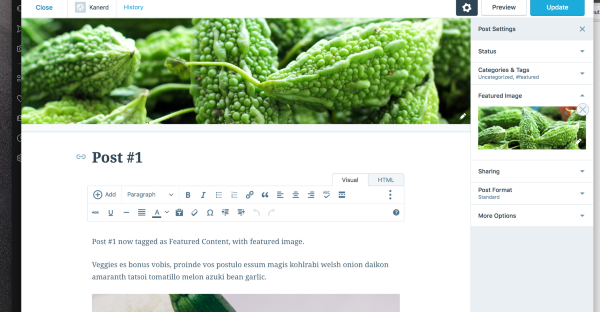
Notice how the featured image spans the width of the page. In a single post view with a desktop browser (using my test site or the Canard demo site), the featured image displays between the menu and the post copy.
But I am not seeing the same on your site.
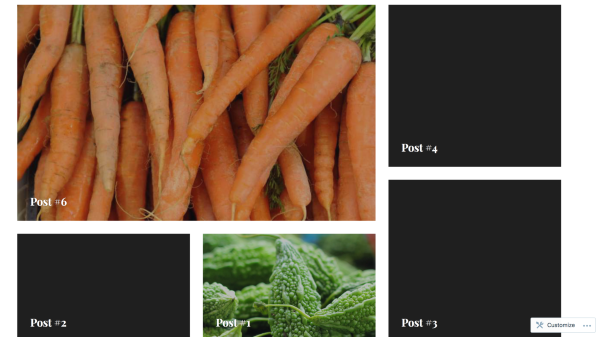
I ask again because I reproduced the black box problem with Canard on desktop and (IOS) mobile by tagging posts as featured content without assigning a featured image.
Here is screen shot of a Canard front page, two featured posts with featured images assigned, and three other posts (with black boxes) tagged as featured content but without featured images assigned:
-
link to my live hidden test site:
https://kanerd.wordpress.comThe link is not working in the prior post.
-
Hi,
So I checked my settings again. Every post on my blog has a featured image, but in my Customizer > Content options > Featured Image > “Display on single post” … This option has always been unticked. I’ve never selected this option because I don’t want my featured images to be displayed on single posts (they are very large, I don’t like the look of it).However, for the sake of this test I’ve now ticked this option. So the featured images now appear on single posts. But I’ve just loaded my website on my phone and the featured posts still appear black on my homepage. I have no idea what to do at this stage, but again thank you for looking into it.
-
Hey, quick update to say it’s not black anymore! *does happy dance*! After I ticked the option to display the featured pictures on single posts, it fixed the issue. Took a few hours though! The issue wasn’t resolved when I typed my reply earlier. But it is now.
Thank you so much for all the help! I’m not used to having such large featured images at the top of my posts but I’ll have to get used to it. At least my Homepage looks normal now!
Thanks again -
Hi waikiharnais,
I’ve checked alawaiki.com and the featured images are temporary black (for a couple of seconds) when images are slow to load — I noticed some images load straight away and a black box does not appear. This behaviour is the same on the Canard theme demo site:
https://canarddemo.wordpress.com/
If you need any further help, you are welcome to use the email and Live Chat support included in your plan here:
-
Thanks Gemma. The issue was fixed yesterday. Before then the images never appeared at all. I don’t mind a short delay to load the photos. What I was getting before was completely black boxes with just the titles of the posts. Fixed now, so all good!
-


- The topic ‘Canard Theme: Featured photos appear black on mobile’ is closed to new replies.
 WordPress.com Forums