

Cancelling upgrades and transferring site
-
Okay, so this has been a long process so I’ll outline it:
I needed to transfer my site to GoDaddy.
1. I transferred my registered domain that was registered through wordpress.com to GoDaddy
2. I attempted to delete the wordpress installation through GoDaddy, but it remained
3. I deleted the wordpress files from the fileserver using FTP, but my wordpress site was still up and active when I went to the url.
4. I deleted the website through wordpress, but after all of this my site is still there at the registered domain.I have discovered that if I type mysitename.wordpress.com it still redirects it to mysitename.com, now I checked my account and it appears that my account still has domain mapping on it. I’m trying to cancel that, hoping it will solve my problem, but the cancel upgrade button won’t work.
-
Hello there!
I did see that there was an extraneous domain mapping upgrade on your WordPress.com site. Because you had deleted the site before deleting all the upgrades, the mapping got “stuck.” I unstuck it for you! :)
You custom domain, lepicespicekitchen.com, should no longer be affiliated with your old WordPress.com site. Take a look and let me know if all is working well for you now. You may need to clear your browser’s cache, using the instructions below, before you can see your domain correctly:
http://en.support.wordpress.com/browser-issues/#clearing-your-browser-cacheFor the future: Any action you take at GoDaddy will not impact your WordPress.com site!
I hope this helps! If you have any other concerns, drop me a note. Thanks much.
-
Ah! There has been a change, thank you so much :)
Now my issue is that I get this message “Warning! Domain mapping upgrade for this domain not found. Please log in and go to the Domains Upgrades page of your blog to use this domain.”
Does this mean that the domain still points to WordPress?
-
That message seems like something caught in your browser cache from when domain pointed to WordPress.com. Could you try clearing your browser’s cache and cookies?
Clearing Browser’s Cache and Cookies
Since your site is now self-hosted and it’s name I do not see any WordPress.com messages:
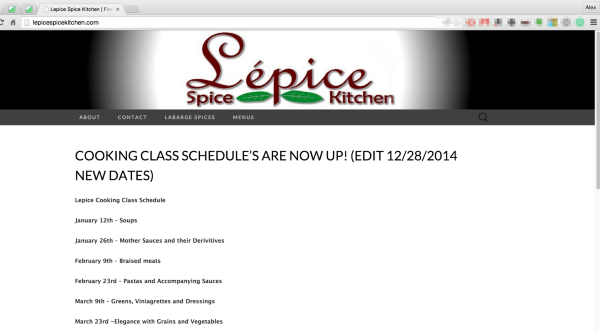
The DNS appears to have updated fully as well:
http://who.is/whois/lepicespicekitchen.com
Let me know if you still see that message after clearing the cache.
-Alex G.


- The topic ‘Cancelling upgrades and transferring site’ is closed to new replies.


 WordPress.com Forums