

Cannot configure image widget
-
I added an image widget to Sidebar 1, but when I added the URL for the image and the link (http://www.saveur.com/article/travels/seeing-green) I could not configure it. I entered different heights and widths for the widget, no matter what I entered, or when I left the size blank, after I saved the configuration, the URL in the image field disappeared and I got a “Please configure the Image widget in your widget settings.” on the blog sidebar where the widget should be. Please help! Thanks.
The blog I need help with is: (visible only to logged in users)
-
Hi there!
The link you posted above (http://www.saveur.com/article/travels/seeing-green) is not an image, which is why it is removed from the image widget. If you click on that link, you’ll see an article.
Is this the image you want?

Please note that it’s against the law in the United States and in many other countries to reproduce text or images created by someone else without their permission, even if you provide a citation. To be on the safe side, make sure that you request permission before publishing anything on your blog that was created by someone else.
Here’s some information about Fair Use from the U.S. Copyright Office:
http://www.copyright.gov/fls/fl102.html
And here’s some information on finding free and fair use images and other media:
http://en.support.wordpress.com/add-media/finding-free-images-and-other-media/
Let me know if I can help with anything else!
-
Hi Shawna, The link is to an article I wrote myself and I am sure the magazine will not have any objections if I put it on my blog to promote it, I have already put it on my Facebook page too, but I will ask them. So after I get their permission to reproduce it, what do I do? Just turn the image into an image file, upload it and link to the article? Thanks!
-
If it’s your article, then perfect, no worries! I just wanted to make sure. :)
The second link I gave above is the direct link to the image. You can just copy that link and put it in the Image widget. And then put your link to the article in the URL box. Like this:
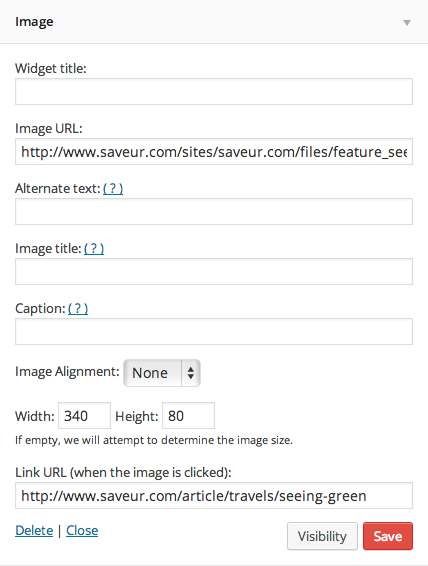
Then the image from the article will appear in the widget and when a viewer clicks on it, they’re taken to the article.
Does that clear things up?
-
-
-
Actually I do have two other questions. 1. In the mobile view, widgets from the sidebar are all at the bottom. There is no way to bring them further up, is that correct? I already changed the reading settings to 1 post and no infinite scroll to bring them up. 2) Instead of the FB Like Box as a widget, is there a way I can just put a FB icon prominently somewhere in the sidebar that links to my FB page, similar to the Share FB button at the bottom of each post? Thanks so much for your help.
-
1. In the mobile view, widgets from the sidebar are all at the bottom. There is no way to bring them further up, is that correct? I already changed the reading settings to 1 post and no infinite scroll to bring them up.
That’s correct. The only way to make further changes would be with custom CSS through the Custom Design upgrade.
2) Instead of the FB Like Box as a widget, is there a way I can just put a FB icon prominently somewhere in the sidebar that links to my FB page, similar to the Share FB button at the bottom of each post?
Sure! You can do this with either the Text widget or the Image widget. Here’s a quick guide that we have about setting this up:
http://en.support.wordpress.com/add-social-media-buttons-to-your-sidebar-or-footer/
Let me know if I can help with anything else!


- The topic ‘Cannot configure image widget’ is closed to new replies.


 WordPress.com Forums