

Cannot install Premium Theme
-
I cannot install a Premium Theme that i purchased following a link in your Premium Theme list. I viewed the demo and decided to purchase Gridiculous Pro and Magazine Pro from bavotasan. At the end of the payment process I downloaded two zip files and was given the instructions to upload them using WordPress Theme interface, but that page has no “Add New” theme button. Can you please help?
The blog I need help with is: (visible only to logged in users)
-
I think downloaded themes are for
You should be able to activate the purchased themes from your WordPress.com Dashboard > Appearance > Themes > Search the theme > Activate.
We can’t “Add New” theme on WordPress.com. The downloaded theme zip files are for your self-hosted WordPress.org based sites, if any.
-
-
Thanks for the reply. I realised that after I purchased the themes. It seems i am left in the dark here. I followed the links from WordPress, viewed the demo and made the purchase from bavotasan.com. I could not see the difference. I have purchased the official version of the Theme and WordPress should somehow either alert the users to never purchase themese outside WordPress, or do something and allow the users to install the themes such as in my case. The previous version of WordPress user interface had the “Add New” button, but the new one doesn’t and it seems the theme developers don’t know about the change. I hope WordPress has a solution to this, or have I lost my money?
-
I followed the links from WordPress,
Could you let me know exactly which links from WordPress did you follow?
The previous version of WordPress user interface had the “Add New” button, but the new one doesn’t
The previous version you are referring must be some self-hosted WordPress.org install. WordPress.com never allowed an option to install themes.
I hope WordPress has a solution to this, or have I lost my money?
Unfortunately your money is taken by bavotasan, not WordPress.com
Therefore please get in touch with bavotasan here: http://themes.bavotasan.com/support-forum-access/ and check if they can issue refund. Given you have already downloaded the themes, I am unsure if they are willing to refund your money. But you can still check with them and see what they say. -
I clicked on Demo, I clicked on some of the links that explain the features, then I clicked at the bottom of the page on the bavotasan link to see what other themes they have (https://wordpress.com/themes/gridiculous-pro/). I did not realise there is a difference in purchasing off that web site or yours. There is no explanation anywhere on WordPress to say you must not buy themes from your own approved theme developers.
In terms of installing Premium Themse see below the link to the WordPress user interface that bavotasan mentioned. It is WordPress v 3.8. I don’t know if he is lying or not, but it seems to be a genuine image. Otherwise, if he is lying, you should remove bavotasan from your Premium Theme list. Anyway, WordPress should warn its users not to purchase Themes from any of the developers if they want to install it on their WordPress blog. I browesed a few other developers listed on your Premium Theme list following the same Demo link and all of them seem to trust WordPress. How could I possibly have known that purchasing from them doesn’t work, although all of them say so?
This surely should be a problem for WordPress too. It is important for its relationship with its users and developers.
I was looking forward for upgrading my blog, but now i am left wondering. Yes, I will contact bavotasan.com and try and get my money back – but this is a terrible experience. I was planning to upgrade to premium and use my own domain, however I just feel the whole process is booby trapped. I haven’t considered using Google or Tumblr for blogging, but this situation forces me to do so.
See the link with instructions below:
https://themes.bavotasan.com/documentation/how-do-i-install-a-theme/Thanks
-
I am sorry, you haven’t had a chance to understand the difference between WordPress.com and WordPress.org.
If you hoped to activate the Gridiculous Pro theme on thoughtkast.wordpress.com, then you should proceed by clicking Purchase button on the sidebar on https://wordpress.com/themes/gridiculous-pro/
Unfortunately you were misled and ended up on bavotasan.com by clicking on the link to their website at the bottom of the sidebar.
The screenshot bavotasan gave you is genuine but that is a self-hosted
WordPress.org install. Not the WordPress.com. -
I Have the same problem; Did exactly the same thing, and now I lost my money, and can buy exactly the same theme AGAIN?
We need a solution for this, this is really misleading.
Please help fast.
-
NB: Please see: my ticket….
[WordPress.com Support] Help, just bought a time “POORT” but cannot install it?
-
You can ONLY install themes you buy from your dashboard THemes page on the WordPress.com blog you want the theme for. If you buy it from anywhere else, you have to get your money back from whoever you gave it to.
-
Well, I could not know this, since it all looks exactly the same, and since it is following a demo link from your site, as described by mr emibb… and since you and the Theme delivery guys are partners in business i suggest you resolve this with them, since I am YOUR client, and not the Theme supplier client, and I want to keep it that way ;-)
I have a suggestion: Please send me a discount code for the theme (POORT) , and heck I now see that you guys charge a couple of dollars more on the sale of the theme, No problem I am willing to pay you guys the difference so you will not be out of your money!
This way I do not have to reclaim money at some third party company, and I will consider the case closed in a very satisfactory way by You guys!
hope to hear from you soon
-
emilbb & taarts – I’m sorry you accidentally purchased the wrong version of the themes – that is definitely frustrating.
You will need to ask the developers for a refund and then purchase the version that can be used on WordPress.com. You can purchase in one of several ways:
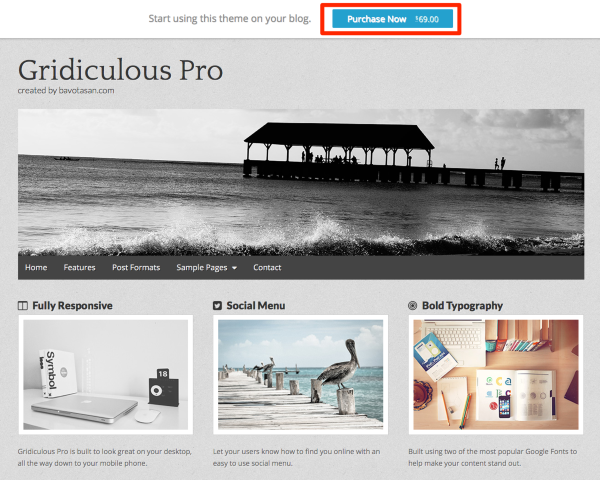
1) Click the “Purchase Now” banner at the top of the theme demo:
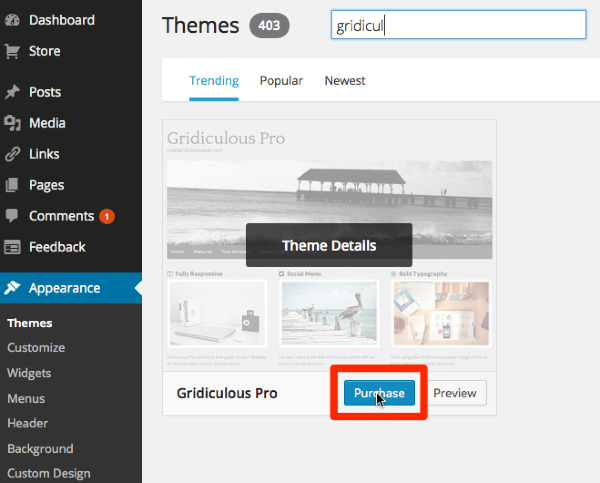
2) Within your dashboard at Appearance > Themes, find the theme you want and then click Purchase:
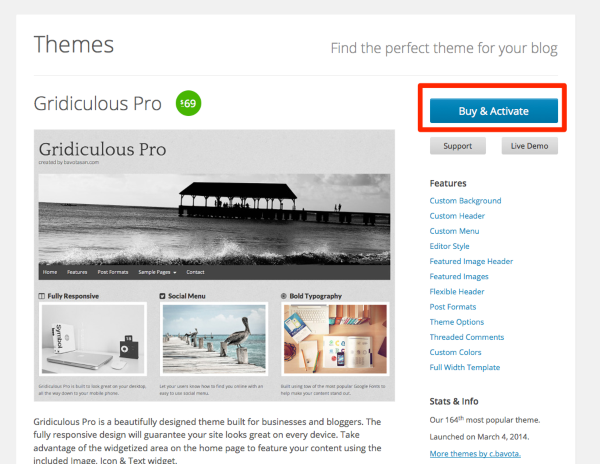
3) On the theme showcase page, click “Buy & Activate”:
emilbb – I’m sorry your experience in this thread has been so negative and hope you will stick around. :-) If there’s anything I can to do help with your free or premium theme setup ,please feel free to post in the themes forum at any time:
-
p.s. Bavotasan does have a warning on its theme purchase pages that:
It is only compatible with a self-hosted installation of WordPress. It will not work on a WordPress.com.


- The topic ‘Cannot install Premium Theme’ is closed to new replies.


 WordPress.com Forums