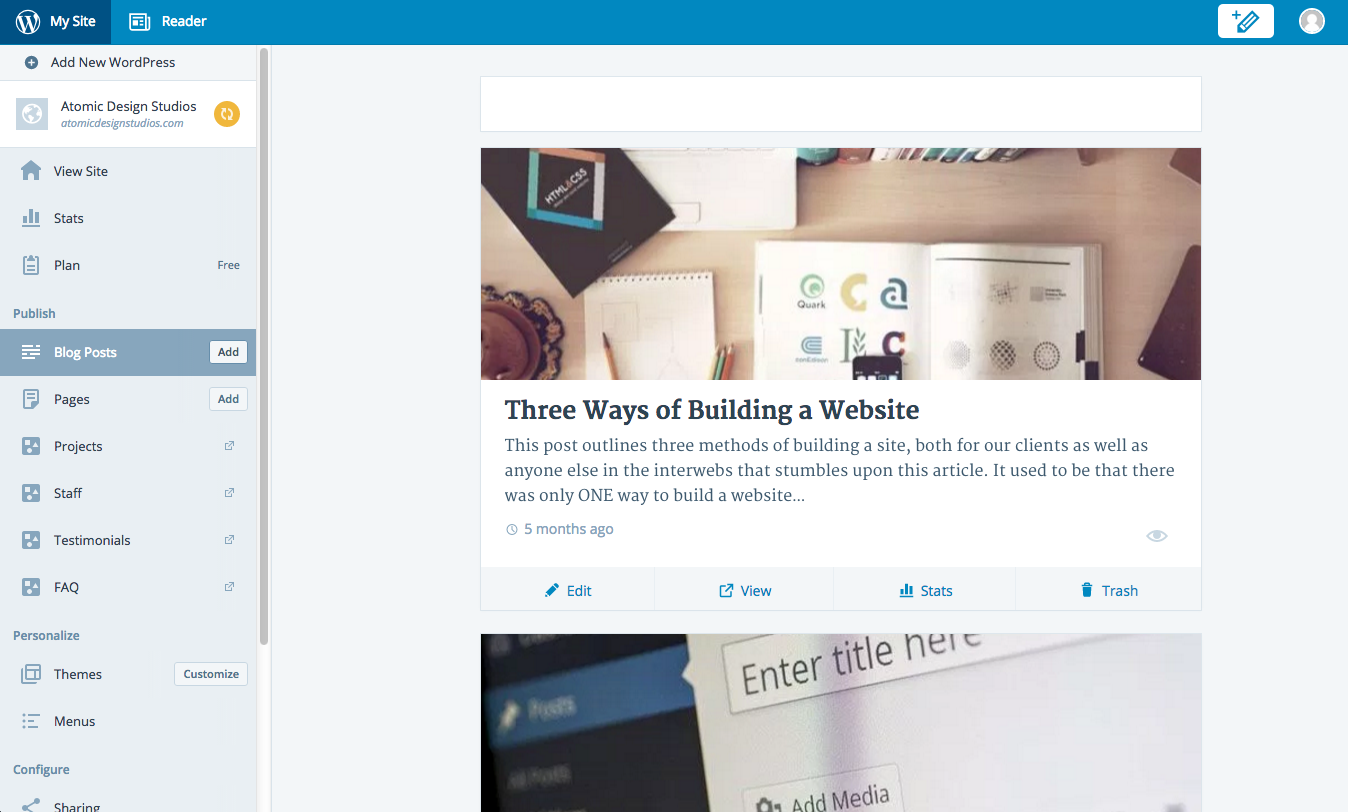
can't access drafts in calypso
-
Major interface bug.
Was just working on a new post. Clicked out to check something else, now I can’t get back to the draft I was working on. I click BLOG POSTS and there’s an empty white box at the top (presumably the new post) followed by all my published posts.
There really should be a nav bar like you have in PAGES. (Published, Drafts, etc.) Why not show this in the BLOG POSTS section too?
Guess I’ll hold off asking my 50 clients to download the app until this kink is worked out.
The blog I need help with is: (visible only to logged in users)
-
Hi peteratomic,
If you go to My Sites and click your site. In the left sidebar, scroll to the bottom for the WP Admin. Then go to Posts -> All Posts and you’ll see (published, drafts, scheduled, trash).
I hope this helps.
-
This is the wordpress.COM support forum where we provide support only for sites that are hosted here. That site is not hosted here and you are posting to the wrong support forum.
Note that Jetpack is a plugin used by WordPress.ORG bloggers to achieve parity with what we already have built into WordPress.COM blogs. We do not provide Jetpack support on these wordpress.COM support forums.
re: Jetpack support
Some Jetpack solutions are here http://jetpack.me/support/Others are in the Jetpack support forum at WordPress.org
http://wordpress.org/support/plugin/jetpackHowever, if you can’t find help at either one then you can file a Jetpack support ticket here > http://en.support.wordpress.com/contact/?jetpack=needs-service
WordPress.COM and WordPress.ORG are completely separate and have different username accounts, logins, features, run different versions of some themes with the same names, and have separate support documentation and separate support forums. Read the differences here http://en.support.wordpress.com/com-vs-org/
If you don’t have a username account at WordPress.ORG account, then click http://wordpress.org/support/ and register one on the top right hand corner of the page that opens, https://wordpress.org/support/register.php so you can post to the support forums there.
Resetting your WordPress.ORG password http://codex.wordpress.org/Resetting_Your_Password
WordPress.org support docs are at https://codex.wordpress.org/Main_PageSee also https://apps.wordpress.org/support/
-
Follow up to all… as my original post stated, I’m having problems with Calypso, AKA the WordPress Desktop App. Could not find any specific support forum for the app, so I posted here as this is essentially a wordpress.COM product.
If there is another place to post problems with the desktop app, please advise.
To restate it very simply… DRAFT POSTS are nowhere to be found in the BLOG POSTS section of the DESKTOP APP.
-
As you are referring to the Windows desktop app https://en.blog.wordpress.com/2015/12/09/the-new-wordpress-com-app-for-windows-is-here/ I typed modlook into the sidebar tags on this thread for Staff help. How do I get a Moderator/Staff reply for my question? https://en.support.wordpress.com/getting-help-in-the-forums/#how-do-i-get-a-moderatorstaff-reply-for-my-question Please subscribe to this thread so you are notified when they respond. To subscribe look in the sidebar of this thread, find the subscribe to topics link and click it.
-
-
-
@peteratomic, can you confirm that you see the draft here?
https://wordpress.com/posts/drafts
… but not in the app?Also would you be willing to upload a screenshot? You can use cloudup (our fave) or Dropbox or even your media library. Just send us a link.
And which app are you using? We have desktop apps for Mac, Windows, and Linux now.
-
Self-hosted site:
http://atomicdesignstudios.com/wp-content/uploads/2015/12/Screen-Shot-2015-12-19-at-1.42.22-PM.pngAnd the drafts link here is disabled:
http://atomicdesignstudios.com/wp-content/uploads/2015/12/Screen-Shot-2015-12-19-at-1.43.19-PM.png
(that’s found when click the Pencil Icon top right)Mac version…
-
@peteratomic, thanks, knowing that you’re using the mac version helps.
Can you also update us on whether you’re able to access the drafts from a browser?
https://wordpress.com/posts/drafts -
@supernovia as I mentioned (but maybe not so clearly) I’m using the app with a self-hosted site
-
@peteratomic, I understand that you are using the desktop app on Mac. For troubleshooting purposes, I’m asking you to try a browser too to see whether you get the same result there.
This would allow us to determine whether the issue is specific to the app itself or whether it’s something in your account.
If you go to https://wordpress.com/posts/drafts do you see your drafts?
-
Ahh… whoops. I kept seeing those wordpress.COM links thinking that you weren’t getting that it’s a self-hosted site. But just to make sure I checked the link and yup! My latest draft is there!
Any ideas why this isn’t showing up in the desktop app?
-
Not yet, but that does help :)
Did the draft exist before you started using the app, or had you created it elsewhere since then? That will help us determine whether it’s a syncing issue.
I am also searching for any other cases where folks can’t see drafts in the Mac app.
-
Thanks @supernovia
I created the draft in the APP. Had saved the draft (or it was auto-saved rather) then clicked out to another section to check something and that’s when I discovered I couldn’t access it again.
-
-
OK, and just to clarify, you’re missing this menu entirely right? Can you post a screenshot of what you do see?
You should get to this by clicking My Sites, selecting your site, then clicking posts. There’s a drop down thing you can use to access drafts:
https://cloudup.com/cowfrhbk–a -
OK, we were able to duplicate one of your issues but not the other.
Can you make sure your Jetpack and the app are both up to date?
-
Ahhh…. that dropdown doesn’t exist for me. That’s exactly what I was looking for! Instead, all I have is a blank box in the same space as your screenshot — no dropdown menu.
* using 1.2.1 on the desktop app (doesn’t seem to be any upgrade/update options anywhere)
* latest jetpack and WP core -
Okay. We haven’t been able to duplicate that yet. Can you add a few more test drafts to see if that helps at all? We’ll keep digging here too.


- The topic ‘can't access drafts in calypso’ is closed to new replies.
 WordPress.com Forums