

Can't add srv record, says 'the value for the protocol is missing'
-
Hello,
I am trying to add office 365 srv records but the srv record will not save saying the value for the protocol is missing even though tls is selected from the dropdown (I’ve tried to select every value just to check and none work). None of the dns management screens look like the examples/docs I’ve looked at on the web, have they been updated?
Thank you! -
Please make sure you are following the steps listed in this article to set up Office 365: https://en.support.wordpress.com/add-email/add-email-through-office-365/
If you are using the article or are still experiencing issues, please let us know.
-
-
@simonarnoldoutlookcom
I clicked your username and you have another issue. Use this link to create your own thread please https://en.forums.wordpress.com/?new=1 -
Tried to follow those instructions but they don’t work. For what it’s worth, the WordPress tools don’t even look like what’s shown in the docs.
-
-
@timethief, I was referring to the link from @ariwinokur: https://en.support.wordpress.com/add-email/add-email-through-office-365/
Thanks! -
Getting the same problem, everything but the SRV records are fine and are working.
How to fix that ? -
Those are the entries, where I am getting the error – ‘the value for the protocol is missing’
Dienst Protokoll Port Gewichtung Priorität Name Ziel TTL
_sip _tls 443 1 100 @ sipdir.online.lync.com 3600
_sipfederationtls _tcp 5061 1 100 @ sipfed.online.lync.com 3600 -
One other point is that I have tried this in Safari and Chrome on a Mac, and Chrome and IE on a Windows machine.
Thanks -
When we need Staff help with issues Volunteers cannot resolve we type modlook into the sidebar tags on our forum threads like this one. How do I get a Moderator/Staff reply for my question? https://en.support.wordpress.com/getting-help-in-the-forums/#how-do-i-get-a-moderatorstaff-reply-for-my-question Then please subscribe to this thread so you are notified when they respond. To subscribe look in the sidebar of this thread, find the subscribe to topics link and click it.
-
-
Hi everyone,
SRV records work a little differently than other DNS records, and based on your questions, I think that is part of the problem. With SRV records, there are 6 fields that all have to have a value added or you get the “the value for the protocol is missing” error.
The exact values you need for the SRV records are in this document https://en.support.wordpress.com/add-email/add-email-through-office-365/#set-up-custom-dns
You have to scroll a bit to find them, so here’s a screenshot of the exact instructions you need
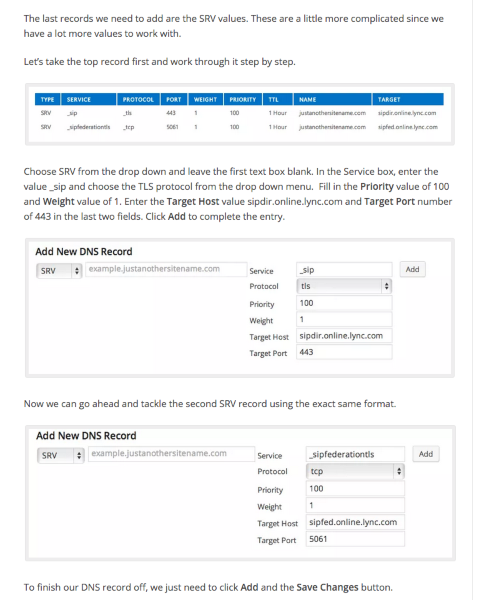
If that doesn’t work for you, let me know here or open a live chat session from here https://en.support.wordpress.com/contact/.
-
The issue is the DNS management screens you are showing are completely different than the DNS management screen I get when trying to manage my DNS records on wordpress.com. And the screens we get are not functioning correctly. I’ll open a chat session now.
Thank you!
-
Spoke too soon, I tried to open a live chat session from the link you referenced but can’t find any link to open chat?
Thanks!
-
Unfortunately this does not work – as you get still the message that: the value for the protocol is missing
For me it seems, that whatever field you are try to choose – it is getting the same error message.
-
@ikrstin I was able to get the records to save by adding them via this link https://niksbbqdotcom.wordpress.com/wp-admin/paid-upgrades.php?page=domains
Are they working for you now? If so please let me know and I’ll update @dmoscone’s records as well.
-


- The topic ‘Can't add srv record, says 'the value for the protocol is missing'’ is closed to new replies.
 WordPress.com Forums