

can't ask questions on some forums
-
I’m trying to ask a css question as I think I might need to get a refund and go with .org to do what I want to do which is simply be able to find a theme in which I can add a multi question contact form in my header and footer similar to this format. http://www.fortefitness.com/
it won’t let me ask questions although I paid $99 to upgrade my package
The blog I need help with is: (visible only to logged in users)
-
Hi there,
Sure! What you can do is pretend to add a post or page and switch to the Text Editor. Then, add the Contact Form there. The Contact Form allows you to add a dropdown so that your readers can choose what they are interested in, or checkboxes like the example you showed me. Here’s what it’ll look like:
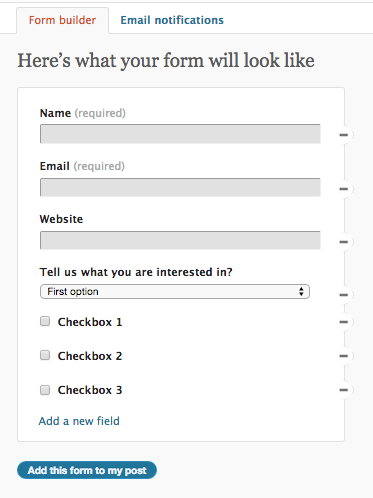
Then add the Contact Format and copy and paste the code from there. You can then add that code to your text widget. That will add a contact form to your footer.
Let me know if you have any questions with this!
-
-
-
I tried it and it didn’t work. All it did was mess up one of the pictures? https://pinellascountybootcamps.wordpress.com/?preview=true&preview_id=270&preview_nonce=a1ee1b7e2f
I’m a total newbie but with a bit of common sense. Do you have any recommendations for a theme (I’m happy to buy one) that would be fairly easy to set up to look roughly similar to the website I origionally posted
Thanks again
-
Hi there,
You didn’t add the Contact Form code correctly. Can you make a draft post with the contact form you want. Then I can add it to your text widget.
As for themes, I found a few with a similar layout:
https://theme.wordpress.com/themes/sela/
https://theme.wordpress.com/themes/edin/
https://theme.wordpress.com/themes/sequential/
https://theme.wordpress.com/themes/goran/Take a look at the support guides to see how to customize them.
Let me know if you have any questions with this!
-
https://pinellascountybootcamps.wordpress.com/wp-admin/post.php?post=414&action=edit&message=6
I tried all of those and can’t get some of the features I want like being able to add social icons to the header (among other things) after reading through the docs
I’m happy to pay. I was looking at gradilicious but am a total newbie so it’s a tad confusing compared to back when I did my old website in front page
-
https://pinellascountybootcamps.wordpress.com/draft-contact-form/ .
you can see the one on the right is the one I tried
-
I don’t want it on the footer, it needs to be above the fold (so to speak) where hers is located on her site right next to the top text and pictures. is there a way to put text boxes directly into the page to split it into 2
-
I tried all of those and can’t get some of the features I want like being able to add social icons to the header (among other things) after reading through the docs
The Edin theme allows for social links in the Secondary menu. Take a look at the guide for further instructions:
https://theme.wordpress.com/themes/edin/
I don’t want it on the footer, it needs to be above the fold (so to speak) where hers is located on her site right next to the top text and pictures.
Hers is not in the header, it’s on the main page. What you can do is create a static Front page and just put the contact form in there. Then go to Settings > Reading in your Dashboard and set that page as your static front page.
Let me know if you have any questions with this!
-
already did that and, as you can see, by the state of my front page, it didn’t quite work.
I really like this theme but it does some pretty random things with pictures and spacing in the full page template as you can see here https://pinellascountybootcamps.wordpress.com/home-4/just-say-no-to-dieting/
The only way things seem to line up properly is in the default template
-
It looks like you’re using the Sequential theme.
I really like this theme but it does some pretty random things with pictures and spacing in the full page template as you can see here
Did you copy and paste the content into the page editor? I can tell by the messy HTML that has been added. The code generated by pasting content from Microsoft Word (and other word processing editors) can cause conflicts with the code at WordPress.com. Because of this, we strongly encourage our users to use the WordPress.com page editor to create content and formatting on the fly. If you’d really like to do offline blog post creation, you might try software such as Windows Live Writer.
If your document has heavy formatting and doesn’t paste cleanly, you can try pasting it in as Plain Text using the ‘Paste as text’ button in the WordPress.com post editor.
You can read more about best practices for adding content created in a word processing program here:
-
The content was cut and pasted from my current page on weebly to the word press editing page for no other reason than I was too lazy to retype it all. Oddly, it only happened on the page I used full page but no the ones I used the default or grid pages.
thanks for the head’s up. I’ll put it in the note pad to clean it up and try again.


- The topic ‘can't ask questions on some forums’ is closed to new replies.
 WordPress.com Forums