

Can't Connect Mailchimp Subscriber Pop-up
-
Instructions: https://wordpress.com/support/mailchimp/#the-subscriber-pop-up-form
When I click “Check Connection” on Mailchimp, it says Fail…
Any idea?
Cheers.
The blog I need help with is: (visible only to logged in users)
-
Hi,
Please try and check your connection with mailchimp. Also try disconnecting and connecting mailchimp again.
Hope this would help.
Thanks
-
It seems to be connected now, but for some reasons I ain’t seeing the pop-up.
Any suggestion to troubleshoot?
Thanks in advance.
-
Hi there,
The Mailchimp pop-up form on WordPress.com does not work properly if you connect your site to Mailchimp, as we explain in our support page that you link to:
Mailchimp has an option to connect your site to Mailchimp for automatic integration; however, the code they require is not supported on most sites hosted here on WordPress.com.
In order to follow the steps in this guide you will want to skip the connection option in Mailchimp.
If you already attempted the connection, you can go to your profile, click on connected sites and choose the disconnect button at the bottom.
Disconnect that, then follow the steps on that page to copy the embed code and paste it in the widget again.
After saving, view your site in an incognito browser window to see if the pop-up appears.
-
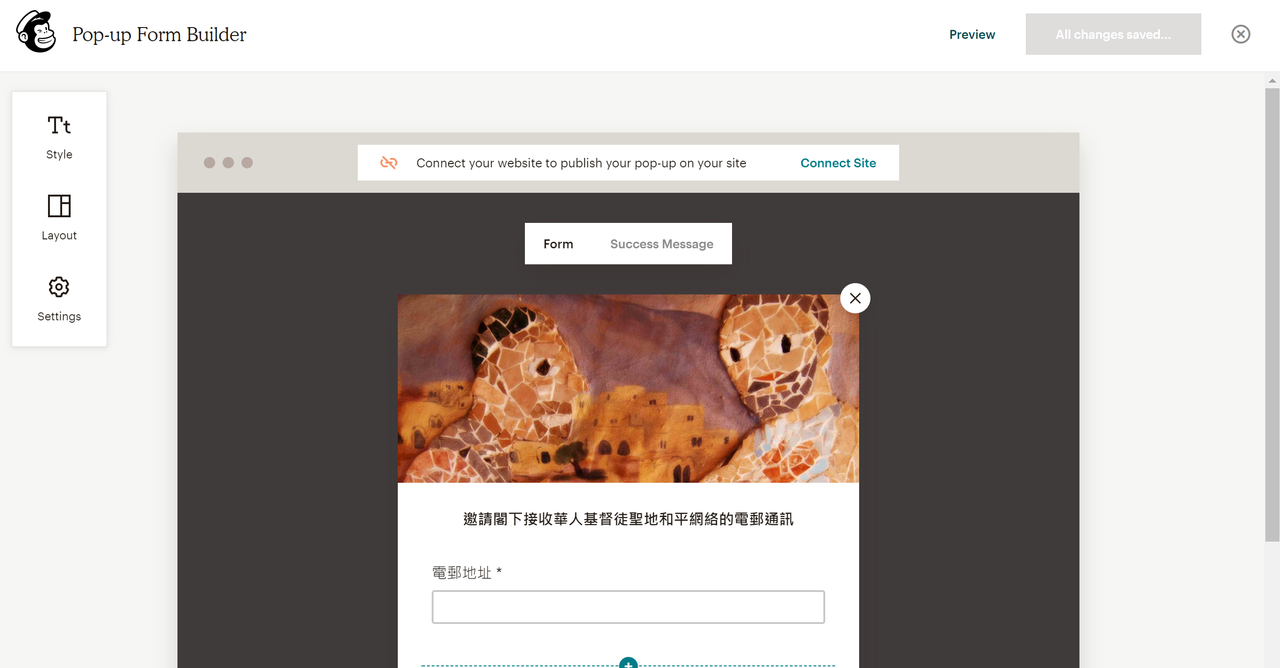
Hi, it seems Mailchimp has changed something and I couldn’t find the “view code” button…?
-
Could you get a screenshot of what you are seeing there? We might be able to see the option for you. Or, you could contact their support directly about it.
-
-
-
-
Hm, it looks like they might have. I recommend checking with MailChimp’s support on this.
-



- The topic ‘Can't Connect Mailchimp Subscriber Pop-up’ is closed to new replies.
 WordPress.com Forums