

Can’t display images full size
-
Hi,
I am trying to do something simple but can’t find a way that works. All I want is for all my images to be displayed full size. I don’t care about performance. I don’t want thumbnails, or medium sizes. Only full size.
I have tried changing the image size on the block on the post to ‘Full Size’. But whenever I save the post, that dropdown always just reverts back to its original setting ‘Thumbnail’ and the image is still rendered at 640.
I have tried changing the settings on this WP Admin page to all be 10000. This saves successfully, seemingly WordPress has accepted the value change:
https://rlccphoto.wordpress.com/wp-admin/options-media.phpI know I should have to regenerate thumbnails but for the sake of testing the change, I simply created a new TEST post, *after* setting all the values to 10000. The new TEST post image is still being rendered at 640:
https://rlcc.photo.blog/2019/08/04/test/So none of the above are working. What am I missing?
The blog I need help with is: (visible only to logged in users)
-
First, please make sure that your browser is up to date: https://browsehappy.com/
If it is not, please try updating your browser or switching to a different browser.
If it is, please do these two things:
1. Try clearing your browser’s cache and cookies.
2. Try with all browser extensions or add-ons temporarily disabled.
Please let us know how each step goes for you, and which browser (and version of) you’re using if you’re still having trouble.
-
Hi macmanx, thanks for your reply.
I have the latest version of Chrome. And I have also tested in a clean version of Safari with no browser addons or settings modifications.
I get the same exact problem in both browsers.
-
Btw I think the support system added this line to my initial post:
“The blog I need help with is morphingform.wordpress.com.”
It’s wrong – the site I need help with is https://rlcc.photo.blog/
And the page which demonstrates the problem is
https://rlcc.photo.blog/2019/08/04/test/ -
Are you speaking of the image of the exit sign? It’s showing full-width to me, as specified in the block alignment setting you have set in the editor for that post:
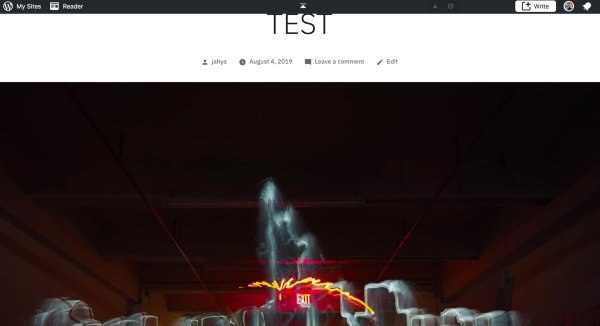
I checked in Safari, Firefox and Chrome.
If that’s not what you see then the problem is likely on your end, but if you’ve already cleared the cache and checked different browsers, I’m afraid I have no idea what else we could check.
-
The image https://rlcc.photo.blog/2019/08/04/test/ is displaying at full-size, but it’s of low resolution because it’s evidently created from the image https://rlccphoto.files.wordpress.com/2019/08/test.jpg?w=640, which has dimensions 640 X 480 pixels, rather than from the file image. The file image is enormous (4608 X 3456), of relatively high resolution, and with the same aspect ratio, 4:3.
-
I meant to say “The image https://rlcc.photo.blog/2019/08/04/test/ is displaying at full-width,” not full-size.
-
Here’s another topic with what sounds, from the description in the OP, like it might be the same issue (though on a different theme): Can’t set image to be shown in full-size.
-
Right. Thanks @musicdoc1.
The image may be displayed across the width of the page, but inspect the source and you see that it is this https://rlccphoto.files.wordpress.com/2019/08/test.jpg?w=640
I can manually modify that URL and see the original version, just by deleting the querystring:

But none of the edits I am making will ever render a page with that latter source URL. It _always_ renders with the
w=640src URL. -
Thanks everyone. This is an issue on our end. I’ve replicated the same thing on a test site. I will file a report for our development team.
In looking at the site I did notice that this image does not display the same issue https://rlcc.photo.blog/2019/06/25/light-sketch-in-highland-ny-forest/
and it was added with an html block. This might be a work around to try for the affected Exit image. -
Yes, I managed to get that block to render the fullsize image by adding an overriding querystring in a custom HTML block. That is, by converting the image block into a HTML block, adding a
full-sizestyle attribute to the existing attribute list, and adding this querystring to the image URL:?w=10000This meant that when WP renders it, it doesn’t override the querystring I have added, which would appear to be a (labor-intensive) workaround. However, I could not replicate the steps on the TEST post I mentioned earlier in this thread, and I can’t figure out why. So the workaround isn’t working all the time, and things are still broken.
-
This might be a work around to try for the affected Exit image.Thanks for the suggestion, as I say I couldn’t get it to work and I don’t know why. If you can figure out the parameters of the workaround in your test site so that it applies consistently whenever I apply it, that would be really helpful.
I have a lot of images on the site and this is something I would need to do for every new image I upload, so I’m not relishing the thought.
-
We found the issue reported earlier at https://github.com/Automattic/wp-calypso/issues/34969
We’ll let you know when it’s fixed, or you can follow along there. :)
-
No full fix yet, but there’s a good recommendation in this reply: https://github.com/Automattic/wp-calypso/issues/34969#issuecomment-519304109
-
Hello, thanks for response on my topic. I’ve found working (in my case) workaround for this. Instead of adding
full-sizestyle attribute and width code in html (?w=10000), I just added only the width attribute, eg.?w=2250. Now it works perfect for me, you can check it out in my post.
https://borutzki.wordpress.com/2019/08/06/polaskotac-jezyk-trolla/Hopefully that workaround will work for you too!
-
-
staff-blorbo thanks for this message:
No full fix yet, but there’s a good recommendation in this reply
However, resizing is not an option for full width or wide width images, and dimensions boxes don’t show on these either. The idea is that I want a full width, hi-res image. Thank you though.
Thanks @mrborucki, the workaround seems to work, though it’s not a sustainable solution at least it works
-
-
-


- The topic ‘Can’t display images full size’ is closed to new replies.
 WordPress.com Forums
