

Can't embed video (YouTube) on page
-
The “insert link” icon and “remove link” icon are both grayed out? If I add the link manually, it simply appears as the URL on the Preview page instead of the title of the link. I would like the video to open directly on my blog post.
The blog I need help with is: (visible only to logged in users)
-
I’d like to add to this. I think they are grayed out because the link wasn’t clicked. However, this is not the real problem. When I Preview the post, what I see is the clickable *URL*. I would like the video from YouTube to display directly on my blog page. Also, why is the video *title* not displaying. I don’t want users to have to view the actual URL, I’d like to simply present them with a clickable title, but preferably an embedded video on the page itself.
-
Another thing. The support page states “Once the URL is unlinked, you will see a playable preview of the video.” I did unlink the URL but when I preview the page this creates a hyperlink with the URL displayed rather than an embedded video with only the *title* displayed. I’m doing something incorrectly, but what? I’m sure this has been discussed before. Strangely, I was able to directly link a video in my previous post without any problems directly from the Post editor.
-
Hi!
Can you point me to a post on your blog where you’ve attempted to embed a YouTube video with no luck? I searched your latest blogs, but I didn’t see a YouTube video URL. I’d like to see this in action!
-
There’s a URL link on the second post about Following and Leading I believe, down at the bottom of the post. However, I may have solved the problem in a rather roundabout way. I went to the YouTube video I wanted to embed and clicked the embed link provided. Copied the link and pasted it into my post on a line by itself. I noticed that after (before?) I previewed the page, WordPress had converted the iFrame source code from YouTube into a short code format. I tried the short code earlier in the day and it never worked. Now it worked and I’m wondering if it’s because of the presence of height and width parameters? It’s a bit confusing. I’m not sure if there’s a bug in the WP editor page or something else is going on.
-
Hi!
It looks like the URL in your Following and Leading post is hyperlinked. When the URL is hyperlinked, it won’t work correctly. To fix this, navigate to the Edit Post page here:
https://tangohighandlow.wordpress.com/wp-admin/post.php?post=31&action=edit
Place your cursor on the URL and click the “Unlink” button here:
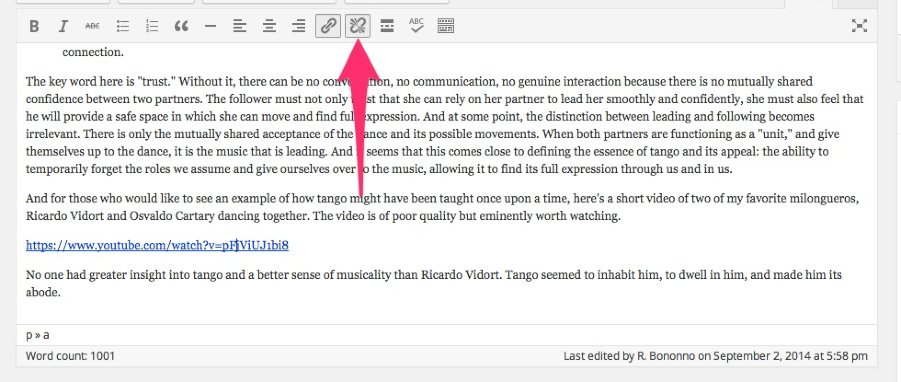
When I tried this on your post and previewed it, I then saw the YouTube video embedded instead of hyperlinked.
Please let me know if you have any more trouble!
-
Oh, yes, now it works correctly, thanks. So one shouldn’t use hyperlinked URLs. You know I tried that earlier today on a new post (not posted yet) and it just wouldn’t work. This time it did. Must it be an https:// URL or will it work with http:// as well?
-
The https vs. http shouldn’t matter at all. The key is just making sure the link isn’t hyperlinked within the text. Please let me know if you run into any additional trouble!
-
-


- The topic ‘Can't embed video (YouTube) on page’ is closed to new replies.
 WordPress.com Forums