

How do I map my existing domain?
-
I cant map my domain http://www.caliscreaming.com
everytime I try to add it it say it costs $12 but doesnt give me
the option to pay for it.
Blog url: http://vegasandre.wordpress.com/ -
Before you map your domain you will need to change your nameservers through your domain registrar to point it to your WordPress.com site.
Please go to your domain registrar’s site and log into the control panel. You will need to update the name servers as below:
NS1.WORDPRESS.COM
NS2.WORDPRESS.COM
NS3.WORDPRESS.COMThen you can purchase our Domain Mapping upgrade at http://vegasandre.wordpress.com/wp-admin/paid-upgrades.php .
For more information please see:
http://en.support.wordpress.com/domain-mapping/map-existing-domain/
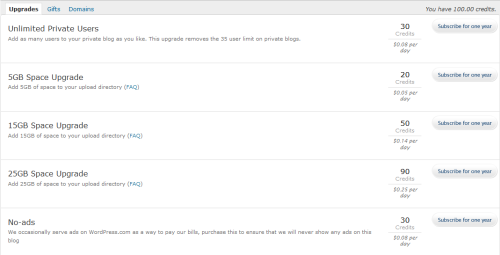
-
thanks
I did all that already .
the problem is that it wont let me pay for it.
no place to click on pay when it asks for the 12 bucks after I enter the domain into the mapping area.this is what it shows:
Domains
Adding caliscreaming.com
Product Cost
Domain Mapping (more info)
Map your WordPress.com blog to a domain of your own.1 year subscription
$12.00
Upgrades can be cancelled for a full refund within 48 hours of placing your order. Total $12.00USDTotal
$0.00 USD
CancelSSL Secure Connection
Have a coupon?Current WordPress.com Credits balance: 12.00
there is no where to enter anything(and I have a $12 credit already). I only have a spot to enter a coupon code.
its weird
-
Can you please take a screenshot of the full page and upload it via Media -> Add New in your Dashboard so I can take a closer look?


- The topic ‘How do I map my existing domain?’ is closed to new replies.
 WordPress.com Forums