

can't set up navigation labels at all
-
I can’t get the navigation labels set up and have tried hundreds of times through the Menu, but I need help.
The blog I need help with is: (visible only to logged in users)
-
Hi there!
I took a look at your Custom Menu setup, as seen here:
https://cloudup.com/cM-dBp-tEo1When I compared it to the menu on your live site, I believe I am seeing that the two menus match. Were you able to fix your own issue? If so, great! If not, could you explain further what you’re trying to accomplish and I can help further?
If you are in need of the custom menu support page, this may help:
http://en.support.wordpress.com/menus/Looking forward to hearing from you. Thanks very much.
-
I have been to that support page often but still can’t figure it out :( I can pay someone to help me set it up. I was able to create the sub-headings of mission and board of directors under About, but then couldn’t add any more on the left hand side of the Menu page, so I selected those (about, mission, board of directors) and dragged them over to the right hand side on the Menu page, and changed the names, but they still don’t show as independent pages with their own appropriate names. I’m sorry to be so inept at this.
-
Hey there!
I’m wondering…did you know you must already have created the pages on your site BEFORE you’re able to add them to your menu?
Let me know! Thank you!
-
Well I tried to create new pages, but they just added to the home page as a post, which is not what I wanted.
-
Hey there,
If they added to the home page as a post, you added posts, rather than pages.
You can click this link to view the pages you created, and to add new ones:
https://pleasantonlibraryfoundation.wordpress.com/wp-admin/edit.php?post_type=page
Why don’t you try to create a new page (even if it’s a temporary/trial page), and then see if the menu label appears when you create a custom menu again.
Thanks!
-
-
-
new challenge today! I have the Navigation Labels up just fine, but the underlying text doesn’t stick. For example, when I pull up the website after logging out, the home page has the text fine at first, but when I click on another heading and then click back to home page, the supporting text underneath is different; and it’s the same way on the all the headings. When I am in the pages panel, I change the text and click “Update.” Shouldn’t that “publish” what I write? THANK YOU AGAIN!!!
-
Hi there!
It actually looks as if you didn’t add the correct Library Facts page to your menu. From this view, it appears as if you added the Who We Are page, but gave it the Library title.
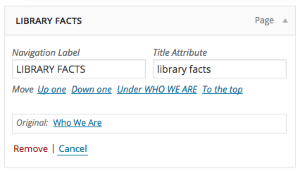
You’ll need to remove that item from your menu. Then, re-add the correct page to your menu, and save it.
Then, the menu should operate as expected!
Thanks much :)
-


- The topic ‘can't set up navigation labels at all’ is closed to new replies.


 WordPress.com Forums