

Can't view poll in my blog
-
I embedded a new poll (Polldaddy) to my blog today, but it is not viewable on the blog itself. It is there, and you can vote by clicking on the ‘Click Here’ link sent in the email, but not through the blog itself. Other’s are reporting being able to view options (I see none) but cannot actually register a vote.
Little help? Thanks in advance. The link to my post is below:
The blog I need help with is: (visible only to logged in users)
-
-
-
There seems to be an issue so I’m tagging this thread for Staff support. Please subscribe to the thread and then you will be notified when they answer.
P.S. I would check at polldaddy support to see if there is a known issue at their end.
-
-
-
-
Just curious, why would you have a feature that would require the user to chase down two separate companies to find out why something isn’t working? If they say it’s not them and you say it’s not you, then what i my next step??
-
Not to worry, if you do not want to approach polldaddy support Staff, despite the fact it is owned by Automattic Inc. which also owns WordPress.com that’s okay with me. I thought you might be able to get an answer there more quickly there than you would here. There are many threads predating this one waiting for Staff assistance so please be patient while waiting.
-
same problem here, my poll is [polldaddy poll="7757931"] and my blog is evia-press.gr please help its urgent we have local elections and i have hundreds of people voting
-
-
Staff work through all forum threads tagged for their attention and through all email support tickets in order of datestamps and timestamps – first posted first served, as would be expected.
When bloggers keep bumping any thread thinking they are going to get service from Staff more quickly they aren’t thinking straight because that moves the timestamps forward and it takes longer to get a response. The same is true if you email more than once the date moves forward and it takes longer to get help.
Bottom line: Patience is virtue.
-
Yes, I truly understand. I only posted because I received an email that the issue had been resolved, except I am still experienced the same issue (as mentioned). This was my way of verifying that I am still experiencing the same issue…not getting impatient or upset. :)
-
Hi there,
Thank you @timethief!
I’m sorry to everyone about the inconvenience. It looks like everything has been fixed.
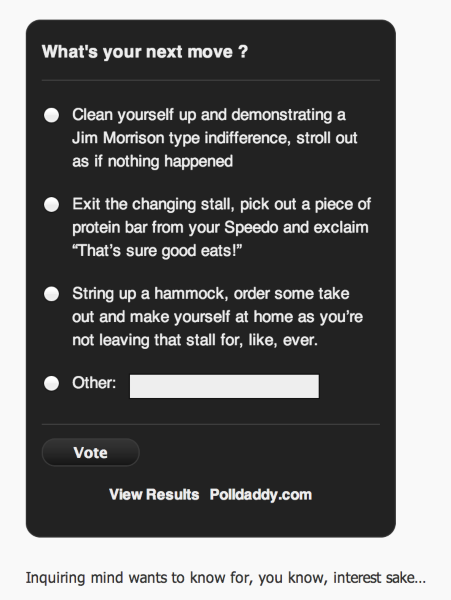
@crazytigerrabbitman- I can view your poll in this post here.
Here is a screenshot of your poll:
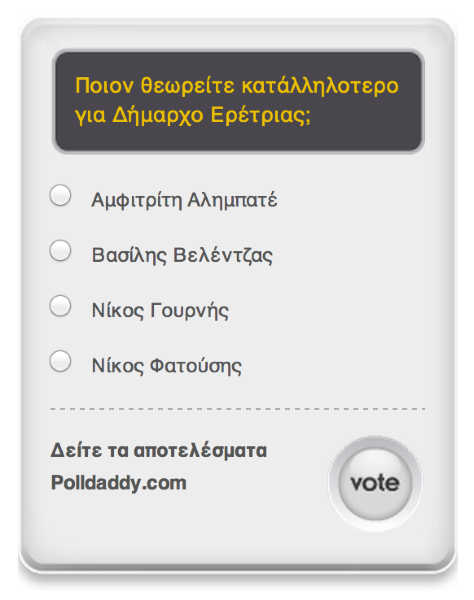
@eretriapress- I can also view your poll in this post here.
Here is a screenshot of your poll:
@whalers34- I see that you created polls, but they were not embedded to any post. Please go to Feedback > Polls in your Dashboard. Click on the poll that you want to embed, and click on the Embed Poll in New Post or add the shortcode to an existing post. It will look like this:

Feel free to reach out if you have any questions!
-


- The topic ‘Can't view poll in my blog’ is closed to new replies.
 WordPress.com Forums