Caption and Image Style
-
I have difficulty to customize my caption style. For the same style it presents different appearance for two different post.
Here is the style:
.wp-caption {
background: #eee;
font: 11px Georgia, “Bitstream Charter”, serif;
margin: 0 0em 1em 0;
padding: 5px;
text-align: left;
max-width: 90.5%;
}.wp-caption img,
#content .wp-caption img {
margin: 0;
max-width: 100%;
width: auto;
height: auto;
}
And here is the code of my post:[caption id="attachment_847" align="alignleft" width="300"]<img class=”size-medium wp-image-847″ alt=”Rute perjalanan haji Mekah – Arafah – Muzdalifa – Mina – Mekah” src=”http://pengajianldii.files.wordpress.com/2013/06/rute-hajj-ldii.jpg?w=300″ width=”300″ height=”206″ /> Rute perjalanan haji
Mekah – Arafah – Muzdalifa – Mina – Mekah[/caption]And here is the result of the post image:
http://i974.photobucket.com/albums/ae224/ldiisidoarjo/Pengajian%20LDII/wp-caption.jpgWhen I observe the problem with firebug tool, I find the value of the style: <div id=”attachment_847″ class=”wp-caption alignleft” style=”width: 310px;”>
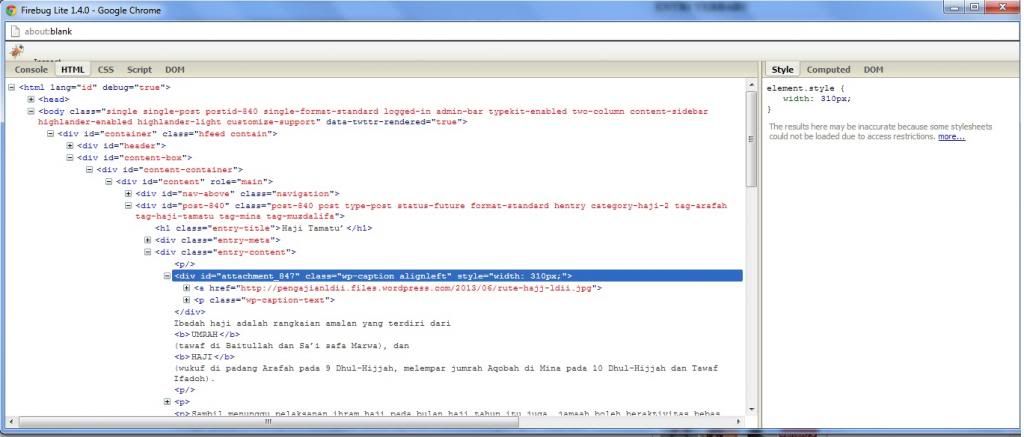
as shown int the screen below:
http://i974.photobucket.com/albums/ae224/ldiisidoarjo/Pengajian%20LDII/wp-caption-firebug.jpgI think I need to remove the value of style width: 310px.
Anyone can help me? Thank you in advance.The blog I need help with is: (visible only to logged in users)
-
1) For starters read this post of mine please:
http://wpbtips.wordpress.com/2013/02/21/where-is-the-theme-css-and-how-do-i-edit-it/
You should remove the stylesheet from the CSS editor and add only the changes you make. (Or at least, if you insist on keeping the entire stylesheet in the editor, tick the option “Don’t use the theme’s original CSS.”)2) No, you don’t need to remove the width:310px.
3) What are the two posts that give you different results? And how exactly would you like things to look like?


- The topic ‘Caption and Image Style’ is closed to new replies.
 WordPress.com Forums