

Caption Mutilates Wrapping Paragraph Text – Suburbia Theme
-
Last night, I was trying to quickly push out a post which contained a right aligned image with a caption. I monkeyed around with a bit for a short while, but no matter what adjustment I made, the paragraph that wrapped around the image had it’s font shifted to the same text the caption was using. Removal of the caption solved the issue, but I would like to be able to use captions for images.
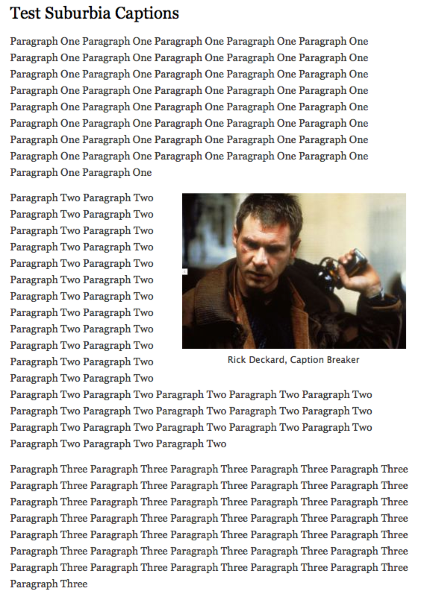
I created a test post this am that demonstrates the issue:
Notice that the text wrapping Rick Deckard (paragraph two) is the same font as the caption and not the same as paragraph one or three.
Is this a known behavior, is it theme specific, or am I doing something fundamentally wrong? Let me know if providing a code sample of the 2nd paragraph post text would be helpful, otherwise I wont litter up the thread with it.
The blog I need help with is: (visible only to logged in users)
-
-
NOTE: I’ll tag this thread for a Themes Staff follow-up. Please subscribe to the thread so you are notified when they respond and please be patient while waiting.
-
Not sure why, but I posted the link as a private post. Actually, I am sure why, but it doesn’t matter. Example post is now public and (should be viewable).
Given that an immediate response didn’t include a polite RTFM, I’m guessing this is theme specific vs. a systemic WP issue.
I have subscribed to the thread, thanks in advance for the help.
-
I see a normal display with the caption here http://wp.me/p1HL8u-b5
I did not experience this:the paragraph that wrapped around the image had it’s font shifted to the same text the caption was using.
That leads me to think you could have a browser related issue.
1. If you are not running one of the browsers and versions listed at http://browsehappy.com/ please try upgrading or switching first.
2. If you are using an IE browser in compatibility mode please disable that mode. http://www.sevenforums.com/tutorials/1196-internet-explorer-compatibility-view-turn-off.html
3. If you are running one of the browsers and versions listed at http://browsehappy.com/
(a) Try clearing your browser’s cache http://www.google.com/support/accounts/bin/answer.py?hl=en&answer=32050
If applicable see here for instructions on how to clear the cache for Chrome and Safari on the iPad:
http://browsers.about.com/od/howtousemobilebrowser1/ss/safari-ipad-clear-cache.htm
http://browsers.about.com/od/howtousemobilebrowser1/ss/How-To-Clear-Browsing-Data-In-Chrome-For-Ipad_6.htm(b) Make sure that you have both third-party cookies enabled and JavaScript enabled
http://en.support.wordpress.com/third-party-cookies/
http://www.google.com/adsense/support/bin/answer.py?answer=12654(c) Disable all browser extensions or add-ons temporarily.
(d) Try enabling HTTPS: http://en.support.wordpress.com/https/
Add both *.wordpress.com and *.wp.com to your list of trusted sites under the Security tab. Make sure to uncheck the box for “Require server verification (https:) for all sites in this zone.” http://en.support.wordpress.com/https/#frequently-asked-questions
4. You can use this link to see if your flash is up to date. http://www.adobe.com/software/flash/about/ If it’s not then go to http://www.adobe.com/products/flashplayer/ and download and install the latest version of flash.
5. Try using another browser.
6. If you are not successful let us know:
(a) Exactly what kind of device you are using to connect to the internet and to WordPress.com.
(b) Exactly which browser (and version of it) you’re using by checking here if necessary http://www.whatbrowser.org/
(c) Exactly what you experience including what any error reports you receive state.Will you also please post a screenshot. You can use http://snag.gy/ to share screenshots. Or you can use the WordPress.com guide I linked to and upload it to your Media Library, and return to this thread to provide the file name so Staff can examine it.
-
Thanks for the reply, I’ll address these issues one by one.
1. Using two browsers (both on Windows): Chrome Version 37.0.2062.120 m, Firefox 32.0.1 (both listed as up to date). Same font issue on both.
2. I don’t use IE.
3. Cache cleared, cookies and javascript enabled, extensions temp disabled, https for admins enabled. Same font issue.
4. Flash is current.
5. I’m already using two browsers. Same font issue on both.
6. PC running Win7 32-bit, browser versions above. As noted, paragraph text of paragraph two in example is different than in 1 and three. This can been seen by me via screen shot and in any post containing an image with a caption.Screenshot at:
https://digifiend.files.wordpress.com/2014/09/captionfontissue.jpghttps://digifiend.files.wordpress.com/2014/09/captionfontissue.jpgPosts Containing Captioned images:
http://digifiend.com/2010/01/01/test-post-cap/ <- paragraph two affected
http://digifiend.com/2014/02/17/house-of-cards/ <- paragraph one affectedJust for s**** and giggles, I’ve posted a copy of the post code that contains the caption in case I’m inserting the media incorrectly
[caption id="attachment_670" align="alignright" width="300"]<a href="http://digifiend.files.wordpress.com/2014/09/deckard.jpg"><img src="http://digifiend.files.wordpress.com/2014/09/deckard.jpg?w=300" alt="Rick Deckard (Harrison Ford)" width="300" height="208" class="size-medium wp-image-670" /></a> Rick Deckard, Caption Breaker[/caption]Paragraph Two Paragraph Two Paragraph Two Paragraph Two Paragraph Two Paragraph Two Paragraph Two Paragraph Two Paragraph Two Paragraph Two Paragraph Two Paragraph Two Paragraph Two Paragraph Two Paragraph Two Paragraph Two Paragraph Two Paragraph Two Paragraph Two Paragraph Two Paragraph Two Paragraph Two Paragraph Two Paragraph Two Paragraph Two Paragraph Two Paragraph Two Paragraph Two Paragraph Two Paragraph Two Paragraph Two Paragraph Two Paragraph Two Paragraph Two Paragraph Two Paragraph Two Paragraph Two Paragraph Two Paragraph Two Paragraph Two Paragraph Two Paragraph Two -
-
Thanks for the test posts and screenshots.
So far I haven’t been able to replicate the issue on a test site, but I’m continuing to dig and I’ll keep you posted. Here’s a screenshot, where I copy-pasted the exact code from your test post.
-
Ah, I think I’ve found the culprit.
This is what the Text/HTML editor looks like on my post. You’ll see that you need a blank line after the caption:
Paragraph One Paragraph One Paragraph One Paragraph One Paragraph One Paragraph One Paragraph One Paragraph One Paragraph One Paragraph One Paragraph One Paragraph One Paragraph One Paragraph One Paragraph One Paragraph One Paragraph One Paragraph One Paragraph One Paragraph One Paragraph One Paragraph One Paragraph One Paragraph One Paragraph One Paragraph One Paragraph One Paragraph One Paragraph One Paragraph One Paragraph One Paragraph One Paragraph One Paragraph One Paragraph One Paragraph One Paragraph One Paragraph One Paragraph One Paragraph One Paragraph One Paragraph One [caption id="attachment_670" align="alignright" width="300"]<a href="http://digifiend.files.wordpress.com/2014/09/deckard.jpg"><img class="size-medium wp-image-670" src="http://digifiend.files.wordpress.com/2014/09/deckard.jpg?w=300" alt="Rick Deckard (Harrison Ford)" width="300" height="208" /></a> Rick Deckard, Caption Breaker[/caption] Paragraph Two Paragraph Two Paragraph Two Paragraph Two Paragraph Two Paragraph Two Paragraph Two Paragraph Two Paragraph Two Paragraph Two Paragraph Two Paragraph Two Paragraph Two Paragraph Two Paragraph Two Paragraph Two Paragraph Two Paragraph Two Paragraph Two Paragraph Two Paragraph Two Paragraph Two Paragraph Two Paragraph Two Paragraph Two Paragraph Two Paragraph Two Paragraph Two Paragraph Two Paragraph Two Paragraph Two Paragraph Two Paragraph Two Paragraph Two Paragraph Two Paragraph Two Paragraph Two Paragraph Two Paragraph Two Paragraph Two Paragraph Two Paragraph Two Paragraph Three Paragraph Three Paragraph Three Paragraph Three Paragraph Three Paragraph Three Paragraph Three Paragraph Three Paragraph Three Paragraph Three Paragraph Three Paragraph Three Paragraph Three Paragraph Three Paragraph Three Paragraph Three Paragraph Three Paragraph Three Paragraph Three Paragraph Three Paragraph Three Paragraph Three Paragraph Three Paragraph Three Paragraph Three Paragraph Three Paragraph Three Paragraph Three Paragraph Three Paragraph Three Paragraph Three Paragraph Three Paragraph Three Paragraph Three Paragraph Three Paragraph Three -
That did the trick, thank you for your investigation of this! As a side question, is this a known “issue”, or am I being particularly dense? It certainly is not intuitive looking at the text in the post.
Also, is this behavior specific to this theme or is this wordpress.com wide?
Thanks again, I really appreciate it!
-
Digifiend, can I ask you a question?
I use the same theme as you and you are the only one I have seen have a home tab – which takes you back to the magazine layout. Can I ask how you have done this? Mine just won’t play ball?
Hope you don’t mind the question on here.
-
-
I’m glad you got it sorted, I believe I used a link in the menu I’m using, is that how you ended up doing it?
-
As a side question, is this a known “issue”, or am I being particularly dense? It certainly is not intuitive looking at the text in the post.
When I made my test posts using the Visual Editor, it automatically added the image and caption correctly, and the fonts came out looking as they should. I did this in both the new and classic (wp-admin) Visual Editors. Here’s a screencast showing my latest tests:
On the posts where you saw the font issue, do you remember if you were using the Visual Editor or the Text/HTML editor?
Also, is this behavior specific to this theme or is this wordpress.com wide?
Since only certain themes use a different font for captions vs. body text, it probably only comes up in certain themes. I’ve actually been helping users with themes for quite a while and it’s the first time I’ve run across the issue, so it doesn’t seem like a common one.
Do let me know how it goes!
-
I can duplicate the issue as follows (and result appears now at same page):
1. Text editor
2. Select paragraph for picture (I’m going to use paragraph 3 now, place cursor at beginning of paragraph and not on its own line
3. Click ‘Add Media’ button
4. Select picture
5. In attachment details (right hand pane), add caption
6. Click ‘insert into post’Using this method (which happens to be the only method I have used), the caption/pic HTML is inserted at the beginning of the line with no line returns afterwards. Maybe a poor assumption on my part, but I assumed that was intended behavior given that pics with no caption inserted in this manner (all steps above except adding caption) work properly. Also, if one wanted to insert a pic with caption in the middle of a paragraph, that would be the method to do so.
Thanks again for your work on following up on this, I know now how to prevent the offending behavior and I’ll count on not inserting any captioned images in the middle of paragraphs :)
-
Thanks for providing the exact steps you’ve been following – always super helpful.
Going through each step on my end on a couple of test posts, I still haven’t been able to replicate the problem you’re experiencing. Mysterious!
I’ve made another screencast just in case you can spot anything we’re doing differently:


- The topic ‘Caption Mutilates Wrapping Paragraph Text – Suburbia Theme’ is closed to new replies.
 WordPress.com Forums
