

Carrousel &c change botto
-
Hello,
I have the Ubud theme, I would like to have in each if my posts a carrousel with pictures and the links of similar posts at the bottom of the posts, like ‘you may also like’.
I would like to change the colour of the bottom of the blog as well as the colour displayed in the categories that is as well black.
Many thanks
Help!
The blog I need help with is: (visible only to logged in users)
-
I would like to have in each if my posts a carrousel with pictures
You can learn how to make an image gallery here:
https://en.support.wordpress.com/images/gallery/
Be sure the “Enable carousel” option is checked under Settings > Media:
https://en.support.wordpress.com/settings/media-settings/#image-gallery-carousel
and the links of similar posts at the bottom of the posts, like ‘you may also like’.
Sounds like you’re looking for the Related Posts feature. Here’s how you can activate that feature:
As you’ll see, you need a minimum of 10 published posts of about 100 words each in order for Related Posts to kick in, so once you add more content you’ll be on your way.
I would like to change the colour of the bottom of the blog as well as the colour displayed in the categories that is as well black.
You can change the background colour of the bottom portion of the site that’s currently black with this CSS:
#colophon {
     background-color: #ffffff;
}
Change ffffff to whatever colour code you prefer.
I’m not sure which categories area you’re referring to. Do you mean you want to change the background colour of the menu dropdown like you see in this screenshot:
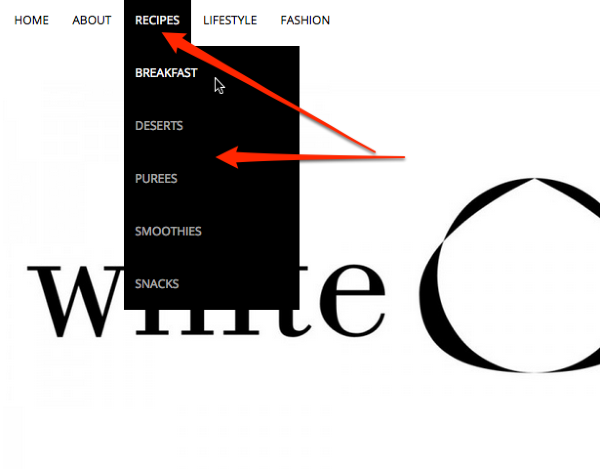
What colour would you like the background and text to be instead?
I noticed you have some unneeded code in your CSS editor – you should remove all of this:
Theme Name: Ubud Child
Theme URI:
Description: Your child theme description text...
Author:		Belinda
Author URI: http://www.thewhitechestnut.com/
Template: ubud
Version: 1.0
Tags: Ubud Child Theme

/* Import the stylesheet from the Ubud parent theme */
@import url('../ubud/style.css');

/*
Now you can start adding your own styles here. Use !important to overwrite styles if needed. */

!
You’re not creating a child theme here on WordPress.com, you’re just adding some custom CSS that overrides the theme’s default styles. :)


- The topic ‘Carrousel &c change botto’ is closed to new replies.
 WordPress.com Forums