

Categories not appearing
-
https://askdrdore.wordpress.com/kids/
I added categories – however, they are not appearing on the drop down menu.
The blog I need help with is: (visible only to logged in users)
-
Hey Dore!
I see your Categories in your main menu, but you’ve placed them in a position that creates regular menu items, not sub-menu items.
In order to make them sub-menu items, you can follow these instructions:
https://en.support.wordpress.com/menus/#changing-the-order-creating-sub-menusI hope this helps! If you have any other concerns, drop me a note. Thanks much!
-
Again .. and I am so frustrated .. just spent an hour on a chat and nothing resolved …. my categories were there earlier in the week and now they are gone …. and after an hour I was told I can’t add categories with the theme I have …. is that true? If so, can you recommend a theme for an advice column where I can have categories ….Thank you!
-
Hey Dore!
I read your chat transcript. I think there’s still confusion about your menu. Please tell me where you want it. Should it be in the top menu bar, or in a sidebar?
Also, it would help me if you provide me with a menu “tree” that shows me how you want your categories to behave. For example, I’d like your menu tree to look like this:
Home
A Parent Page
-First Child
-Fourth Child
-Second Child
-Third Child
HTML Elements
Image Alignment and Styles
Page with a Featured Image
ReadabilityThe menu tree about reflects your theme’s demo menu here:
https://littlestorydemo.wordpress.com/Please take a look at how I’ve done that, and then do the same thing: create a tree that best shows the navigation you want on your site.
Then, I can help further!
From reading your chat transcript, it sounds as if you are expecting Categories to appear on regular Pages. If this is the case, it’s important you read the following article, that will explain how Category Pages actually work:
catswithmustaches.org/category-pages/Your theme does support categories, and drop down menus.
Thanks much. We can help get you up and running once we better understand what you’re trying to do. The more descriptive you can be, the better!
-
Thank you … so looking at the sample you sent … perhaps I have not set this up currently for what my intention is – an advice column. It is so hard doing this via email. Across the top HOME – which is introduction.
On the sale I see little boxes below – what are those and is that the way it needs to be set up? Where are those boxes? How would I get one for each question and answer?
The way I have it set up now the Menus are Ask Dr. Dore with a place where questions can be submitted.
Then I add them to the right category answer – Kids – Teens (*which I just noticed is n to gone ugh :(!) – Parents of Kids and Teens – Parents of Young Adults – Young Adults. The answers may be around dating /. technology / parenting, etc an those are the categories people can search by.
What do you recommend? I am holding contact to add and pulled the Press Release back as I thought this would be ready to go by now.
Whatever you recommend.
-
What happened top my Teens page? It was here this morning. It shows here -https://askdrdore.wordpress.com/wp-admin/edit.php?post_type=page – but gas disappeared from the Menu across the top.
UGH :(
-
I got the TEENS back and I got the categories added but what I see is that the categories are only associated to the HOME page not any of the other pages. As an advice column for various age groups I need categories for all pages. Is that possible with this theme or any theme?
-
Hi Dore,
I really need you to create that menu tree I requested, if you want me to help setup your menu. I’m happy to get in there and see if I can lend a hand, since I know you’re ready to launch once the blog is setup properly.
Is that possible with this theme or any theme?
What you are requesting is possible on every theme that allows submenus. Your theme allows this.
Here is your menu as you have it set up:
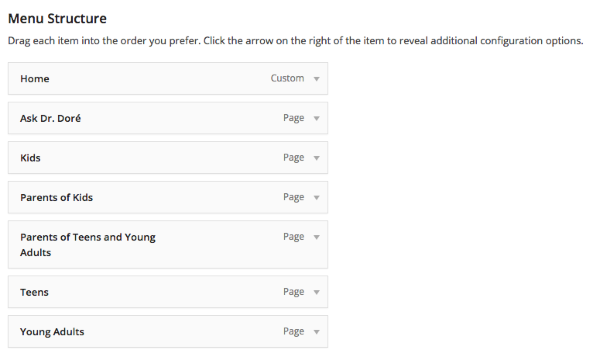
I don’t see any Categories in your menu, only Pages. Post do not appear on Pages, the appear under Categories headings in your menu. If you want those posts to appear, you must add Categories to your menu.
If you would, please read through my last note, reply to my requests, and I can certainly help you. Without that vital information, I’m afraid my hands are tied.
Thanks.
-
I’m feeling overwhelmed. Will look at this tomorrow.
I have spent 6 hours on this. Please help me set up my menu.
All help Is sincerely appreciated -:)
-
Dore,
Have a good night.
I look forward to seeing your response to my questions.
Also, tomorrow, keep an eye out for the Live Chat box in your Dashboard. If a Happiness Engineer is available for a live text chat, you’ll see that popup.
Thanks much.
-
Okay .. So I moved all the menus under the HOME tab and there is now a drop down menu. People won’t know there is a drop down menu unless I tell them. All they see is the HOME page. This could be a stopping point for people as they don’t see anything more. How best for people to see all the menu items?
-
Dore,
If you don’t want your menu items to appear under the Home tab, I need to know under which tabs you want them to appear.
I will know this when you send me your menu tree.
Thanks.
-
https://askdrdore.wordpress.com/wp-admin/nav-menus.php – Menu tree?
So if I made another Menu – Ask Dr. Doré – and the other pages went under that as drop downs … people would see HOME and Ask Dr. Dore yet still not the other categories .. correct?
-
I have tried to add a new menu – it did not appear …. how do I create the menu tree you refer to? Does each so called sub-category I have now under HOME become its own menu? I followed the steps to create a new menu and it did not appear. This site is going is a California news letter to parents and I would be horribly embarrassed for them to see it now.
Do I shut it down and hire someone?
-
I followed these instructions -https://en.support.wordpress.com/menus/ – my page and the sample page on the instructions are not the same.
I created a new Menu – Ask Dr. Dore and moved the other pages under that menu. Saved. And it does not appear on my site. Its hard when the instructions show things I do not see on my page. The instructions and my page do not match.
https://askdrdore.wordpress.com/wp-admin/nav-menus.php?action=edit&menu=96483
I am going in search of an WP expert as I have been working on this for almost a week and I had no idea this wold be so complicated. Do you have any recommendations for professional WP experts I can hire to get this set up? There is nothing on the forums either and the little box in the corner for live chat help no longer appears.
-
Hi Dore!
Let’s see if I can help one more time…
So if I made another Menu – Ask Dr. Doré – and the other pages went under that as drop downs … people would see HOME and Ask Dr. Dore yet still not the other categories .. correct?
You didn’t have a Home link in this custom menu, so I added it for you.
I also added your Ask Dore page.
So you are able to see how Categories can be added as sub-menus, I’ve added your Categories below the Ask Dore link. If you want them under a different header, just let me know what you want the header to be.
IMPORTANT:
Each Category MUST have at least one post assigned to it, or else it won’t appear in your menu. This means that your Category “Mothers” can appear in your menu since you’ve written one blog post in that Category. However, “Dating” will not, as you haven’t assigned any posts to it yet.Once you add this menu to your website, it will work. To activate it, you can click the link below:
https://askdrdore.wordpress.com/wp-admin/nav-menus.php?action=edit&menu=96483Then, you will select “Primary Menu (Currently set to: Menu 1 Home)” where you see Theme locations at the bottom of the page. Then, click Save Menu.
I’ve gotten the ball rolling for you a bit more. Now, you can be more explicit with me about what you want to add and change.
Let’s give this a try. If it’s still too much of a hassle for you, a consultant might be a great route for you.
Thank you!
-
-


- The topic ‘Categories not appearing’ is closed to new replies.
 WordPress.com Forums