

Category
-
My category isn’t correct. How do I change the category from the “original” setting?
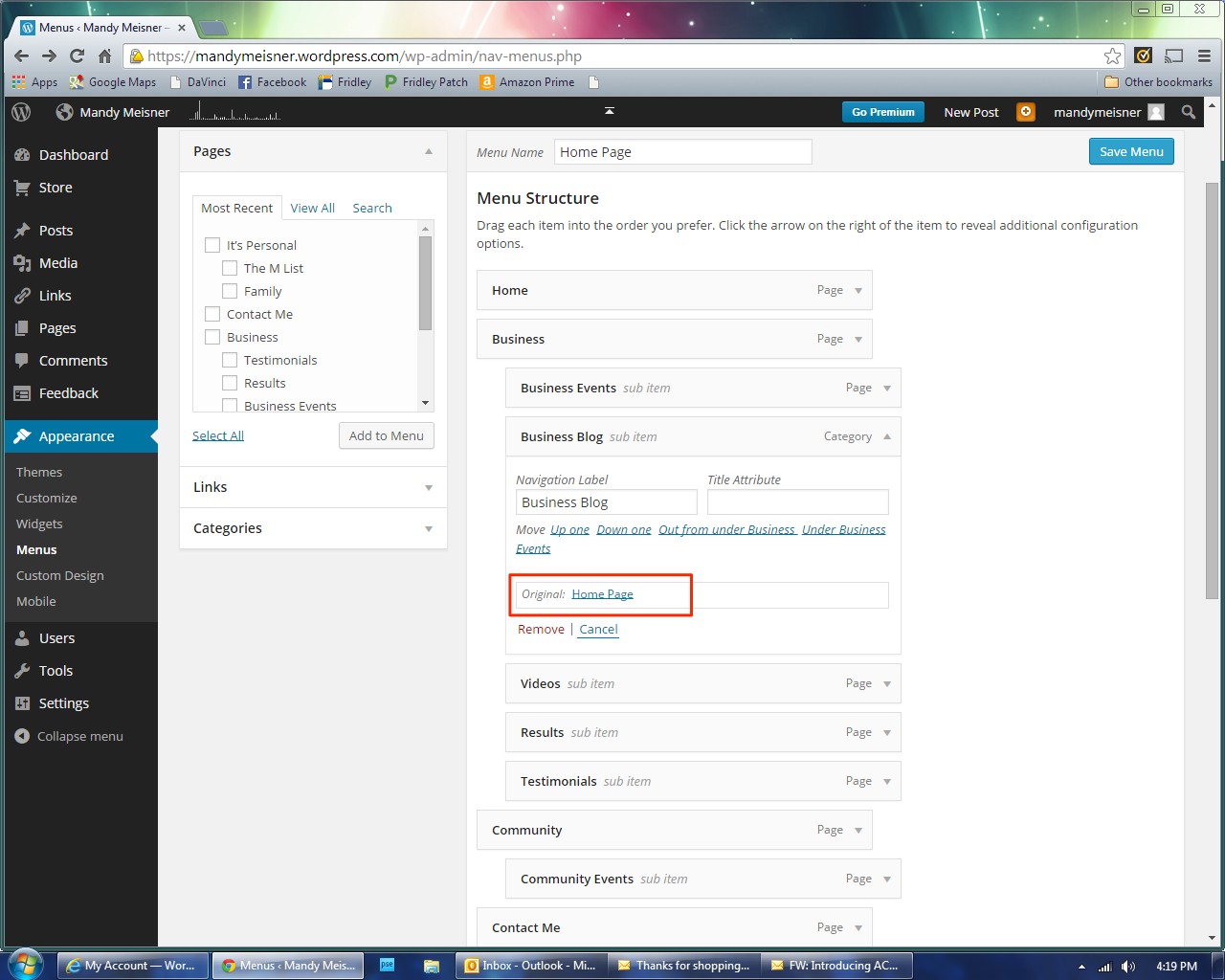
Specifically, it posts CORRECTLY on my “Business Blog” tab and page. But in the Menu appearance, my BB is actually named “home page”, which is NOT my actual home page.
When I use my home page as a link http://www.MandyMeisner.com it brings you to my Business Blog page…
The blog I need help with is: (visible only to logged in users)
-
Hi there,
Just to make sure I understand what you’re saying, when you Business >> Business Blog, the header says “home page” and you don’t want it to say that, correct?
The reason it says “Home Page” is because this is a category page which you have built based off of the category “Home Page” on your blog posts. You can change this at any time by going in to your categories under Posts >> Categories and changing the category there to something you like better.
Once you change that, you’ll want to go back to your Menu (under Appearance >> Menu) and make sure that your menu item has updated accordingly. It should then work just fine!
Let me know if you have any questions.
-
Not exactly. The actual category itself says “home”, but it shows up on my “business blog” (a sub of my Business page). It is showing up correctly, but there is something not right about it… It will bring some people to my business blog, instead of my real, actual home page.
Thank you!
Mandy Meisner
Executive Consultant/Owner
Rodan + Fields Dermatologists
763-226-1809 (cell)
[Click for: MY WEBSITE] [ how I got this gig] [Facebook] [Skincare tips] [The Business]
From: WordPress.com Support Forums [mailto:(email visible only to moderators and staff)] Sent: Wednesday, October 08, 2014 2:19 PMTo: (email visible only to moderators and staff): [WordPress.com Forums] Category
amightywp replied to a forum topic that you subscribe to
in response to the topic “Category”:
Hi there,
Just to make sure I understand what you’re saying, when you Business >> Business Blog, the header says “home page” and you don’t want it to say that, correct?
The reason it says “Home Page” is because this is a category page which you have built based off of the category “Home Page” on your blog posts. You can change this at any time by going in to your categories under Posts >> Categories and changing the category there to something you like better.
Once you change that, you’ll want to go back to your Menu (under Appearance >> Menu) and make sure that your menu item has updated accordingly. It should then work just fine!
Let me know if you have any questions.
Reply View forum topic
Want less email? Unsubscribe from this topic
Thanks for flying with WordPress.com
-
Here’s a print screen. See how my “Business Blog” has under “original” “Home page”??
M.
From: WordPress.com Support Forums [mailto:(email visible only to moderators and staff)] Sent: Wednesday, October 08, 2014 2:19 PMTo: (email visible only to moderators and staff): [WordPress.com Forums] Category
amightywp replied to a forum topic that you subscribe to
in response to the topic “Category”:
Hi there,
Just to make sure I understand what you’re saying, when you Business >> Business Blog, the header says “home page” and you don’t want it to say that, correct?
The reason it says “Home Page” is because this is a category page which you have built based off of the category “Home Page” on your blog posts. You can change this at any time by going in to your categories under Posts >> Categories and changing the category there to something you like better.
Once you change that, you’ll want to go back to your Menu (under Appearance >> Menu) and make sure that your menu item has updated accordingly. It should then work just fine!
Let me know if you have any questions.
Reply View forum topic
Want less email? Unsubscribe from this topic
Thanks for flying with WordPress.com
-
This one (my Personal Blog) is all lined up correctly…
M.
From: WordPress.com Support Forums [mailto:(email visible only to moderators and staff)] Sent: Wednesday, October 08, 2014 2:19 PMTo: (email visible only to moderators and staff): [WordPress.com Forums] Category
amightywp replied to a forum topic that you subscribe to
in response to the topic “Category”:
Hi there,
Just to make sure I understand what you’re saying, when you Business >> Business Blog, the header says “home page” and you don’t want it to say that, correct?
The reason it says “Home Page” is because this is a category page which you have built based off of the category “Home Page” on your blog posts. You can change this at any time by going in to your categories under Posts >> Categories and changing the category there to something you like better.
Once you change that, you’ll want to go back to your Menu (under Appearance >> Menu) and make sure that your menu item has updated accordingly. It should then work just fine!
Let me know if you have any questions.
Reply View forum topic
Want less email? Unsubscribe from this topic
Thanks for flying with WordPress.com
-
Hi,
We can’t actually receive attachments in the Staff Answers queue. Instead can you upload the attachments to your Media Library so I can review them there?
Thanks so much!
-
One! I thought I sent it inside the email as a screen print (?). That’s why YOU have this job : D
Thank you so much!!
M.
From: WordPress.com Support Forums [mailto:(email visible only to moderators and staff)] Sent: Wednesday, October 08, 2014 6:11 PMTo: (email visible only to moderators and staff): [WordPress.com Forums] Category
amightywp replied to a forum topic that you subscribe to
in response to the topic “Category”:
Hi,
We can’t actually receive attachments in the Staff Answers queue. Instead can you upload the attachments to your Media Library so I can review them there?
Thanks so much!
Reply View forum topic
Want less email? Unsubscribe from this topic
Thanks for flying with WordPress.com
-
Thanks for those screenshots! I’m not sure I understand what you want to do. Can you clarify?
Here are your Categories:
https://mandymeisner.wordpress.com/wp-admin/edit-tags.php?taxonomy=category
Currently the page Business Blog is showing the category “Home Page” and the page Personal Blog is showing the category “Personal Blog”. You can see which category being displayed here:
Which Category do you want to appear on the Business Blog page? And which do you want to appear on the Personal Blog page?
-
Thanks for the reply! Is there ANY WAY I can call you (or someone) to walk me through this and what I’m trying to say??? Pretty please!!!
M.
From: WordPress.com Support Forums [mailto:(email visible only to moderators and staff)] Sent: Friday, October 10, 2014 10:11 AMTo: (email visible only to moderators and staff): [WordPress.com Forums] Category
shawnajroberts replied to a forum topic that you subscribe to
in response to the topic “Category”:
Thanks for those screenshots! I’m not sure I understand what you want to do. Can you clarify?
Here are your Categories:
https://mandymeisner.wordpress.com/wp-admin/edit-tags.php?taxonomyÊtegory
Currently the page Business Blog is showing the category “Home Page” and the page Personal Blog is showing the category “Personal Blog”. You can see which category being displayed here:
Which Category do you want to appear on the Business Blog page? And which do you want to appear on the Personal Blog page?
Reply View forum topic
Want less email? Unsubscribe from this topic
Thanks for flying with WordPress.com
-
-
Do I reply HERE, or go to my wordpress site?? (Yeah. That’s why YOU have this job. I’m such an idiot when it comes to these things…!)
From: WordPress.com Support Forums [mailto:(email visible only to moderators and staff)] Sent: Friday, October 10, 2014 5:15 PMTo: (email visible only to moderators and staff): [WordPress.com Forums] Category
shawnajroberts replied to a forum topic that you subscribe to
in response to the topic “Category”:
We don’t have phone support, but I’m online right now if you want to work this out. :)
Reply View forum topic
Want less email? Unsubscribe from this topic
Thanks for flying with WordPress.com
-
:) You can reply via email like that, or you can head over to your thread in our forums:
-
Please look closely at the screen print. The “original” doesn’t match up with “business blog” HOW DO I CHANGE THE “ORIGINAL”???
M.
From: WordPress.com Support Forums [mailto:(email visible only to moderators and staff)] Sent: Friday, October 10, 2014 5:15 PMTo: (email visible only to moderators and staff): [WordPress.com Forums] Category
shawnajroberts replied to a forum topic that you subscribe to
in response to the topic “Category”:
We don’t have phone support, but I’m online right now if you want to work this out. :)
Reply View forum topic
Want less email? Unsubscribe from this topic
Thanks for flying with WordPress.com
-
Great! I can help you with that.
- Head over to Appearance > Menus.
- On the right, select and open the current Business Blog menu item.
- Select “Remove”.
- On the left select ‘Categories’.
- Put a check mark next to the Business Blog category and select “Add to Menu”.
- On the right, move this new Menu Item where you want it.
That should get your menu item linking to the correct thing. Let me know if there’s something else I can help with!
-
-
I followed you instructions, and that DELETED my entire Business Blog (and ALL the blogs). PLEASE HELP!!! My website had TWO blogs on it.
I am seriously panicked.
-
-
-
THAT TOTALLY DELETED ALL MY BUSINESS BLOGS, and the page no longer exits… Please HELP ME!!!
From: WordPress.com Support Forums [mailto:(email visible only to moderators and staff)] Sent: Friday, October 10, 2014 5:35 PMTo: (email visible only to moderators and staff): [WordPress.com Forums] Category
shawnajroberts replied to a forum topic that you subscribe to
in response to the topic “Category”:
Great! I can help you with that.
1. Head over to Appearance > Menus.
2. On the right, select and open the current Business Blog menu item.
3. Select “Remove”.
4. On the left select ‘Categories’.
5. Put a check mark next to the Business Blog category and select “Add to Menu”.
6. On the right, move this new Menu Item where you want it.
That should get your menu item linking to the correct thing. Let me know if there’s something else I can help with!
Reply View forum topic
Want less email? Unsubscribe from this topic
Thanks for flying with WordPress.com
-


- The topic ‘Category’ is closed to new replies.


 WordPress.com Forums