

Category subheadings
-
One one of my blog categories, I managed to make the description show up at the top of the category page. I’d like to do that for some of the other categories, but, I can not remember how I did it. This would simply be a paragraph that would always be at the top of the page that explains what that category is. How do I set that up? Thank you.
The blog I need help with is: (visible only to logged in users)
-
Hi Michael,
You can manage those category descriptions by going to your blog’s Dashboard and click on the Posts > Categories menu.
Looks like this:
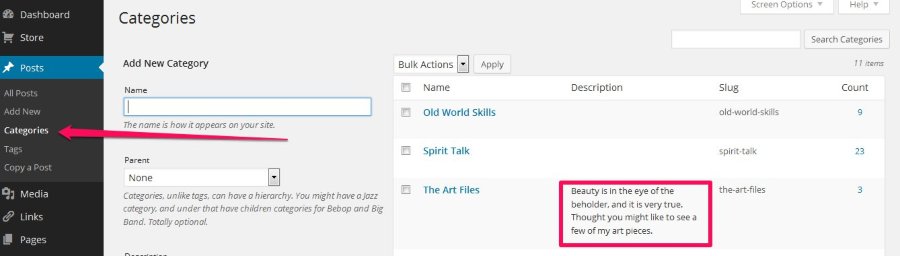
On that menu, hover over the Category you’d like to edit, click edit when it appears, and type in your description.
Best,
-Alex G.
-
Alex, as I said, I would like for the description to show up at the top of the category page, and right now, they are not. What do I do to make them appear on the page?
-
Hi Michael,
When I visit your site, I all the category descriptions you’ve created appear at the top:
https://cloudup.com/cN4DgMVR8JC
https://cloudup.com/cSXzQpmW3urThis is really the only space that category descriptions can be displayed.
The only exception (where a category description exists) is this one. While you’ve created the category and description, there are no posts within that category. The description should appear once there’s a post to display:
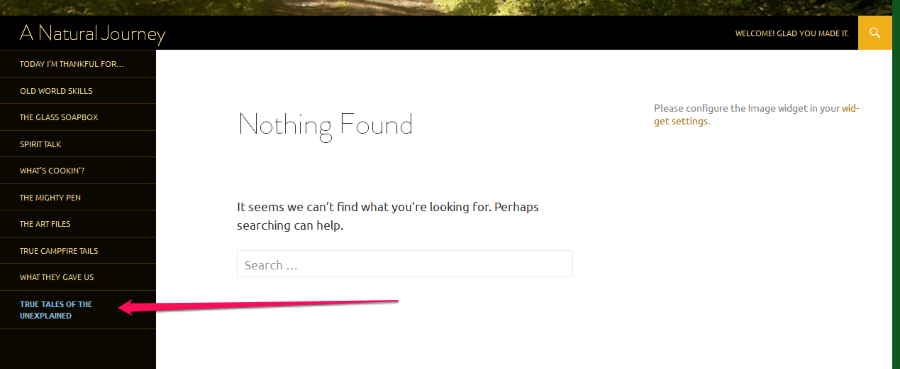
Your remaining eight categories just need their descriptions created and saved, then they’ll appear in the same spot below the category title, but above the posts.
Best,
-Alex G.


- The topic ‘Category subheadings’ is closed to new replies.
 WordPress.com Forums