Centering social widget
-
Hi, how can I center the social network widget in the bottom of my site?
Thanks :)
The blog I need help with is: (visible only to logged in users)
-
To center the social network widget, add the following to the bottom of your custom CSS.
.site #wpcom_social_media_icons_widget-8 { margin-left: auto; margin-right: auto; padding-left: 0; text-align: center; float: none; } .site #wpcom_social_media_icons_widget-8 ul li { display: inline-block; float: none; } -
-
-
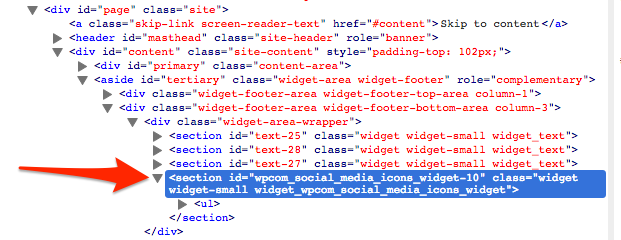
Oops, sorry, I seemed to have gotten the wrong widget id number in my code. Add the following.
.site #wpcom_social_media_icons_widget-10 { margin-left: auto; margin-right: auto; padding-left: 0; text-align: center; float: none; } .site #wpcom_social_media_icons_widget-10 ul li { display: inline-block; float: none; } -
about making the icons bigger and the circle black possible?
thanks again thesacredpath!
-
-
I see you have gotten the icons enlarged and changed the color to black. Nice job.
I use the web inspector built into my browser. Each widget, post and page will have a unique CSS class in the opening div in the HTML. Screenshot.
-
yes Im feeling my learning curve speeding up :)
thanks alot thesacrepath you teach me alot when I read your answers to me and to others! keep up the awesome work! -


- The topic ‘Centering social widget’ is closed to new replies.
 WordPress.com Forums