Chalkboard theme thread nesting doesn't indent
-
I am using the chalkboard theme and like it, except for the way it displays nested thread comments.
It doesn’t indent comments, with each successive reply further indented, which can make it difficult to tell who or what a person is commenting in reply to.
I played around with the nested thread setting but I think the way comments indent or do not indent, is a feature of the theme. Can this be changed or do I have to go premium to change it?
-
Hi there,
Were you able to sort this out? When I viewed a few posts today, all of the comments I saw were indented starting with the username of the commenter. (example)
Are you seeing instances where the replying username is not indented below the comment being replied to? If so, could you send a link to it so I can take a look?
-
I see the problem.
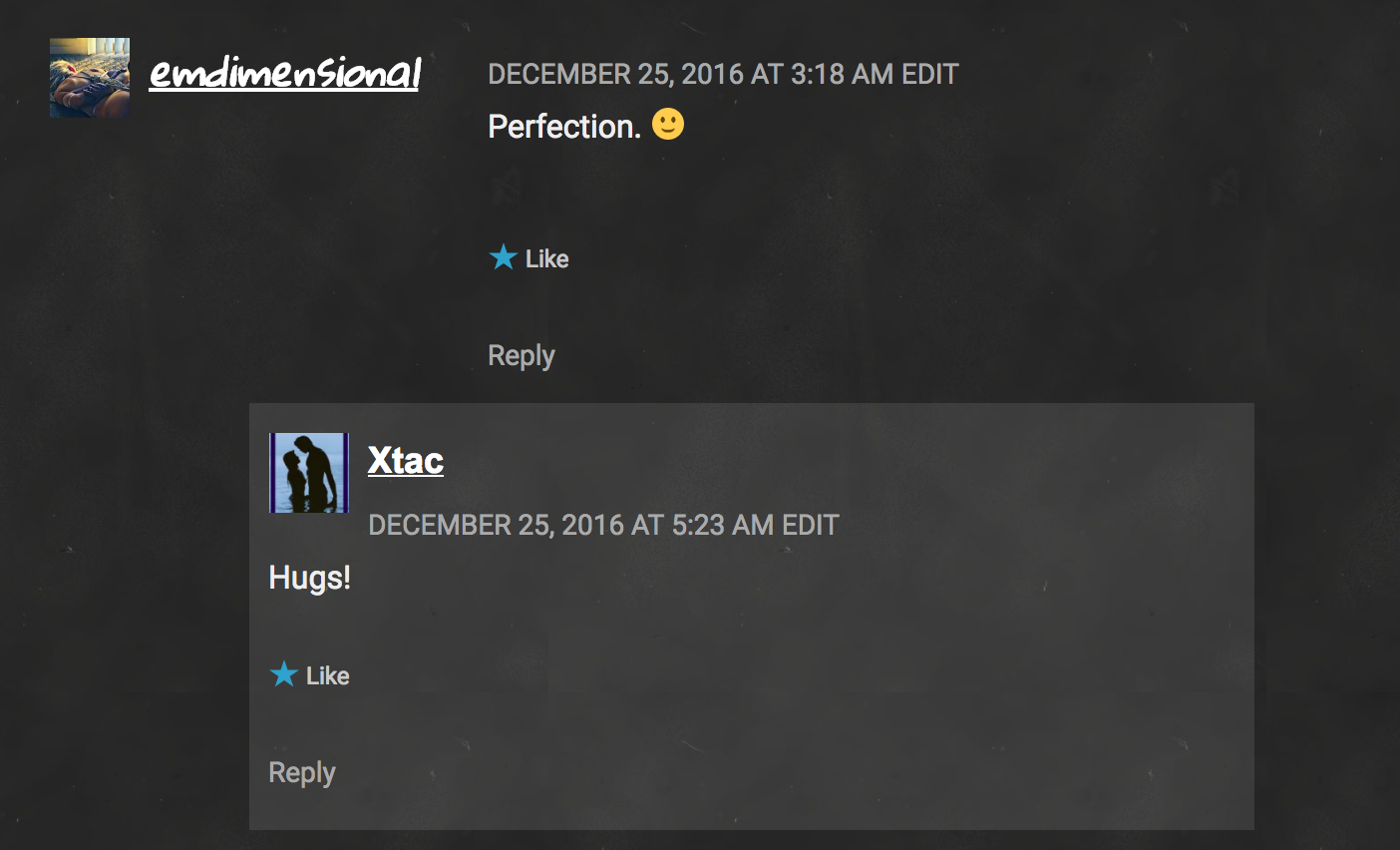
The original comment has no shading box and the text is to the RIGHT of the avatar.
The respondents text how ever is in a shading box and place directly BELOW the avatar.
The avatars themselves are indented, but because the text is handled differently, the text of the first comment is to the right of the response. In other words, the response text appears to be further left and can be confused as original text, especially in a long response where you cannot see the avatar alignment.
If the text and avatars were handled the same for comment and response, the indent would be visible.
-
The avatars themselves are indented, but because the text is handled differently, the text of the first comment is to the right of the response. In other words, the response text appears to be further left and can be confused as original text, especially in a long response where you cannot see the avatar alignment.
I understand what you’re saying about the longer comments. It’s more clear with shorter comments for sure. I’ve submitted this to our developers to take a look at. We’ll update you here when we have something back from them.
It may take a bit for them to get back to us to on this, but if you’re interested in looking at another theme with a dark background and a similar layout, check out Hero. Here’s a quick preview of it on your site.
You can go to My Site > Themes and use the Try & Customize option for any other theme to see how it looks on your site. To get to that, just click on the three dots at the bottom right of any theme, and you’ll find Try & Customize in the popup menu.
-
You have been most gracious and helpful. I deeply appreciate the interest, care and concern demonstrated. Thank you.
I do like the Hero look, however I have grown quite fond of the classroom feel of Chalkboard. The replies concern aside, I feel confident that in time the developers will see how the different treatment of original and response leads to text not appearing to indent, and might make a correction.
At least now I better understand how to tell which is and original, and which are replies.. you just have to pay attention to the avatar, not the text.
Thank you for your time and patience.
-
You’re quite welcome. :)
As soon as we hear something back from the developers, we’ll update you via this thread.


- The topic ‘Chalkboard theme thread nesting doesn't indent’ is closed to new replies.
 WordPress.com Forums