Change Text Color in a Subscription Form
-
I can’t figure out how I can change a text color.
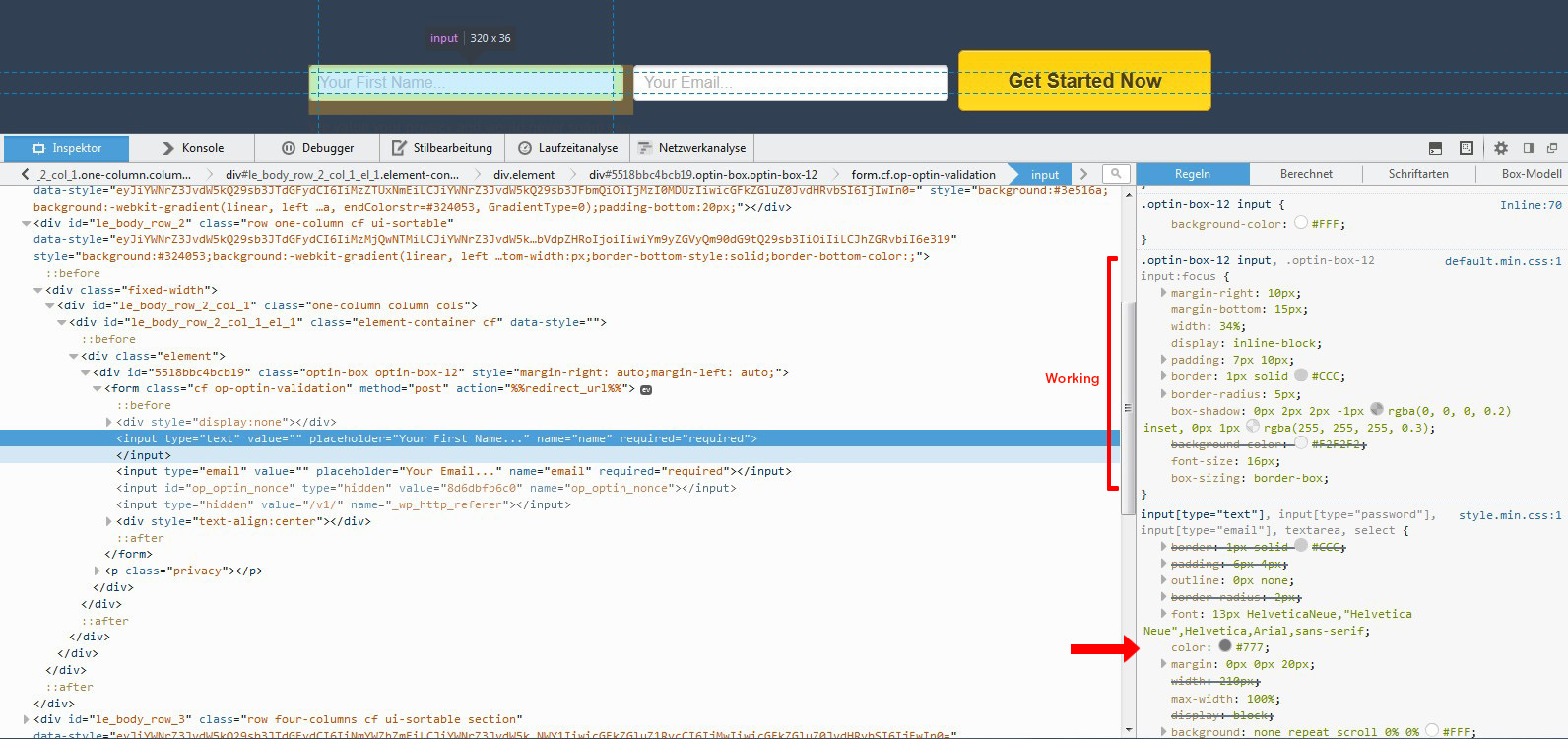
This is a screenshot from firebug:
http://fs2.directupload.net/images/user/150331/yvz8lfij.jpg
The red arrow points to the value which changes the color. In firebug it is working.But what is the actual CSS Code?
I have tried:
.optin-box-12 input[type=”text”] {color: #ffffff!important;}
But nothing happened.If I use some other code, it is working well. For example :
.optin-box-12 input {font-size: 18px;}I also tried:
.optin-box-12 input {text-decoration-color: #ffffff!important;}Can somone help me? What is the right CSS Code for this?
-
Hi there!
Are you working on a WordPress.com or WordPress.org site?
WordPress.COM and WordPress.ORG are completely separate and have different logins, features, run different versions of some themes with the same names, and have separate support forums. http://support.wordpress.com/com-vs-org/
If you’re working on a WordPress.org site then it would be best to ask this in the WordPress.org forums here: https://wordpress.org/support/
-
@meerrauschen, can you give us a link to the site you are talking about? I don’t see any site associated with your account here at WordPress.com.


- The topic ‘Change Text Color in a Subscription Form’ is closed to new replies.
 WordPress.com Forums