

Change width of Google Calendar
-
Hi everyone,
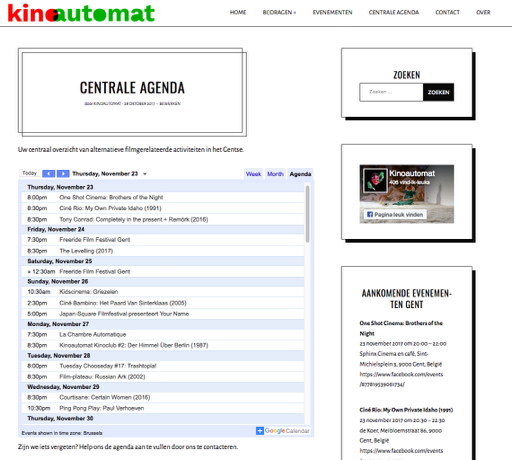
I am trying to change the width of our embedded Google Calendar on our WordPress-website. As you can see (https://kinoautomat.com/centrale-kinoagenda-gent/), the width of the calendar is incorrect. I tried to change this through HTML, but that didn’t work out. Next I tried everything by changing the CSS of our website, but since I don’t have enough experience with these matters, I’ve got no idea how this works. Also, I would prefer that the width of the page only applies to one single page, namely the one that contains the Google Calendar.
Is there anyone that can help me? Or is this because of the theme that I am using?
Thanks a lot in advance!
The blog I need help with is: (visible only to logged in users)
-
Hi, The calendar is displaying as wide as it can withing the constraints of the page column it is contained within. Perhaps try changing the page format on the right hand side of the editor page, if this theme allows, I cannot test this as the theme is a paid one.
As you have paid for this theme, why not take advantage of the dedicated support it comes with?
https://wordpress.com/theme/gema/support
Hope this helps!
-
Hi @kinoautomat, how much wider are you wanting to make the calendar? On screens 1240px and wider, the logo and menu are to the left of the content, which complicates things, but on screens 1239px and narrower, it is less of a problem. Let me know, and I can work that out for you.
-
Hi @thesacredpath, thanks for your response! I’m not sure, since I don’t know how wide it is right now (the embedded HTML code says width=”900px” height=”600px”, but I guess that it is not at all that wide now since it’s being confined by the WordPress theme). We could try out different widths maybe? Maybe to start with 850px? Or even 900px? The thing is that now, as you can probably see, almost all entries in our calendar are halved.
Thank you in advance!
@andysabel: thank you for the comment. If it does not work out with the help of @thesacredpath, I will follow your instructions :)
-
The calendar currently takes up the full width of the main column, which is 600px on larger screens.
If you’d like to widen that up on screens below 1239px, as Richard mentioned, it’s possible to do that. The simplest route might be to remove the 140px of left padding that’s currently set on the content area below that width. This CSS would override that:
@media (max-width: 1239px) {
  .singular .content-area {
    padding-left: 0;
  }
}
That will make the content of posts – including the Google Calendar iframe – fill the width of posts on smaller screens.
Let me know how you like it.
-
andysabel – as I mentioned earlier, please don’t send folks away from the CSS forum. Feel free to leave questions you’re not able to answer and staff or other volunteers will take care of them. Thanks!
-
For some kind of reason, this doesn’t seem to work? Am I doing something wrong here? I’m not sure, but could it be possible that this has to do with the fact that the calendar isn’t considered as an image, but as text? A huge thanks for the help, though!
-
To see the effect you’ll need to make your browser window narrower than 1239px. Below that width, you can see the wider calendar:
If you want to also affect screens wider than 1239px, you could try removing the 60px of padding that is applied to pages, by also adding this:
@media screen and ( min-width: 1240px ) {
  .singular .page {
    padding-left: 0;
  }
}
That’ll make everything in that column – including your calendar embed – 60px wider on larger screens.
-
-
Awesome! You’re very welcome. I’ll mark this thread as resolved but feel free to start a new one if you need help with anything else.


- The topic ‘Change width of Google Calendar’ is closed to new replies.
 WordPress.com Forums