

changing blog address?
-
When I set up my blog and upgraded to chearle2010.com I forgot to change it to Chearle Photography.com, Can I change the address of my blog?
The blog I need help with is: (visible only to logged in users)
-
Hi there,
Please note that considering that the nature of domains depends purely on spelling, it isn’t possible to just edit a domain name. However, since you bought it within 48 hours, you can cancel and refund the domain by going to your Store > My Upgrades page in your Dashboard. There should be a link to Cancel and Refund.
Then you can purchase the correct domain exactly like you did this one by going to Store > My Domains in your Dashboard.
The last I checked: chearlephotography.com was available!
Feel free to reach out if you have any questions!
-
Thank you very much, that’s what I did and I will buy Chearlephotography.com instead.
Chere :)
-
-
Thank you, now that I upgraded i can’t see any of my blogsite, it just shows a blank page, I think that’s normal, is it, will I lose all my work? How long should it be before I can see it again?
Thanks,
Chere :) -
It’s back up and running, can I ask you about setting up my page, I’m wondering how to make subpages in my galleries page, if you need to redirect me to somewhere else let me know.
Thank you,
Chere :) -
Hi Chere,
Were you able to figure the subpages out? I see that you have subpages under the Galleries tab as seen here:
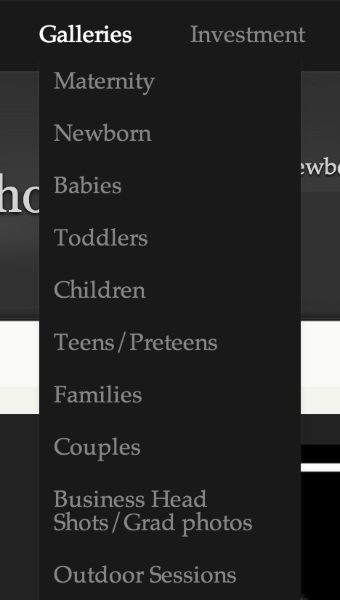
If this is not what you mean, please let me know! Just another tip, you can create a Custom Menu as well. Check it out and let me know if you have any questions!
Happy Blogging! :)


- The topic ‘changing blog address?’ is closed to new replies.


 WordPress.com Forums