

Changing color of contact form
-
Yes, about the Gallery. I was thinking about different appearance/facet of image when mouse hover, like having alternative blank(color only) image with name of service on it. If you could do the one, I would copy for others 12. Or maybe just saying once it will understand the rest…
Please, tell me if I still need to add caption for it. Hope it’s possible to do. Thanks as usually in advance! -
Hmmm, can you explain a bit more what you are wanting? Are you wanting some sort of color overlay on the Gallery with “Services” that then disappears to reveal the gallery when you hover? Or are you wanting each individual image to have a different color overlay?
Given the lack of unique CSS ids and classes this might not be something we can do.
-
Hi, thank you for hanging with my site on Sunday..
I meant …to reveal this particular service.
Idea – to make each service to stand up separately from others when visitor hover with mouse. It can be done maybe by fading the color of this image…Feel frustrated with other things too…many more questions, but I will wait till Tuesday, thanks! Happy Labor Day! :)
-
I’m still a bit confused, but see if this is what you are talking about. This fades the top left image in the gallery. The problem is I’ve not found a way to add any sort of description that appears when the image fades. There is the title field that appears on hover. Is that what you were talking about?
.home .tiled-gallery-item img[data-attachment-id="947"]:hover { opacity: 0.4; } -
Ha, how interesting, on my screen it fades one particular image(with hands and cards), even after the page is refreshed. I did random gallery. So wherever this image goes – up, middle, down – it’s always fades on hover.
Can we add this effect to all images, and leave the titles for now as they are?
Thank you so much! -
-
@, after a good night’s sleep, if you wish to have all the images in the gallery in Services fade on hover, we can do it with the following.
.home .tiled-gallery-item img:hover { opacity: 0.4; } -
Ah, amazing! it worked in edit mode, but just for 1 min or less: after I saved – there was nothing about hover in CSS. What happened? Didn’t want to save? Is it Mercury passed by? Please, help.
-
-
-
Hello, Happiness Engineer,
can you, please, continue helping me to curb this Pique model?
I invite you to my Tarot Reading page..
– Is it possible to change the colors of titles under each picture?
I filled the portfolio excerpts, this allow me to escape the huge golden title.
But adding colors it seems CSS property.
– Can we add this time the background for each service on hover, with some color and border?
– How to get rid of link at each photo? For home page I did it for whole gallery, but for portfolio the link already there, I don’t see the way to set
them to no link.
Thank you very much in advance! Your vibes are very supportive! Blessings! -
Hi there, I’ll answer your new set of questions in batches. For additional questions, please start a new thread in the CSS Customization forum, thanks!
– Is it possible to change the colors of titles under each picture?
This CSS should target those:
.pique-template-grid .pique-panel-content h3 {
  color: #bb00bb;
}
Change the colour code to anything you like.
-
I invite you to my Tarot Reading page..
Actually, the code I gave you earlier was for the homepage. Is this the page you need help with?
Next time if you could provide a direct link to the page you need help with, it’s super helpful. Thanks!
If you only want to change the page title colour on this specific page, this CSS should do it:
.page-id-1216 .entry-title {
  color: #bb00bb;
}
Change the example colour to whatever you like.
-
– How to get rid of link at each photo? For home page I did it for whole gallery, but for portfolio the link already there, I don’t see the way to set them to no link.
This should make the photos on the Tarot Reading page not clickable:
.page-id-1216 .portfolio-featured-image { pointer-events: none; cursor: default; } -
– Can we add this time the background for each service on hover, with some color and border?
Could you explain a bit more what you mean? Do you want a coloured border to appear around each photo in the grid on the Tarot Reading page when you mouse over it, or are you referring to something else?
-
Hello,
thanks for replying. Starting from the last part. Yes, I’d like the border to appear around not only picture, but also around all description including picture.
~ thanks for no links, it’s work!
~ No, I don’t want to change the color of page’s title, I want somehow highlight the name of service under each picture, I did capital letters, but they all the same color with description.
Thanks again for assistance. -
I’ll answer your questions separately again:
~ No, I don’t want to change the color of page’s title, I want somehow highlight the name of service under each picture, I did capital letters, but they all the same color with description.
In order to do this, you’ll need to first put the name of each service in a heading tag so it has a separate HTML element that can then be targetted with CSS.
First, go into each post excerpt and put a heading tag around each service name.
So for example, where you see:
'SPIRITUAL PATH' Tarot Spread…you can add an h3 (heading 3) tag like this:
<h3>'SPIRITUAL PATH' Tarot Spread</h3>You can then style those h3 tags as you like with CSS. For example:
.jetpack-portfolio-shortcode h3 { color: #bb00bb; font-size: 20px; } -
Yes, I’d like the border to appear around not only picture, but also around all description including picture.
.portfolio-entry:hover {
  border: 3px solid #1f426a;
}
Adding a border causes the content to shift a little as you hover over, so if you don’t like that effect (I find it a little hard on the eyes myself) you might think about a background colour on hover instead, for example:
.portfolio-entry:hover {
  background-color: #d8e5f4;
}
If you have any new questions, rather than continuing to add them here, please start a new thread – thanks!
-
Thank you so much! I still want to talk about the same topic, so I will start new forum with new topic, okay?
I did change the background, ths!
About highlighting the name of service. 2 things happening:
1. I’ve got the unwanted link.
2. Even I can change the font-family and size, I still unable to change the color of title.Can you please help me with it? Ths!
-
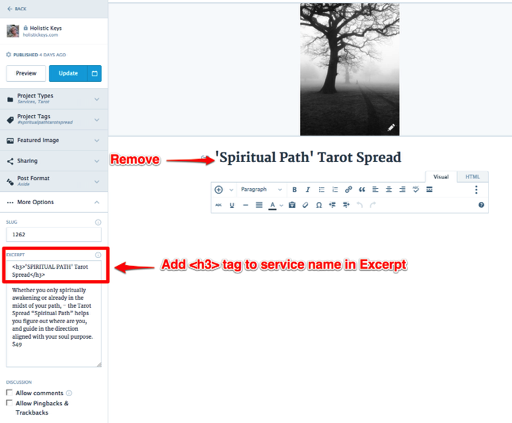
It looks like you added the words to the post title field, instead of keeping it in the excerpt and adding an h3 tag, as I suggested. That’s why it’s linked – post titles are automatically linked.
Please remove the words from the post title and add the code I gave you to the post excerpt field instead, in the Excerpt field in More Options.
Here’s a screenshot:


- The topic ‘Changing color of contact form’ is closed to new replies.
 WordPress.com Forums