

Changing email notification avatar
-
I recently changed my wordpress.com blog’s avatar to my new picture. But when I get my email notifications for my blog posts they still have my old avatar. I tried changing the gravatar but it seems broken as no image appears above the text description and when I have used it it still didn’t change the old image.
The blog I need help with is: (visible only to logged in users)
-
Hi Larry!
Just to confirm, can you let me know what image you’re referring to in the email notification? I’ve provided an example here:
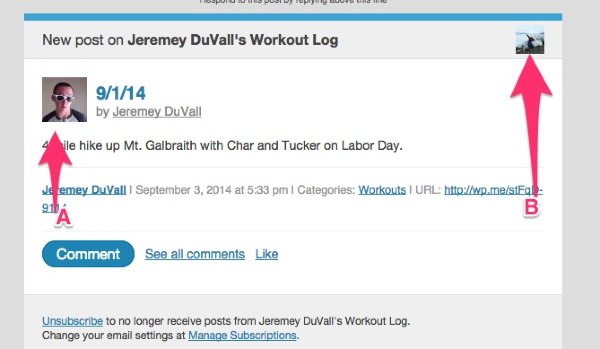
The image labeled (A) should be adjusted when you adjust the Gravatar image for your profile as instructed here:
http://en.support.wordpress.com/avatars/gravatars/#upload-an-avatar
The image labeled (B) is actually called a blavatar and is blog specific. You can read instructions for how to change that here:
-
Hello Jeremey;
Thanks for helping me.
For background I have several WordPress blogs. This is primarily regarding the MaryPenich.Wordpress.com blog.
I wanted to change the old gravatar for the new gravatar. All went fine as I used the Change your Gravatar widget. Then I noticed that in the email notifications that the old gravatar kept appearing where your gravatar appears and the new small one in the upper right-hand corner. So I went back to change it again but this time it appeared “broken.” Then I noticed that the upper-right and upper-left gravatar on the Dashboard were not appearing at all.
So now I’m scratching my head and trying to figure it out. Before I scratched a hole in my head I decided to yell for help…and you heard me. Thanks!
Here are some illustrations of what I see and what I don’t see. I hope this makes it clearer.
Thanks again for all your help.
Larry
-
Hey Larry,
That’s really odd. I’m currently seeing the correct Gravatar on your Dashboard and the Blavatar (blog avatar) on the left-hand side next to your stats sparkline. Can you try clearing your cache as described here?
I’m wondering if the browser is just mixed up.
I’m also followed your blog so I can see what the next email update looks like.
-
Hey Jeremey;
You won’t believe this. I opened up Firefox and found just what you said you saw on your browser so I not only did what you suggested about cleaning out my cache but I completely uninstalled Chrome, my primary browser, and then reinstalled it. Then I opened up WordPress.com. Know what I saw. The exact same thing I showed you. Now that is strange.
I can use Firefox for WordPress.com from now on.
Oh, I forgot to mention that even Gravatar central was all messed up in Chrome. Maybe I got a bug somewhere that is eating my Chrome.
Thanks for all your help.
Larry
-
Hey Larry,
That’s really odd. I don’t want you to have to use another browser! Unfortunately, as you described, I think this might be a Chrome-related issue. I’m unable to reproduce on my side, but I’ll continue to look. I’m also on the lookout for your next post email to see how that looks.
-
Hey Jeremey;
The posting from the MaryPenich.wordpress.com site is daily and I still get the two different images. I wonder if this may be something that the other administrator, Mary Penich, may have to do herself in order to fix. I can’t seem to affect it no matter what I do. :-(
Thanks for your help.
Larry
-
Hey Larry,
Ah – great point. It looks like Mary is the author of those posts. So, her Gravatar will pop up in the A slot here:
Can you make sure she’s updated her Gravatar as well? It wouldn’t hurt to also have her check-in on the Blavatar here as well just to make sure it’s set correctly:
https://marypenich.wordpress.com/wp-admin/options-general.php
-
SUCCESS!
I had Mary, the other administrator of the blog, sign in and change the avatar/gravatar. Now the new image appears in the A position as well.
Thank you for all your troubles.
-


- The topic ‘Changing email notification avatar’ is closed to new replies.
 WordPress.com Forums