Changing Favicon on Bueno Theme
-
Hello:
I’ve been trying to change the favicon on my blog with the Bueno theme I have but haven’t had any luck. I’ve read other Q&As regarding this, but they’re not helping in this situation.
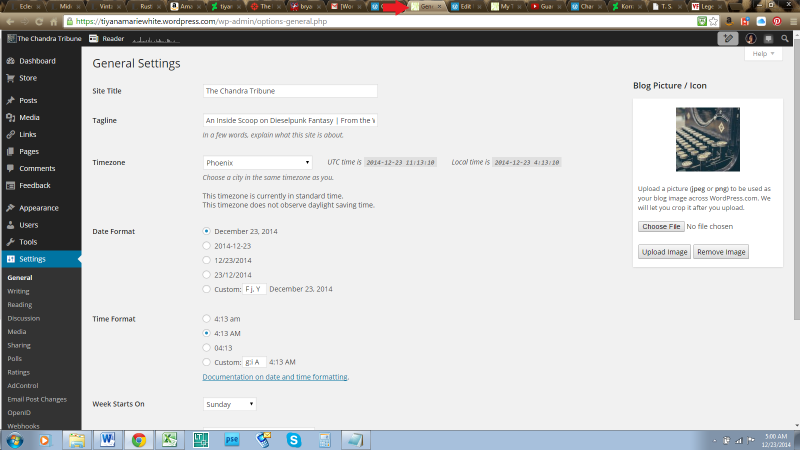
Since the updates, things are a bit different. One answer was to go through the “Plug-Ins” tab on my admin panel, which doesn’t exist. Another was to go to Settings->General, Blavatar to make the change, though when I go to General now what show’s up is “Blog Picture / Icon.” I’ve already changed this image to the one I want and it’s been over 24 hours, but I’m not seeing a change in my Favicon on the browser tab.
Am I doing something wrong?
– Tiyana
The blog I need help with is: (visible only to logged in users)
-
Yes.
You are reading instructions that do not apply to your blog. Yours is a WordPress.com blog and the instructions will be found in the Support documents.
Change the Favicon on the Settings->General page.
-
Alright, but my question is *where* should the image be changed under General Settings? Is it the “Blog Picture / Icon” that needs to be changed? If so, as I stated above, I’ve already changed my blog picture but the Favicon on the browser tab has not reflected this change over the past 24 hours.
-
Is it the “Blog Picture / Icon” that needs to be changed?
Yes.
I’ve already changed my blog picture but the Favicon on the browser tab has not reflected this change over the past 24 hours.
I see this favicon/blavatar https://cloudup.com/cxDrAsZhKMG
-
I do, too. What I’m talking about is on my browser’s tab: http://i89.photobucket.com/albums/k206/tmwhite5/Screenshot2014-12-23-2.png
I’m still seeing my old Favicon. Is there a way to change that?
-
Well that’s odd…the part I was talking about seems to have magically fixed itself, haha.
Thanks for the tips, though.
-


- The topic ‘Changing Favicon on Bueno Theme’ is closed to new replies.
 WordPress.com Forums