Changing Menu bar color in iTheme2
-
I would like to change the menu bar color in iTheme2 from the gray to a gradient blue. Tried everything but it doesn’t seem to overwrite whatever background image is in the core template. Any suggestions would be greatly appreciated.
Chris
The blog I need help with is: (visible only to logged in users)
-
Create a gradient image that is only 1px wide by 40px tall with your gradient in it. Upload it to the media library, get he URL of it and put that URL where it says IMAGE URL in the CSS below (between the double quote marks). Change the #6a6a6a color to something complimentary to your gradient just in case the image doesn’t load for some reason.
#access {
background:#6a6a6a url("IMAGE URL") repeat-x !important;
}
This is the existing image: http://s1.wp.com/wp-content/themes/pub/itheme2/images/nav-bar-bg.png . Hard to see since it is only 1px x 40px.
-
-
These two declarations together do the line between the tabs.
#access > div > ul > li { border-right: 1px solid #575757; box-shadow: 1px 0 0 rgba(255, 255, 255, 0.1), -1px 0 0 rgba(255, 255, 255, 0.1) inset; } -
-
-
ah, got it! Thanks! I never changed color code :(
Now how do I do the same on the menu tabs on the right please?
-
If you change the “border-right color here, it changes all of the lines. Add the “!important” attribute to make sure it changes them all.
#access > div > ul > li { border-right: 1px solid #FF19CC !important; } -
I added it but the tab color on the didn’t change http://i1210.photobucket.com/albums/cc419/RayTheRambler/Captureh.jpg
-
Sorry, I was still stuck on the lines in between.
Hover color.
#access > div > ul > li:hover {
background: #19ff4c;
}
Non-hover color
#access > div > ul > li {
background: #ff19cc;
}
Current menu item (current page)
#access .current_page_item, #access .current-menu-item { background: #ffbf19; } -
Thanks for the hover color code but I think you’re confused. I don’t want to sound like an asshole BTW, lol. I really appreciate your help.
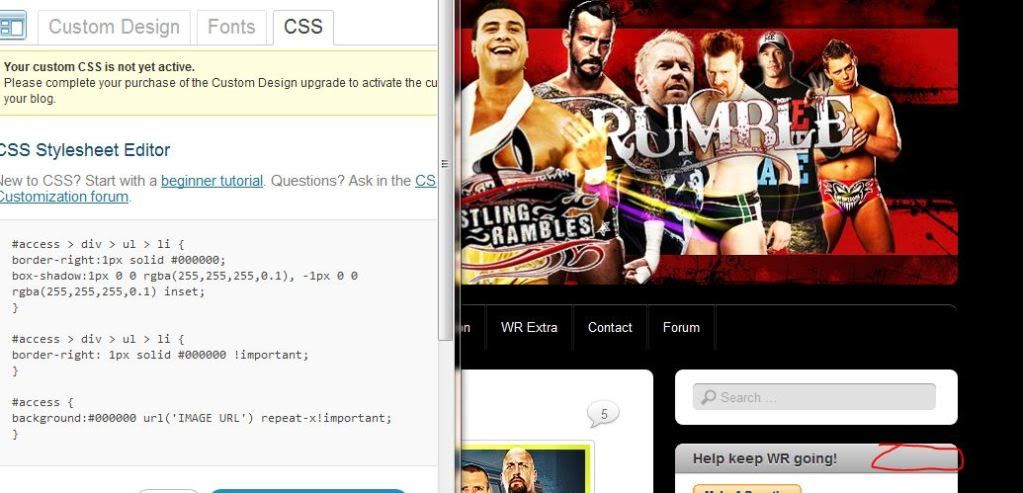
But, what I want is to do the same on the menu bars but on the right sidebar windows as well. If you look on the pic below I have added in red circular thing, where that’s circled, I want the black, and the writing on that to be white. Example:
The text ”Help Keep WR going” I want white, behind that I want black. The hover code for that too. Please. Sorry to ask so much it’s because I’m explaining it bad.
-
I have no idea what site you are talking about. One time it is one site and the next time it is another. You talk about menus, and the menu is the thing at the top. Now apparently you are talking about widget title bars.
The one with a widget title of this, “Help keep WR going!” doesn’t have any white text on black background for the menu at the top, so am I to assume you are talking about yet a different site?
And you did not provide a link to any image.
.widget-title, .widgettitle { background:#a9a9a9 url(images/widgettitle-bg.png) repeat-x; color:#333; } -
No, you got it, that’s what I needed. I gave the picture link above, my third last post on this thread. Thanks! You’re great help.
-
-
One more thing. You probably hate my guts now since I ask so many things.
Can the search bar be customized? Or even moved onto a place on the header image?
-
Yes to both. Here’s an example of moving your search widget higher up:
#search-3 { position: absolute; top: 50px; margin-left: 100px; background: transparent; box-shadow: none; } -
Actually, you can use the vendor specific rules to make double extra sure to get rid of all the box-shadow things:
#search-3 {
position:absolute;
top:50px;
margin-left:100px;
background:transparent;
box-shadow:none;
-webkit-box-shadow:none;
-moz-box-shadow:none;
}
(which is a little more complete than the first example)
-
Hey, thank you very much, everything seems to be spot on. I’m really glad I chose WP, I don’t see many other sites being as good with support and all.
Thank you sacredpath too, you were tremendous help!
-


- The topic ‘Changing Menu bar color in iTheme2’ is closed to new replies.
 WordPress.com Forums