

Changing navigation menu headings from text to social media images
-
Unfortunately, my theme [Expound] doesn’t support a Social Links Menu. I’ve been trying to adapt my current menu from Text links to Social Media icons using this guide:
http://nathaningram.com/tutorials/easy-social-icons-in-the-wordpress-navigation-menu/
I’ve come unstuck at stage five [adding the icon(s) to the menu] because my knowledge of CSS is really limited. I’ve tried reading some basic CSS tutorials but have still had no success. I think my problem is that I’m not sure where it is that I need to past in the relevant code? Can anyone help?
The blog I need help with is: (visible only to logged in users)
-
Hi there!
We spoke on Live Chat earlier today. Thanks for making the forum thread. :)
I took at shot at this on a test site and I think they turned out pretty well. First thing you’ll need to do is add images for the icons you like into your media library. The code here will only have placeholder image.
First, go into your menu settings here:
https://prvnce.wordpress.com/wp-admin/nav-menus.php
Add CSS classes to each item, like this:
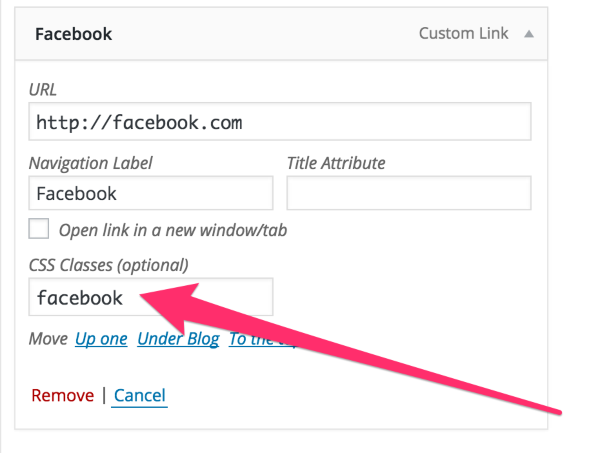
My code here assumes you add the class ‘facebook’ for the facebook link, ‘twitter’ for the twitter link, etc.
Next add this CSS:
/*Hide the link text*/
.navigation-main li.facebook a, .navigation-main li.facebook a:hover, .navigation-main li.twitter a, .navigation-main li.twitter a:hover, .navigation-main li.instagram a, .navigation-main li.instagram a:hover, .navigation-main li.soundcloud a, .navigation-main li.soundcloud a:hover {
	color: transparent;
}

/*Add icons into the list item background*/
.navigation-main li.facebook{
	background-image:url('https://placekitten.com/g/200/40');
}
.navigation-main li.twitter{
	background-image:url('https://placekitten.com/g/200/40');
}
.navigation-main li.instagram{
	background-image:url('https://placekitten.com/g/200/40');
}
.navigation-main li.soundcloud{
	background-image:url('https://placekitten.com/g/200/40');
}
Next, replace the https://plackitten.com image URLs with the URLs for the icons in your media library. Use the Facebook icon for the .facebook rule, the Twitter icon for the .twitter rule… etc.
Let me know if you hit any snags working through this. :)
Best,
-Alex G.
-
Alex I can’t thank you enough – this worked perfectly!
The only slight problem I hit was that my images were far too large, which was easily fixed by Tiago in live chat, who told me to add the following code after the URL:background-size: cover;
width: 50px;
height: 50px;Or change the original image size, of course! Anyway, problem solved – hopefully this thread will be really useful to anyone looking to do the same thing in Expound!
-
-
Thanks Alex! One more thing, I’ve been trying to space out the menu items using the code provided here…
https://en.forums.wordpress.com/topic/space-out-navigation-bar-menu-items?replies=4
… but when I insert the code the images revert to their original size and can’t be seen. Do you know of any way around this?
-
Try this to start:
.navigation-main li{
	margin: 0 20px;
}
Make that 20 larger or smaller to increase the space on the left and right, change that 0 to ’20px’ (or another number) to add some space on the top and bottom.


- The topic ‘Changing navigation menu headings from text to social media images’ is closed to new replies.
 WordPress.com Forums