

Changing picture format of my old blog posts
-
Hello,
I am trying to update my blog and having a hard time figuring out how to reformat the pictures I have on my blog posts. I want to change the format so that my pictures are all in a ‘collage’ setting. Right now it’s a mix with some posts showing in a collage and others just showing the pictures in the ‘large’ format. How can I change this? Thank you! Cori
The blog I need help with is: (visible only to logged in users)
-
Hi Cori,
I tested this on my free blog here and maybe it can help you.
I added several images to a post and used “Tiled Mosaic” as the format for the gallery.
If you edit one of your posts and click on the Pencil icon for editing the gallery (images) you will see the options on the Right Hand side under Layout. There are several options, “Individual Images”, “Thumbnail grid”, etc.
Test those out and see if they work for you.
I hope this helps! -
Thank you for your help! So I can’t find the pencil icon that then leads my to a place that shows layout. I’ve tried the pencil icon on the cover picture I have and that does lead me to the gallery, but nothing that says layout. I’ve attached the screenshot, I’m sure I’m just blind.
I know how to make the “tiled mosaic” on new posts/ when I upload new photos to the post. I was hoping to change the layout to pictures I’ve already uploaded.
-
-
Ahh crap sorry! I forgot to attach it and now I can’t find a place to attach it. I’m sorry I’m such a disaster, I swear I’m normally adequate with technology lol.
-
@coriallan,
no worries maybe upload it to a free service like https://cloudup.com and share it. I think there are no attachments allowed -
Ok, I see.
Well, what I tried was clicking directly into the image in my post, that seemed to activate the pencil. (I had trouble at first)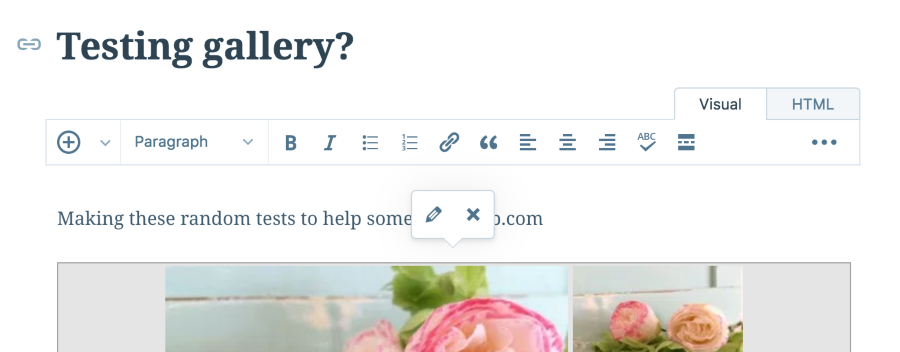
-
Hi Cori,
I noticed something on your screenshot and was wondering if you could check it for me.
The post type for that particular post was “Image”.
Now on image posts, the top image (before the text editor) is the featured image.
In order to edit the gallery items you have to choose the gallery photos “inside” the text editor.
Take a look at this > https://cloudup.com/iqrp_eNRc4h
Are your new posts “standard” post type or “Image” post type?Let me know!


- The topic ‘Changing picture format of my old blog posts’ is closed to new replies.
 WordPress.com Forums