

changing primary domain
-
I have purchased earsinbalance.com. When I change my primary domain to this – it does not bring up my blog. It brings up earsinbalance.com on register.com that shows the website is under development.
Not sure what to do.
Many thanks
Jess
The blog I need help with is: (visible only to logged in users)
-
Hi Jess,
You’ve purchased the Domain Mapping upgrade. This upgrade is intended for folks who registered a domain name elsewhere, but want it to point to their WordPress.com site:
http://en.support.wordpress.com/domains/map-existing-domain/
Some folks confuse this with the Domain Registration upgrade, where you buy a new domain and it’s all setup to point to your WordPress.com site:
It appears the domain earsinbalance.com was purchased from Register.com on November 1st:
http://who.is/whois/earsinbalance.com
Did you purchase that domain through Register.com (or one of their resellers) and you need help completing the mapping? Or did you need to register a new domain through WordPress.com?
Please let me know and I’ll help you clear this up. :)
Best,
-Alex G.
-
I did purchase the domain through register.com and need help completing the mapping.
Many thanks
Jess
-
Hi Jess,
Great! So the next step you’ll need to complete is changing your domain’s name servers. This is done through the Register.com side of things. They have (brief) instructions on how to change name servers here:
(Their Help site doesn’t really load well, so I took a screenshot as well.)
Your name servers will need to be set to these three lines:
NS1.WORDPRESS.COM
NS2.WORDPRESS.COM
NS3.WORDPRESS.COM
If you hit snags getting these entered into your domain’s settings with register.com, we have a sample email you can send to their support under Step 3 in this guide:
http://en.support.wordpress.com/domains/map-existing-domain/
Once your name servers are set with Register.com, visit this page in your site’s dashboard:
https://earsinbalance.wordpress.com/wp-admin/paid-upgrades.php?page=domains
Choose the radio button next to earsinbalance.com and click “Update Primary Domain.”
Best,
-Alex G.
-
-
Hi Jess,
Awesome! Those name servers can be a tough step, but the end is worth it. :)
Let me know if you hit any more snags setting up your site.
Best,
-Alex G.
-
Alex
It worked with my website, but I now can’t use my email (email visible only to moderators and staff)
What should I do ?
Regards
Kay
-
I have just checked and on the site, register.com says that we need to change the following:
Register.com’s Email Services
If you choose to no longer use Register.com’s DNS Servers, then you must contact the DNS Server Administrators of the ISP or Web hosting company that manages your account’s DNS Servers. They will be required to change your MX record and CNAME (Alias) entries in order for you to use Register.com’s email services.
Below are the settings necessary to use Register.com’s email services. Please copy this information for your reference before continuing:
In CNAME (Alias):
mail.earsinbalance.com points to webmail.register.comIn MX:
earsinbalance.com points to mxmail.register.com
Priority: Highcan you do that ?
Thanks
Jess
-
Hi Jess,
I’ve added that CNAME and MX record to your domain’s DNS settings.
You can check my work if you like reaching the menu described in this guide:
The one discrepancy you’ll see is the “priority” on the MX record. Priority is a numerical value, but it’s relative to all the other MX records in the DNS settings. I’ve set this one’s priority to 0, as the lowest number in the MX records will be the highest priority. But since this is your only MX record, that number could be anything for now.
Would you please send a few test emails over the next few hours? It can normally be 2 – 6 hours before MX records function correctly. The alias for mail.earsinbalance.com already works though!
Best,
-Alex G.
-
Alex
The emails don’t work. Should I still use pop or IMAP ?
Is the incoming mail server still mail.earsinbalance.com ?
My password doesn’t work either
I noticed on the set up that there are 2 CNAMES. Is that a problem ?
Could you see if you can get my email to work (email visible only to moderators and staff).
Thanks
Jess
-
I have managed to find my email on https://webmail05.register.com/interfaces/sso/login.php?redirected=yes&user_domain=mail.earsinbalance.com
But I can’t send or receive emails from this email account
Thanks
Jess -
Alex
This is the error
The original message was received at Wed, 5 Nov 2014 22:08:41 -0500
from [10.30.71.107]*** ATTENTION ***
This email is being returned to you because the remote server would not
or could not accept the message. The registeredsite servers are just
reporting to you what happened and are not the source of the problem.The address which was undeliverable is in the section labeled:
“—– The following addresses had permanent fatal errors —–“.The reason your mail is being returned to you is in the section labeled:
“—– Transcript of Session Follows —–“.This section describes the specific reason your e-mail could not be
delivered.Please direct further questions regarding this message to your e-mail
administrator.–Registeredsite Postmaster
—– The following addresses had permanent fatal errors —–
<(email visible only to moderators and staff)>
(reason: 554 5.4.6 Too many hops)—– Transcript of session follows —–
554 5.4.6 Too many hops 38 (35 max): from <(email visible only to moderators and staff)> via localhost, to <(email visible only to moderators and staff)>
Reporting-MTA: dns; atl4mhob16.myregisteredsite.com
Arrival-Date: Wed, 5 Nov 2014 22:08:41 -0500Final-Recipient: RFC822; (email visible only to moderators and staff)
Action: failed
Status: 5.4.6
Diagnostic-Code: SMTP; 554 5.4.6 Too many hops
Last-Attempt-Date: Wed, 5 Nov 2014 22:08:52 -0500From: Kay Rundle <(email visible only to moderators and staff)>
Subject: Testing thu 6 nov
Date: 6 November 2014 2:08:21 pm AEDT
To: Jess Blakeley <(email visible only to moderators and staff)> -
Sorry Alex
Now getting this:
Too many redirects occurred trying to open “earsinbalance.com” This might occur if you open a page that is redirected to another page which then is redirected to open the original page”
I am driving you crazy !!
regards
Jess
-
Alex
I fixed too many redirects !!!
One less problem.
Email still a problem though
Many thanks
Jess
-
Hi Jess,
Sorry for the troubles!
Since the emails aren’t getting through, I’ve adjusted the priority on the MX record to 10 (instead of 0.) Please try another test email in 2 hours and let me know if that gets through.
For these MX record specifications, did you get the information from your Account Manager as described in this documentation?
https://forum.web.com/register/faq/#AccountInformation/What_Are_My_MX_and_CNAME_Records.htm?Highlight=mx records for domain registered elsewhere
I only ask because it appears that Register.com manages their mail servers differently account-to-account, so if that MX record was found with specifications for another user’s account it may not work correctly.
Some answers to your questions as well:
Should I still use pop or IMAP ?
You would only need to use pop or IMAP when attempting to access your mail account through an application like Apple Mail. This MX record in your DNS
Is the incoming mail server still mail.earsinbalance.com ?
Correct. All emails with “@earsinbalance.com” are redirected through that MX record to be handled by your Register.com service. To access your emails, you can go either to webmail.register.com, or you can type in mail.earsinbalance.com which will redirect you.
My password doesn’t work either
These custom DNS settings have no effect on your Register.com account. If you’ve lost access to your Register.com webmail, I’d recommend going through their password reset.
I noticed on the set up that there are 2 CNAMES. Is that a problem ?
This isn’t a problem. One CNAME redirects specifically “mail.earsinbalance.com” to “webmail.register.com” while the “*.earsinbalance.com” redirects any unexpected value in that * spot to just earsinbalance.com. This is so that readers are less likely to reach a 404 error because they entered a typo in the domain.
—
Let me know how that test email goes ,or if you see different MX record speciications in your Register.com Account Manager.
Best,
-Alex G.
-
Alex
still not working.
i can’t find the mx and cname despite following register.com instructions.
can i privately give you my register.com information and you look for me ?
when i type in mail.earsinbalance.com, it goes to
but it is then a blank screen
same thing happens with webmail.regiser.com
i have tried ringing register.com but i am in australia and on hold !!!
thanks
jess
-
Hi Jess,
It’s expected we’d get the same address for both mail.earsinbalance.com and webmail.register.com with that particular CNAME record in place. That’s what CNAME records do; they redirect URLs to another URL. I don’t know if the networksolutions URL is to be expected, as that is controlled on the register.com side.
It’s never a good idea to give our your username/password for a service, especially not for something as important as a domain registrar. I’m glad to know you trust me that much though. :)
If you cannot find verify the MX record needed in your account manager, I’d recommend contacting Register.com support over email:
http://www.register.com/customersupport/contact.rcmx
Here’s a sample email you can send if you like:
Hi there!

I have a domain registered through Register.com, earsinbalance.com. I'm hosting my site with WordPress.com and have pointed custom name servers there.

I'm trying to verify the MX records (and any additional Custom DNS settings) necessary to continue using my Register.com email services but cannot find them in my account manager as indicated in your support documentation.

If you could send me the appropriate DNS records I'd appreciate it.

Thanks,
Jess
For email to flow correctly, the MX record is the key piece of the puzzle. So once they confirm that for us we can know this is setup correctly. :)
Best,
-Alex G.
-
-
Alex
me again. Still had no luck with register.com Will keep trying.
I now have a new problem. When I am on primary domain and click edit – nothing happens.
It is on the My Domains Page
Any suggestions ?
Thx
Jess
-
Hi Jess,
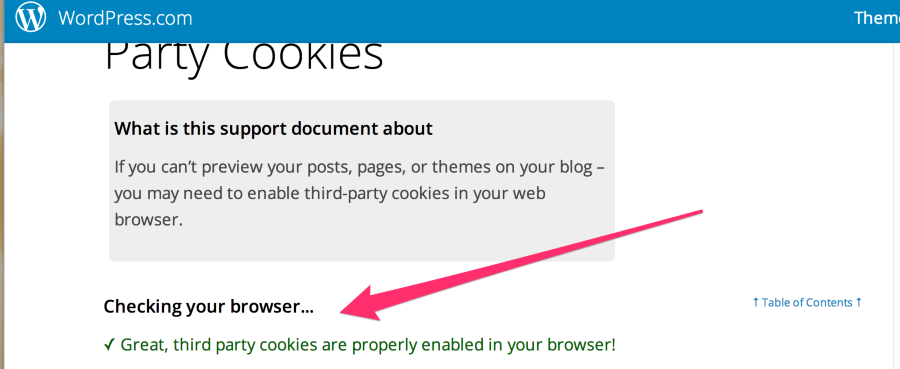
If nothing pops up when you click Edit Domain, normally this is because Third-Party Cookies are not enabled. Could you please visit this link?
Let me know if you see this message, or if you get a different one:
Great, third party cookies are properly enabled in your browser!
Should look like this:
Best,
-Alex G.


- The topic ‘changing primary domain’ is closed to new replies.
 WordPress.com Forums