Changing The Background Colour Of A Widget
-
Hi, I’m customising a premium blog where you can style the CSS. I want to change the background COLOUR of the widgets to add my personal touch. Is there any way I can do this using HTML or CSS!
it is not my site but I am designing it at :
https://ipunablack.com/The blog I need help with is: (visible only to logged in users)
-
If you want to change the background color of all widgets, try this CSS:
.widget {
	background: #B8F8D4;
	padding: 10px;
}
That’s a light green color, you can swap out a different HTML color code of your own :)
You could also use .widget-area instead of .widget if you wanted to make one large background block instead of separate ones for each widget. :)
-
Hi,
I copied and pasted that into the site https://ipunablack.com/CSS sheet on the CUSTOMIZER and changed the hex code to #FE9E95
and nothing happened. Slightly confused? -
Hi @ponderingpossibly, there is a missing ending curly bracket on your second custom CSS rule. If you put in that missing bracket, the color will show up.
-
Thank you! That worked perfectly! Is there any way to change the colour of a SPECIFIC widget?
-
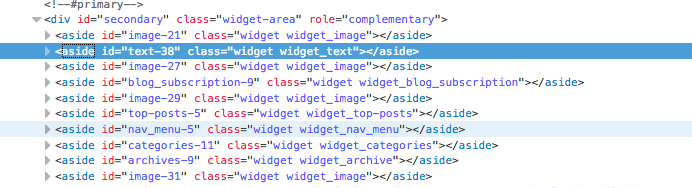
Yes, you can do that by using the unique CSS id assigned to the individual widgets. As an example, this would change the background color of you bio text widget to salmon.
#text-38 {
  background-color: salmon;
  padding: 10px;
}
Here is a screenshot of my browser inspector window showing where the widgets are and the above text widget is highlighted in blue: https://cldup.com/D1AGFimJXa.png.
-
Okay. Thank you, trying that out now and I’ve found all the widget id’s! It’s worked for what I wanted it work for so thank you!
-


- The topic ‘Changing The Background Colour Of A Widget’ is closed to new replies.
 WordPress.com Forums