

Changing the colour of the Page Title
-
I cannot find a way of changing the colour of each Page Title. I have a Premium upgrade but the font colour changer does not include the Page Title. there is nowhere on the Customizer that you can do this. It just comes out black.
Is there a way?
ThanksThe blog I need help with is: (visible only to logged in users)
-
Hi there,
You can do this if you edit CSS. All you will need to do is find the post/page ID and then replace that in the code I will provide you.
So, first things first, you have to find the post/page ID. You can do that by highlighting the Page Title that you want to change. Then, right click and go to Inspect Element. You will see something like this:
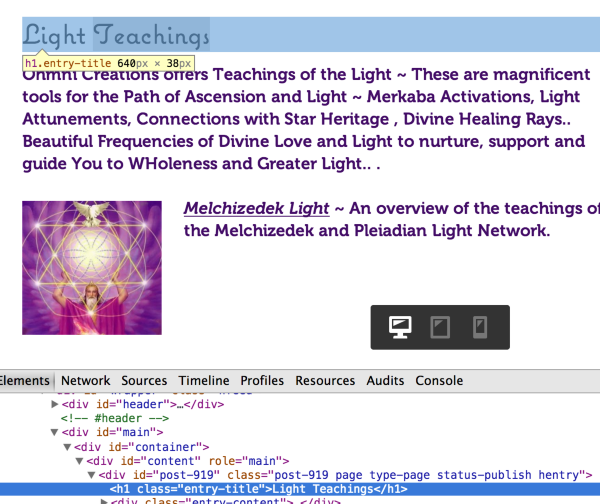
You see:
<div id="post-919"So that is the post id.
Then, go to Appearance > Customize > CSS in your Dashboard and add this:
#post-919 h1.entry-title {
	color: CSS COLOR VALUE;
}
Where it states CSS COLOR VALUE, please choose a color from below and enter the color value that you want:
http://www.w3schools.com/tags/ref_colorpicker.asp
So an example would be this:
#post-919 h1.entry-title {
	color: #FF00FF;
}
So that will change the page title for just the Light Teachings Post.
You can do the same and just add the same code and switch out the post/page ids for the other posts you want to change.
Let me know if you have any questions with this!
-
-


- The topic ‘Changing the colour of the Page Title’ is closed to new replies.
 WordPress.com Forums