

Changing the default front page and its title
-
Help!! I am trying to get my site up and running this weekend, and know how to get most of this accomplished to my satisfaction. However, my site–bigpicturelongterm.com–opens to a default page that simply says, ‘My Blog.’ Since this will be a business site, I want and need to have the page show the business name, that is, Big Picture, Long Term. I cannot find anywhere that tells me how to change from the default name.
I am sure I’m missing the obvious, but am about to panic. Please help me out.
Thanks.
The blog I need help with is: (visible only to logged in users)
-
Hi Dan,
You can change this by going to Appearance > Customize > Site Title in your Dashboard!
It will look something like this:
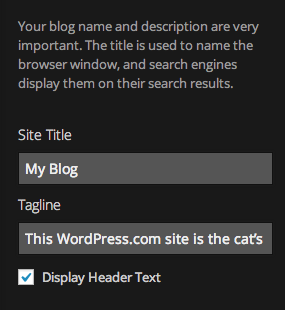
You can change the Site Title and Tagline.
Feel free to reach out if you have any questions!


- The topic ‘Changing the default front page and its title’ is closed to new replies.


 WordPress.com Forums