

Changing theme
-
Hello!
I’m thinking about changing my theme. But I’m afraid to try one, as it might get activated and I loose all i have in my current theme. How does this work? Can I try a theme with my own posts and picture (just not the example theme)? And if I accidently press activate, is it possible to get my old theme back?
I also have some CSS codes and widgets, will these still be there if I change the theme?
The blog I need help with is: (visible only to logged in users)
-
Hi there,
What I would suggest is creating a private blog that you use for testing themes and other test purposes. You can export the content from your current blog and import it into the test blog so that the two blogs mirror each other. Then, you can test out the theme on the private blog without having to worry about disrupting your main site. Make sure that the blog is private so that it doesn’t conflict in the search engines with your main site.
Let me know if you have any questions.
Thanks!
-
In addition to Darnell’s suggestion of creating a test site, I wanted to answer your questions directly:
Can I try a theme with my own posts and picture (just not the example theme)?
You can preview a theme within your Customizer without activating it. That’ll give you a sense of what it looks like with your content.
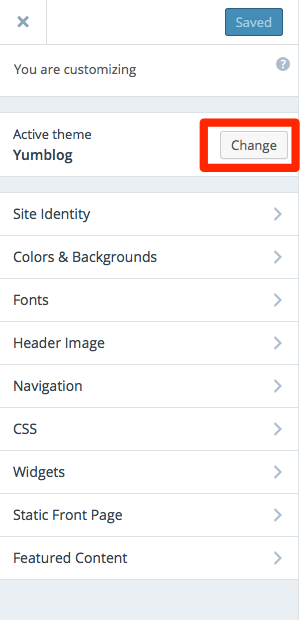
Just click the Change button next to your active theme in the Customizer and you’ll be able to preview another theme, and see what it looks like in the preview pane to the right of the Customizer:
And if I accidently press activate, is it possible to get my old theme back?
Yes! Not to worry – you can always get your old theme back anytime, whether it’s a free or premium theme.
I also have some CSS codes and widgets, will these still be there if I change the theme?
Yes, but you might have to reset them. Here are some specific things to watch out for when switching themes:
Custom Menus
If your custom menu has gone missing after a theme switch, reassign it to the location you want it in the new theme. Each theme supports different locations, so visit My Sites → Menus or WP Admin → Appearance → Menus to reassign them as you wish.
Widgets
If any of your widgets are missing or in an unexpected spot, you’ll want to get the back where they should be. Like Custom Menus, each theme supports different widget locations. If any widgets seem to be missing, never fear – they should be resting safely in the Inactive Widgets section of the Widgets-management page in WP Admin (Appearance → Widgets) and can be reassigned to your desired widget location from there.
Custom CSS
When you switch themes, your custom CSS editor will be reset to a blank slate, because most custom CSS is theme-specific. You can still access past custom CSS though, at the CSS revisions link located at My Sites → Customize → CSS.
-
Thank you, both of you! I’m looking at the veggie theme, which I really like. Although there is a black line under every picture, is this something I can get rid of? Same with the lines around my recipe box?
-
I also see that my menu under “Oppskriftsarkiv” goes missing, but this is easy to change? I can just do what you said and all of my menuitems will still be there?
Another question to… What I don’t like about my current theme (Yumblog) is that I can only have a really small header image. I would like a big one, in the middle of the page. It looks like this is possible with these theme, altough I’m not sure. Do you know?
-
Thank you, both of you! I’m looking at the veggie theme, which I really like. Although there is a black line under every picture, is this something I can get rid of? Same with the lines around my recipe box?
Yes, custom CSS can override those styles.
-
I also see that my menu under “Oppskriftsarkiv” goes missing, but this is easy to change? I can just do what you said and all of my menuitems will still be there?
Your menu will still be there after a theme switch – you will probably just need to reassign it to the theme in the menu-management area.
-
Another question to… What I don’t like about my current theme (Yumblog) is that I can only have a really small header image. I would like a big one, in the middle of the page. It looks like this is possible with these theme, altough I’m not sure. Do you know?
The recommended header size in Veggie is 2600 × 300 pixels.
If you have further questions about Veggie you can feel free to ask directly in the Veggie forum:
-


- The topic ‘Changing theme’ is closed to new replies.
 WordPress.com Forums