Child categories in Oulipo
-
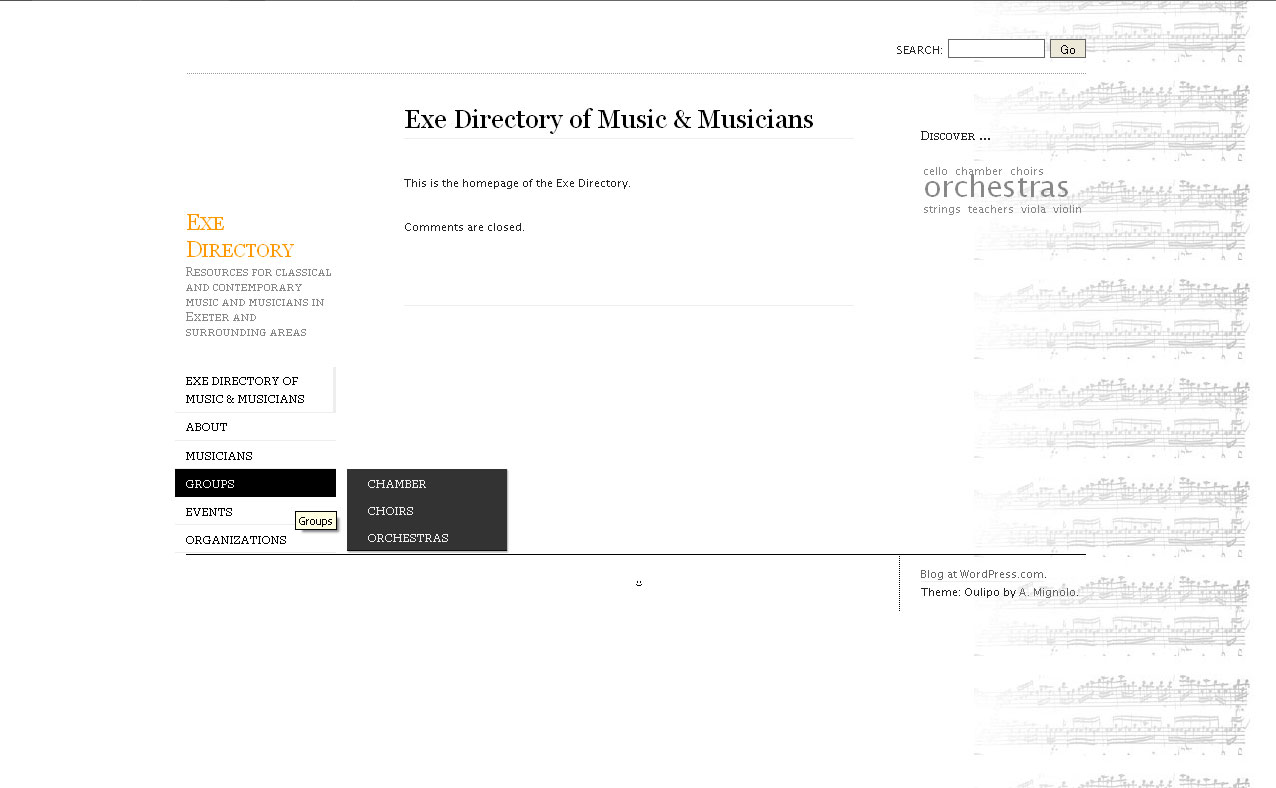
I’m setting up a variety of parent pages (which show in the left-hand sidebar) and child pages (which appear in the left-hand sidebar when I hover over the parent page links). However, I’m having great trouble in actually being able to click on the child page links from the homepage (ie, jumping straight to the child page without having to visit the parent page first … if that makes sense) – they don’t hang around for long enough for me to be able to move my mouse between the parent page and child page links.
I use Firefox, my mouse settings aren’t set to super-speedy and I’m pretty sure my mouse is working okay. Am I missing something, or is there a way to make the child category links ‘hover’ for a bit longer?
The blog I need help with is: (visible only to logged in users)
-
-
-
It’s at http://exedirectory.wordpress.com/
I’ve set it to private for now while I’m working on it, but I’ll open it up a bit so you can take a look. Thanks! -
Cool, looking good!
The way the drop-down menus work is to reveal the lower level links only when your mouse is on the parent link. As long as your mouse is hovering over the parent link, the menu below will not disappear. There isn’t a time limit or fade out — it’s just on or off depending on whether you’re hovering on the parent link.
When you go to “Groups”, for example, hover your mouse on the Groups link, and let go. The submenu will stay visible until you move your mouse off the Groups link. If you move horizontally across the Groups link (left to right) you can access the child links without losing them from view.
One thing to note: if you are moving from Groups to the bottom-most item in the menu, say “Orchestras” your mouse will need to move to the right first (hovering over “Chamber”, then move down the list to Orchestras.
-
I’m losing the child links as soon as my mouse hits the white space between the main menu and the submenu – I can’t seem to move it across quickly enough, even when I move it strictly to the right before moving down. Perhaps my mouse is dying after all … do you not have any problems moving to the submenu?
-
@amerrierworld OK, thanks for the info. There shouldn’t be any whitespace in between the two, so if you’re seeing a gap that could be a display bug. Could you tell me about your browser setup (name and version number) so we can try to repeat it and fix it?
-
-
If it helps, it looks like this for me – http://exedirectory.files.wordpress.com/2010/08/screenshot.jpg
-
Thanks for the screenshot and browser info. I assume your computer is running Windows XP or Vista?
@timethief Thanks—what OS are you on?
-
-
-
-
@amerrierworld
Some issues that you encounter with your WordPress.com blog or account can be solved by changing your browser settings, refreshing the page, or clearing the browser cache and cookies. See here > http://en.support.wordpress.com/browser-issues/ The instructions for specific browsers are found here > http://www.google.com/support/accounts/bin/answer.py?hl=en&answer=32050
Will you please try that? -
I have NoScript and AdBlock Plus as plug-ins, but the white gap is still there when I disable those. I also tried different screen resolutions, but the white gap remains (incidentally, the left-hand sidebar drops off the bottom of the screen at 1024×768 for me and the screen doesn’t scroll when the main content is less than the sidebar … if that makes any sense again).
-
I’ve just tried IE8 and the white gap isn’t there. I’ve cleared the cache, cookies etc as per the links you gave, Timethief, but I can’t seem to get rid of that white gap at all in Firefox.
-
My screen resoultion is also 1024 x 768 and there’s not problem with scrolling. I am also using AdBlock plus on my Firefox 3.6.8 browser. I do not have no-script. NoScript for Firefox pre-emptively blocks malicious scripts and allows JavaScript, Java and other potentially dangerous content only from sites you trust. So have you adjusted your “white list” for trusted sites appropriately?
-
@amerrierworld Here is my view in Firefox 3.6.8 with Windows XP: http://img.skitch.com/20100818-nic95iwkip41ey28h9qq2h6g5g.jpg
Don’t worry, I think we can figure out a solution, soon.
-
@timethief – here’s a screenshot of what happens at that resolution for me – http://exedirectory.files.wordpress.com/2010/08/screenshot21.jpg . And yes, I do adjust the whitelist proactively as I browse.
@lance – thanks – and fingers crossed!


- The topic ‘Child categories in Oulipo’ is closed to new replies.
 WordPress.com Forums