

Christopher Slider/Carousel Not working
-
So far I have applied the “sticky” feature to the posts. They do have a featured image. Then after further researched, I found that i needed to set the tag. I set the tag to “feature” and then added that tag to the post. Still no slider. Can anyone enlighten me on what is going on?
The blog I need help with is: (visible only to logged in users)
-
Hi Erik! I have Christopher theme and I can help you in that but your site is private so I’m not able to see what’s there in it’s Homepage.
Slider of Christopher will work only on a Front page template. Have you created a Front page using a page attribute? It’s explained there in theme’s support page.
You do not have to apply a sticky feature to the post if you want it to be displayed in slider. A “Featured” tag is enough. You’ll also have to add this tag to ‘Featured Content’ section in customization module.
It may sound tricky but it’s not if you follow all the steps given in support document.
-
You’ve set your Featured Content tag as feature in the Customizer, but you have no published posts with that tag.
You have:
1 post with the tag Feature
0 posts with the tag featuredTags are case-sensitive, so I suggest you make your posts tag feature (lowercase) instead of Feature. You’ll need a second post with the same tag to create a slider, as you can’t slide with only one post. :)
Let me know how that goes.
-
I changed the tag to “feature” with the lowercase F. It is still not appearing. I’m going to remove the sticky to see if that it the reason why
-
Unfortunately, the slider is still not functional. I changed my content tag to “Feature,” as well as the posts tag to the same thing but I did not work. I think I’m missing something
-
-
There are two main problems. :)
These are your posts:

There’s still only one post with the “Feature” tag. You’ll need at least two.
You’ll also need to change your featured content tag in the Customizer to match, it still says “Featured” (with a “d”):

Let me know how it goes.
-
I don’t think the tag is the issue. I checked the Front page attribute and set it to the home page. The carousel images shoed up there, however, in bullet point form not slider form…Is there a way I can set my landing page to the front page attribute?
-
You’re nearly there! Currently your front page is set display your latest posts. The slider is displayed when the front page is set to a static page assigned to the Front Page template. You can make that change in the Customizer’s Static Front Page section. (Be sure to create a placeholder page to assign to your blog posts too, otherwise they won’t be accessible.) Full guide to creating a static front page with a separate blog page:
http://en.support.wordpress.com/pages/front-page/Once you do that, your slider will appear on the front page:
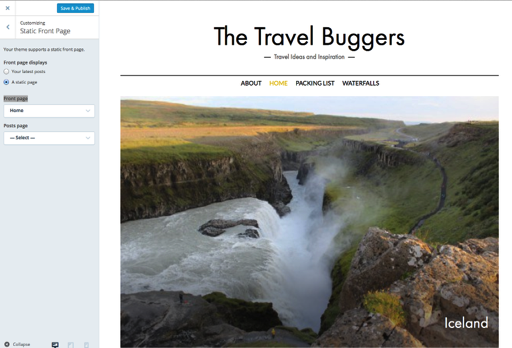
If you need further help with Christopher, feel free to post in its own forum:
https://premium-themes.forums.wordpress.com/forum/christopher
-
And the slider works!!! Thank you!!
Well, now my posts aren’t showing up under the slider…I set my posts to “home” page, but now the slider wen’t away. Can i not designate slider and posts to the same page?
-
And I have discovered widgets! I figured out that I can add posts, with a certain category, to my “front page.” I couldn’t have done it without everyone. Thank you do much for all your help and being patient through my learning! :)
-


- The topic ‘Christopher Slider/Carousel Not working’ is closed to new replies.
 WordPress.com Forums