

Chromebook
-
Is Chromebook compatible for a WordPress blog? Is there are section of directions that is for Chromebook?
-
Hi there,
What is the address to your blog?
Sure, It should be compatible and rather no different from any desktop. You can load your website in the browser e.g. Google Chrome, Firefox, etc.
-
I am still deciding if to pursue this. I have a domain name purchased from before that if I decide to continue with this I will use it again, Knotbored. However, that is where I get another question. I have Knotbored.com and am going to make a non-profit. Is it smarter to purchase Knotbored.org?
I would like to start a blog, but any time I have tried to do classes from Udemy (they even offered me a refund) or learn anything about WordPress they don’t work on my Chromebook. They suggested Flywheel download, but there isn’t a download for Chromebook. There isn’t anything listed in the downloads Chromebook applications or in a google search. Even after downloading Flywheel on a PC so I can do the temporary setup, when I try to follow directions on the Chromebook, nothing works, or what is supposed to be there isn’t. I tried downloading the one WAMP listed for Chromebook, but the application never opens up.
It seems difficult to find any directions for what is different when working with a Chromebook compared to a pc or mac. I cannot find downloads, suggestions, examples, etc.
-
Hi @shadskeet541 – What you are talking about there is installing and setting up an environment to create your own WordPress installation.
There is more than one way to accomplish creating a WordPress site. Let’s step back a bit. Could you tell us more about what your goals are with creating a WordPress website in the first place? And why you have chosen WordPress to be the site creation platform for your needs?
My hope is that by better understanding what’s important to you, we can direct you to the best possible resources to help you accomplish your goals. :)
-
Chromebook
I’m looking to make more of a blog site. I’m thinking it’ll be more of a discussion site than a sales or informational site. Kind of like a Combination of Twitter and Facebook but more of a free speech.At this time I am using fly wheel to take a class from Udemy to learn WordPress. However I have found that chrome book cannot be used for fly wheel because of the local host.
That made me wonder if chrome book can be used for what I’m looking for when I go to create the website on WordPress.
-
You can use any device to build a site here; a $50,000 gaming PC, a Chromebook, even a smart phone.
You don’t build a site on localhost here with WordPress.com, you build it live online (and can make it Private if you want while you build it), so all you need is a device with internet access.
-
Is there a link for how to do WordPress on Chromebook or a local host of some kind that I can use to set it up and test it before I run it live?
-
If you’re just starting out with WordPress.com, I recommend you go through our new user’s guide: https://wordpress.com/learn/
In just a few quick steps, you’ll learn about all the best and most useful features of WordPress.com, with lots of screenshots and videos.
You can also browse our support documentation at https://wordpress.com/support/
And, we have additional courses available at https://wpcourses.com/ and webinars at https://wordpress.com/webinars/
-
Sorry, I forgot part 2 of the reply. :)
We don’t work with localhost here. Instead, you’ll build the site live online, and you can make it Private until you’re done by following the steps at https://wordpress.com/support/settings/privacy-settings/
-
If you don’t have a local host does that mean I would be charged from the beginning of me attempting to set one up?
That is the main reason why I was doing a local host was to see if I could learn how to do this without paying for it first.
-
You can start with a free site here at WordPress.com and you can upgrade once you want to set your custom domain. Note: you are limited to what you can do with a free site – you can compare the different options here under “compare options”:
https://wordpress.com/pricing/
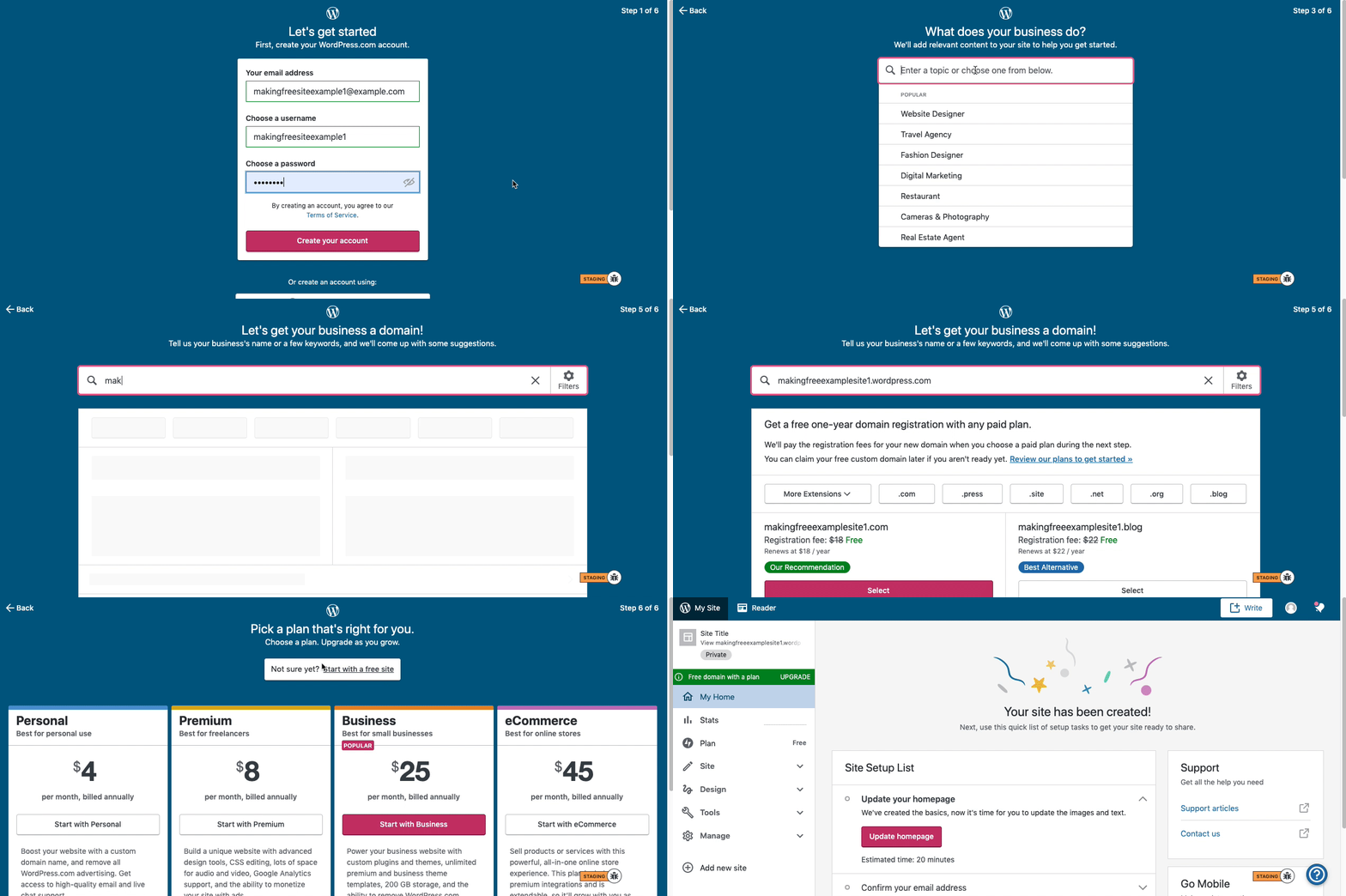
Here are visual instructions on how to create a free
.wordpress.comsite:Step 1: Select email, username, and password.
Step 2: select Blog for a.home.blogfree site or Business for a.wordpress.comsite.
Step 3: Select the Topic of your site.
Step 4: Type in the Title of site (optional).
Step 5: Type in the full, exact site address you want including the.wordpress.comor.home.blogsubdomain (ex:freeexamplesite.wordpress.com,freeexampleblog.home.blog). The first option should be the free site that you manually typed in. Click select next to that option.
Step 6: At the very top, click the link that says: start with a free site.Then, your free site should be created! Please follow those steps and if you have any questions, let us know. Thanks!
-
-
We’re happy to help! Let us know if you need anything else for now, and after you’ve upgraded you’ll have access to chat here:
https://wordpress.com/help/contact



- The topic ‘Chromebook’ is closed to new replies.
 WordPress.com Forums