

Classic Editor ???
-
I’m having a real problem finding out how to use the classic Editor of ancient days, from way back when.
Can you assist me in some way please.
No offence but I hate the new editor stuff that you’re using. It may well help others, but unfortunately not me atm.
& I’m trying to paste from a pdf to WP but it’s not working the way I thought it would. The text is in two columns, and this changes when I try to paste it into the text area, and I lose the highlighted areas also, that I put on there. -
If you really want to use the classic editor, it is still available: https://wordpress.com/support/editors/#classic-editor
We also have tips for transitioning from the classic editor to blocks https://wordpress.com/support/switching-from-the-classic-to-the-block-editor/ and FAQs: https://wordpress.com/support/replacing-the-older-wordpress-com-editor-with-the-wordpress-block-editor/#frequently-asked-questions
We do recommend the new editor though, and we have some extensive documentation available at https://wordpress.com/support/wordpress-editor/
If you have feedback that could help make the new block editor a better experience for you, please let us know here: https://wordpress.com/forums/topic/feedback-thread-for-the-block-editor/
-
The option is not showing up where you say it does. Unless I missed something?
Thanks for the reply. -
The option is not showing up where you say it does.
Hi there, can you explain a bit further. Is the link to WP Admin missing at the bottom of your WPcom MySite Dashboard?

-
@justjennifer, @mancmax – I think the issue is that the link to the classic editor inside WP-admin appears to have been removed for new accounts.
Here’s how it should look according to the documentation:

Here’s how it actually looks for new accounts:
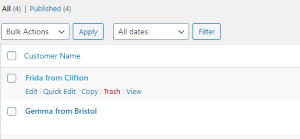
There is no link to the classic editor. Clicking”Edit” redirects to the block editor.
-


- The topic ‘Classic Editor ???’ is closed to new replies.
 WordPress.com Forums