

Classic editor gone?
-
Suddenly, this morning, my classic editor is gone! And the new one doesn’t work. I can’t remove the “featured” tag that puts posts into the home page slider. Or rather, I can remove it but it doesn’t take the posts out of the slider.
The blog I need help with is: (visible only to logged in users)
-
P.S. Okay, 20 minutes after the fact, the removal of the “featured” tag has finally taken effect. (Not acceptable, and yes, the first thing I did was clear my cache.) However, I’m still stuck, apparently, with editing in the new editor. Odd, since I was able to create today’s post in the classic editor.
-
Hi @windwhistle, if you were using the classic editor before you should have an option to switch between editors. If not, please clarify which site it’s missing on.
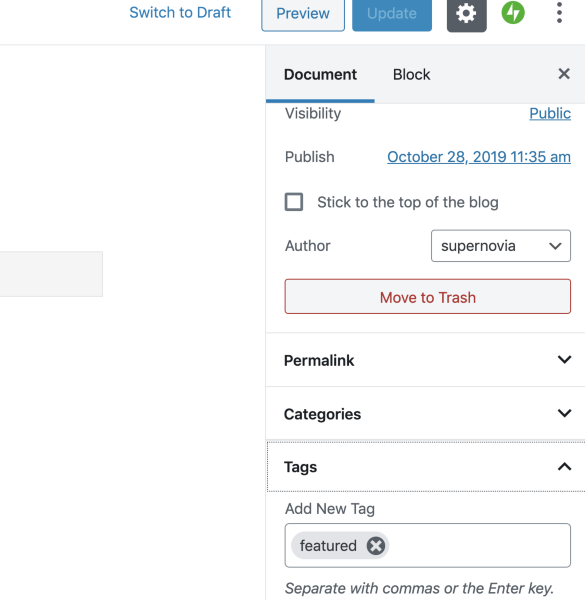
That said, we won’t be keeping the old editor indefinitely since it takes quite a bit of effort to maintain multiple editors, and there are many (many) reasons we’re moving our efforts toward a block editor. I’d recommend getting used to the new editor as much as you can. You can remove tags, for example, by ensuring you’re in the Document tab. Tags will be there.
-
The classic editor I’ve been using is actually two (?} versions ago, so apparently I’m being squeezed into the most recent “classic” editor. I’m sure I won’t be the first to say the block editor is unacceptably rigid and limits the flexibility and creative options currently available. Once I’m stuck with it, I’ll have some decisions to make.
Meantime, it’s still unacceptable to have to wait 20 minutes for a change or edit to take effect.
-
What is the URL of the site you lost the editor on? We can fix that from our end, but we need to know which site.
-
The URL is http://piedtype.com
I’m thinking now that I just lost the older classic editor, since the one I see now is still not the block editor.
If I start a new post, it starts on the editor I’m used to. Once it’s posted, if I try to edit it, I get an unfamiliar editor. It’s not the block editor, so I assume it’s the most recent “classic” editor.
I hope the images clarify because I’m not sure what to call the screens I’m talking about.
-
That’s still the Classic Editor, it’s just through the main WordPress.com interface, but it works the same as the Classic Editor in the Dashboard. :)
The new Block Editor looks like this: https://en.support.wordpress.com/wordpress-editor/
-
If you visit your site to see how it looks for other people and click “edit” below a post you’ll be sent to the “My Sites” post editor. Just make sure you only edit posts by accessing them directly from “all posts” at the /wp-admin dashboard /wp-admin/edit.php
-
-


- The topic ‘Classic editor gone?’ is closed to new replies.
 WordPress.com Forums

