

Clear instructions to viewers to accept invitation
-
Invited viewers to my blog are having difficulty accepting invitation. They sign up for free account. Then press accept button and are taken to the my blog Dashboard. Then what?
The blog I need help with is: (visible only to logged in users)
-
Hi there,
It looks like several users are able to view your site as listed here:
https://steelaway1.wordpress.com/wp-admin/options-reading.php
Are the viewers you have added unable to actually see your site once they accept the invitation (i.e. does steelaway1.wordpress.com load for them)? If not, can you let me know an example of a username that is having trouble?
-
I have sent out 60+ invites to follow my blog. Many have not accepted. I sent an invite to my own e-mail to see what invited people were receiving. I find it may put followers off if they have to set up a wordpress account. I did this and then went back to the invite e-mail a pressed the accept button and it took me to the dashboard. Then what. Is this what invitees see. Very confusing.
All I want is to have followers notified when there is a new post. Many of our followers are not techies.I found the widgets to add to my front page – one is to receive the blog by e-mail – do followers add their e-mail here?
The other widget is a button to follow Steel Away – what does it do that is different form the other widget? -
Hi!
Please see my answers below:
I
did this and then went back to the invite e-mail a pressed the accept button and it took me to the dashboard. Then what. Is this what invitees see. Very confusing.
I believe the confusion here lies in the fact that you’re accepting an invitation to view your own private blog, which you already have access to since you’re the owner.
When you invite a reader to view your private blog, they will receive an invitation in their email similar to the one you received. If they do not already have a WordPress.com account, they will need to create one upon accepting the invitation. This is the only way that we can correctly monitor who is viewing your private blog.
If they already have a WordPress.com account, they will just need to login after clicking “Accept Invitation”.
After they have either created a WordPress.com account or logged into the account they already have, they will be taken to your blog at steelaway1.wordpress.com. You were taken to your blog’s dashboard since you were logged in as the owner of the site. Does that make sense?
What does it do that is different form the other widget?
I believe you’re referring to the Follow Blog widget and the Follow Button widget. The main difference is that the Follow Blog widget works for both WordPress.com users and non-WordPress.com users. WordPress.com users will just see a button to click to follow your blog. Non-WordPress.com users (those without an account) will see an email sign-up form similar to the one shown here:
http://en.support.wordpress.com/widgets/follow-blog-widget/
In contrast, the Follow Button widget only generates a button for WordPress.com users (not for email users). If a non-WordPress.com user clicks the button, they will be asked to login or create a WordPress.com account first.
In regards to getting the follower situation resolved for you, the main factor is that your blog is listed as completely private. This means that even if you put a widget on your sidebar, you would need to invite the users to view your private blog for them to be able to see the widget so that doesn’t solve the invitation issue. There are two primary ways to proceed:
- You can keep your blog set to private and continue to invite users to your blog. If you need any additional help on how to do that, please let me know!
- You can set your blog to “Discourage search engines from indexing my site” as described here:
http://en.support.wordpress.com/settings/privacy-settings/
This would help to prevent your blog from displaying in search engines, but would also make it publicly available to anyone that wanted to read it/follow it and alleviate the issues with the invitations.
Please let me know how you would like to proceed!
-
Thanks Jeremey for your response. That gives me more insight. I think I will continue to stick with the private blog for now. So it sounds like there is no point in using the widgets if I’m going to stay private. OKAY. I will continue trying to invite people to sign on.
Can you tell me if there is a difference between a viewer and a follower. One place said I had 7 followers, but I have 24 users who have access to the blog. Why are some followers and some users(those I’ve invited).
Finally, I tried to insert a link to a map(URL), but I kept getting a message to hide the referrer. I didn’t know what to do with this. It came up every time when I clicked the link I had created. So I gave up.
-
See below!
So it sounds like there is no point in using the widgets if I’m going to stay private. OKAY. I will continue trying to invite people to sign on.
Well, it’s not that the widgets are useless with a private blog. It just didn’t solve the issue of having to invite users to view your private blog. Once they’ve accepted the invitation and they can see your blog, they can still use the widget to follow your blog and receive email updates. Does that make sense?
With a private blog, using the widget just requires two steps:
- Accept invitation to view private blog
- Use widget to follow blog once you are visiting the blog
When a blog isn’t private, the first step is just eliminated.
Can you tell me if there is a difference between a viewer and a follower. One place said I had 7 followers, but I have 24 users who have access to the blog. Why are some followers and some users(those I’ve invited).
Certainly! A viewer is someone that has come to your site and registered a “view” (views are registered when someone loads your page in their web browser). For example, on your stats page, you’ll see two stats under “Today”: Visitors and Views
https://wordpress.com/my-stats/?unit=1&blog=69671175
A visitor is a unique person that comes to your blog. A view is how many times your page has been loaded. So, one visitor could create multiple views by either clicking around your site or refreshing a page several times.
Since your blog is private, you also register a “view” every time you check out your own site (blog admin views are only registered on private blogs).
A follower is someone that is receiving updates whenever you post to your blog. You can see your followers here:
https://wordpress.com/my-stats/?blog=69671175&blog_subscribers&unit=1
Visitors aren’t necessarily followers since they would have to sign-up to become a follower.
Finally, I tried to insert a link to a map(URL), but I kept getting a message to hide the referrer.
Were you following this guide for Google Maps?
Could you try to embed it one last time so I can see it in action and troubleshoot more?
-
In the Lewiporte to Bonavista espisode, I have inserted Map Link under the slide show. When I click to open it……. you’ll see.
-
Hi there,
It looks like that link is a link to a directory on your computer. It starts with the following:
C:/Users/Owner/Documents/This generally means the actual document is living somewhere on your hard drive within your C: drive (not accessible online). That won’t work within WordPress.com.
There are two options moving forward:
1. If you would like to just display a set map that you have stored on your computer, you can upload it following the instructions here:
2. Alternatively, you could look at embedding a Google map, which would be interactive on your site per the instructions here:
Let me know how you would like to proceed!
-
Hi again Jermemy,
I have tried the google maps for inserting a map and it works very nice. I will use it.
Another question….
I have 26 people listed who have access to my blog, yet it seems only a handful get e-mails to notify them of a new posting. Why is that?
I notice that for some people I would get an e-mail saying they have accepted my invitation and other e-mails would say access is requested. Why is that?
-
Howdy!
Please see below:
I have 26 people listed who have access to my blog, yet it seems only a handful get e-mails to notify them of a new posting. Why is that?
Being added as a viewer on your private blog isn’t the same as being a subscriber (which would mean they would receive email notifications). Being a viewer just means they can see your blog. In order to get emails of new posts, they will also need to follow or subscribe to your blog.
The methods for following a blog are broken down here:
http://en.support.wordpress.com/following/#how-to-follow-blogs
Could you pass those instructions along to anyone that isn’t receive email notifications? If an individual user is having trouble, let me know their WordPress.com username. I’ll be happy to take a look into their individual case!
I notice that for some people I would get an e-mail saying they have accepted my invitation and other e-mails would say access is requested. Why is that?
For users that you send an invite to manually through Settings -> Reading -> “Invite viewers to your blog”, you will receive an email notification when they accept your invitation.
The other email you’re referring to (requesting access) is from WordPress.com users that have come across your blog and seen the following notice:
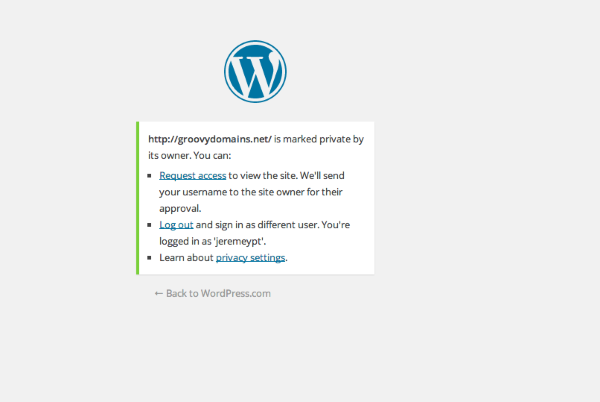
This basically means that they have stumbled upon a private blog (you didn’t invite them). They’re presented with the option to “Request Access”. When they request access, you’re sent an email asking if you would like to give them access. If it’s someone you know, you can allow them to view your blog.
Does that help to explain the difference a bit more?


- The topic ‘Clear instructions to viewers to accept invitation’ is closed to new replies.
 WordPress.com Forums