

Coding padding and justification
-
Hello-
-How can I change the code in my columns on one of my pages so there is less padding or space between the columns?
-How can I change the padding of my social icons so they are aligned horizontally rather than vertically?
-How can I keep the columns on this page but leave the copyright portion untouched and centered on the bottom?
thanks!
The blog I need help with is: (visible only to logged in users)
-
-How can I change the code in my columns on one of my pages so there is less padding or space between the columns?
Could you provide a link to the specific page so I can take a look.
-
-How can I change the padding of my social icons so they are aligned horizontally rather than vertically?
If you’re referring to the social icons in the body of your homepage text, you have some padding in your code that’s causing that to happen. Flip to HTML/Text view in the editor and remove it, and the icons should appear horizontally again.
Current code:
<p style="text-align: left; padding-left: 300px;"><a href="https://instagram.com/montgomerycollection/"><img class=" wp-image-717 alignnone" src="http://mmontgomeryco.files.wordpress.com/2013/06/unknown.jpeg" alt="Unknown" width="36" height="36" /></a> <a href="http://twitter.com/montgomeryyyy" target="_blank"><img class="alignnone wp-image-715" src="http://mmontgomeryco.files.wordpress.com/2013/06/images.jpeg" alt="images" width="35" height="35" /></a> <a href="http://www.linkedin.com/pub/marissa-montgomery/52/a37/97b" target="_blank"><img class="alignnone wp-image-713" src="http://mmontgomeryco.files.wordpress.com/2013/06/linkedin-icon-gray.png" alt="linkedin-icon-gray" width="34" height="34" /></a></p>This is the piece you need to remove:
padding-left: 300px;Let me know if that does the trick.
-
-How can I keep the columns on this page but leave the copyright portion untouched and centered on the bottom?
Do you still need help with this part? Your copyright line looks centered to me.
-
Thank you so much that solved the icon issue! The padding i am referring to is on that same page, ideally i would like the text in the right hand column to begin right after the Y in “Montgomery”… if that makes sense. any insight t on how I can reduce that padding would be great thanks!!
-
Looks like you defined the widths of those columns yourself with some inline CSS, so you can adjust them as you’d like.
Right now you have them at 40% (left) and 60% (right) – try something like 37% / 63% and see if that does the trick.
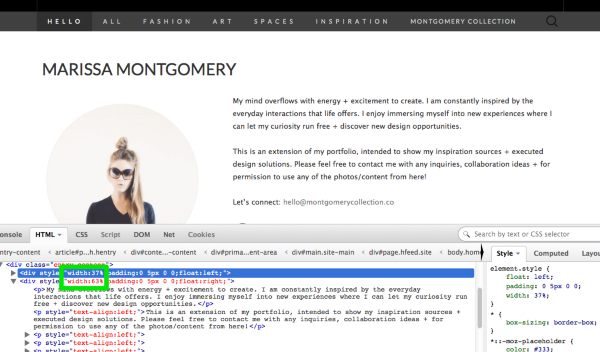
Let me know how it goes!


- The topic ‘Coding padding and justification’ is closed to new replies.
 WordPress.com Forums