

Colinear – how to stop main (top) menu stacking on tablet screen?
-
Hi,
Can anyone tell me how to stop my top menu going into 2 rows when viewed on a tablet screen? It looks fine on my laptop but on my iPad it stacks up and looks awful.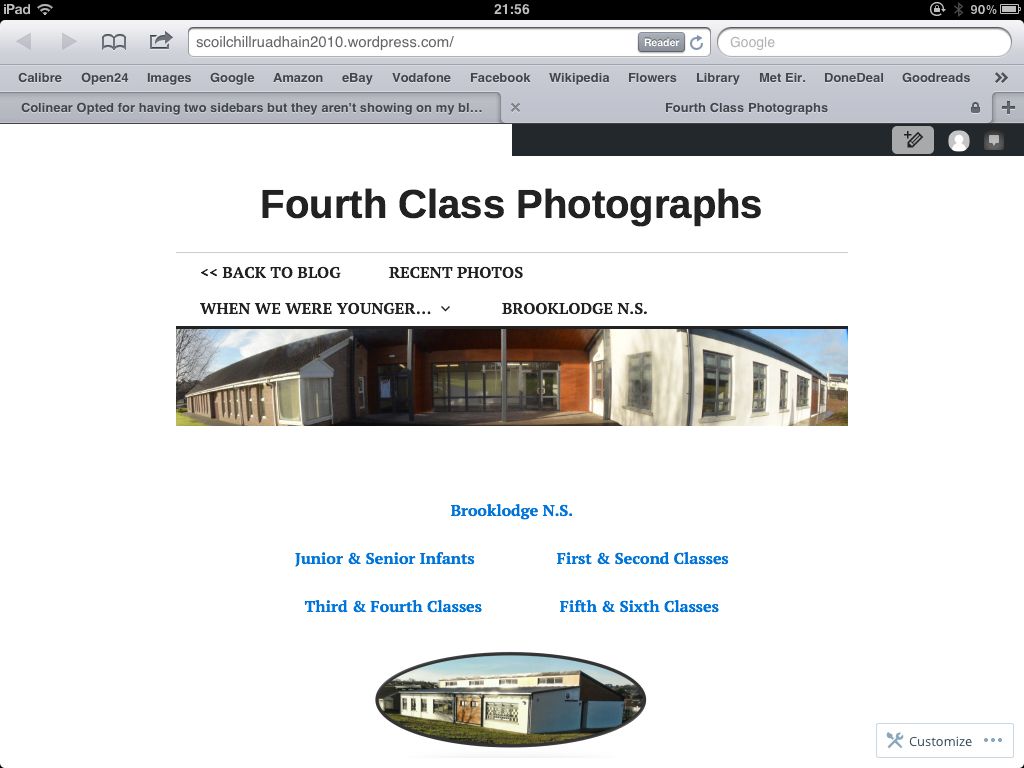
I have tried mobile option both on and off. Very disappointed with Colinear as a whole to be honest. Seems like a step down from Coraline not a step up! :-(
The blog I need help with is: (visible only to logged in users)
-
Not sure why screen-shot didn’t work first time, will try again…
[IMG]http://i1164.photobucket.com/albums/q571/derialc/f7bfe5673b9421e428e049e967f94cd6_zpsoapbqoyj.jpg[/IMG]
-
Hi there, we can’t post screenshots here in the forums, so you can just past in the link (without the [img]…[/img].
To be able to widen things, and/or adjust the menu spacing and such would require the Custom Design upgrade, which is $30 per year and you can find out more about it at Store > Store in your dashboard.
You can try out and preview custom CSS before you buy as explained here.
The following CSS would widen your site out to a max of 1024px (the no-sidebar template is 768px originally) and tighten up the spacing a bit of the menu items. Since Colinear is a responsive design, it will adjust to smaller screen/browser widths automatically. Go to Appearance > Customize > CSS, delete all the informational text in that window, and paste in the following custom CSS and see what you think.
.site { max-width: 1024px; } .site-header .main-navigation a { padding-left: 12px; padding-right: 12px; } -
Thanks for your reply. It’s a bit disappointing that the old theme (Coraline) did all that for free but the updated responsive version doesn’t unless you pay to upgrade :-(
-
Sorry I don’t have a solution for you. Did you try playing with some other fonts like @kathrynwp suggested in the other thread to see if that would help?


- The topic ‘Colinear – how to stop main (top) menu stacking on tablet screen?’ is closed to new replies.
 WordPress.com Forums