

Colors and Capitals
-
Hello,
For several days, I have been encountering two problems when formatting my articles.
The first problem is that I can’t put my titles automatically in capital letters. I have to do it in capslock. Here is a screen of the problem:
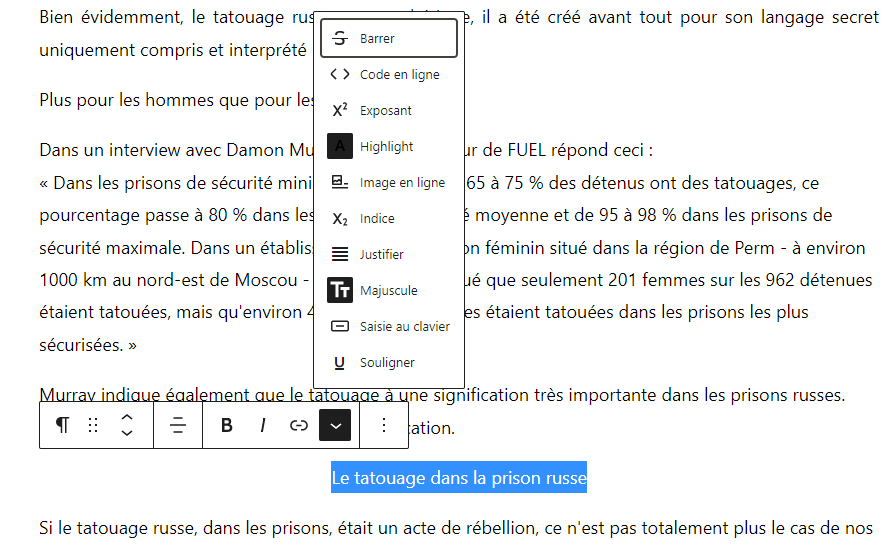
The second problem is that I can’t type the html code of the color I want to put in my text and in my title. The site forces me to change the color to black and refuses any modification.
Would you know how to help me, please? (I originally came to the French wordpress forum, but it advised me to turn to you).
The address of the site concerned is http://lencredelapieuvre.wordpress.com as well as a site that is not yet online.Thank you very much for your help and I apologize for my bad English.
Sincerely,
Edda T. Charon.The blog I need help with is: (visible only to logged in users)
-
Hi Edda,
The problem with the uppercase button is a known issue. Our developers are already aware of it so, hopefully, a fix will be deployed soon.
In the meantime, I can only suggest using CapsLock for writing your titles. Also, remember that you can use Heading Block for those:
https://wordpress.com/fr/support/editeur-wordpress/blocs/heading-block/.
The second problem is that I can’t type the html code of the color I want to put in my text and in my title. The site forces me to change the color to black and refuses any modification.
As I understand, you are trying to change the color of a piece of text and, when you type in the HEX code, it’s changed to the default?
If so, could you try copy-pasting the color code, instead of typing it? Let me know if that helps.
-
Hi,
If I understand correctly, you are trying to change the color of a piece of text and when you type in the HEX code, it is changed by default?
If so, could you try copying and pasting the color code, instead of typing it? Let me know if this helps.Exactly, when I type the hex code, it changes it to black by default. Even when I copy and paste as you suggested.
I did try to divert the problem by writing the rgb code, but that doesn’t give the hex code I was looking for.Translated with http://www.DeepL.com/Translator (free version)
-
Hi there, When you copy/paste the HEX code in the color selector box, make sure that the hash # symbol doesn’t appear twice ##. That cuts off the last symbol of the HEX code you paste there and makes the color default to black.
I hope that helps.
-
Hi,
Yes, I am always careful not to put the “#” when I insert my hex code. Except that for the last few days, even when I am careful in my copy/paste or when I type the code manually, the color defaults to black.
Thanks for your help.
-
-
Hi,
Pour mes titres, je cherche à mettre ce code hex suivant : #703e23
Et pour certains passage de texte, il s’agit de ce code hex : #a08c8b -
Sorry, I forgot to do the translation.
Hi,
For my titles, I try to put this hex code : #703e23
And for some text passages, it is this hex code : #a08c8b -
Hi there,
So, I tried to highlight a sample text from one of the posts under your site (without saving) and I was able to successfully change the color with the hex code you provided. The catch is that the hex code will appear the same even after you paste your code, but the color does change. Example below:
Please try this on your end and let me know if you get the same results.
Thanks!
-
Hi,
I tried it as you advised and it works! Indeed, the hex code keeps the black color code, but the title appears in the right color desired (whether with one or the other of my codes).
Thanks a lot for your help. I hope the problem won’t happen again ^^’
Thanks to you !


- The topic ‘Colors and Capitals’ is closed to new replies.
 WordPress.com Forums