

Colour change in Sela Theme
-
The Sela Theme showcase page suggests you can change the colours and fonts. Please can someone let me know how I can change the default pink/red colours to something else, and also the fonts, using a self-hosted wordpress install?
-
The Sela Theme showcase page suggests you can change the colours and fonts.
That refers to the Custom Fonts and Colors options available in the WordPress.com plans.
You can find out more about the WordPress.com colors and fonts features here:
http://en.support.wordpress.com/custom-design/custom-colors/
http://en.support.wordpress.com/custom-design/custom-fonts/Please can someone let me know how I can change the default pink/red colours to something else, and also the fonts, using a self-hosted wordpress install?
In WordPress.com, this is done automatically with annotations behind the scenes which are setup by the theme team on our side for each theme to make it so changing the colors can happen in a single click—it takes a bit of work to set them up! On WordPress.org, you would need to work out the CSS for making those changes manually.
-
Sela has been submitted to the WordPress.org directory, and once it’s accepted it’ll have its own support forum at https://wordpress.org/support/theme/sela
In the meantime, if you need further help with the self-hosted version of Sela, you can post in the WordPress.org general themes forum:
https://wordpress.org/support/forum/themes-and-templates
Tag your post with wpcom-theme in the tags area to be sure it will get attention:
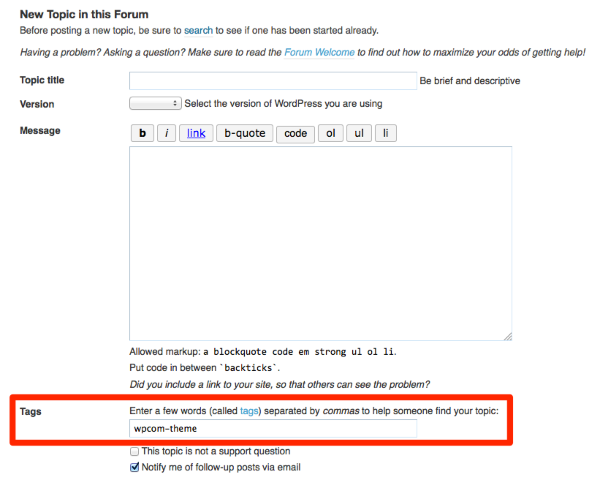
You’ll need a free WordPress.org account to post – if you don’t already have one, you can register here:
https://wordpress.org/support/register.php
Be sure to provide a link to your site when you post so folks can help you more easily.


- The topic ‘Colour change in Sela Theme’ is closed to new replies.
 WordPress.com Forums