

Comment Box "Submit" option
-
I’ve tried three browsers. I can type a message but there is no option to submit. Is this because I am the account owner? Attempting to field functionality prior to premium launch.
The blog I need help with is: (visible only to logged in users)
-
I have discovered this seems to be only applicable on “pages” as opposed to “posts”. For some reason the comment areas on pages will not allow a person to actually submit their comment, just fill in the text.
-
Go to Dashboard -> Pages and hover over the title of the page you want to edit. A menu should appear with the option Quick Edit. Click this and then check that the box next to Allow Comments is ticked.
-
Thanks for the reply. I had disabled comments but enabled again. If you review the page it shows comments. But on my end one can type a message but cannot submit it. No functionality appears to permit it.
-
Hello there,
All WordPress blogs by default have comments open on all Pages and Posts. You can enable and disable comments on free hosted WordPress.com blogs on this page > Settings > Discussion
Discussion settings is where you set up defaults for comments.
http://en.support.wordpress.com/settings/discussion-settings/You can override the default settings and enable or disable future comments on any individual post or page.
http://en.support.wordpress.com/enable-disable-comments/
See also for faster ways:
http://wpbtips.wordpress.com/2010/04/23/comments-off-1/Note: By default, new blogs on WordPress.com will have the Discussion hidden. You can reveal it by clicking on Screen Options http://en.support.wordpress.com/screen-options/ on the top right corner of your Admin page, and checking the box that says Discussion so the module is included. http://en.support.wordpress.com/modules/#list-of-modules
-
@autismcandles
I checked out your blog and I see the issue you are reporting. I’ll tag this thread for a Staff follow-up. Please subscribe to the thread so you are notified when they respond and please be patient while waiting. -
Ok. I had read the exact same enable/disable comment posting as well and attempted it. Let’s see what the staff states.
-
You currently have both your front page and posts page set to the same page, under Settings > Reading:
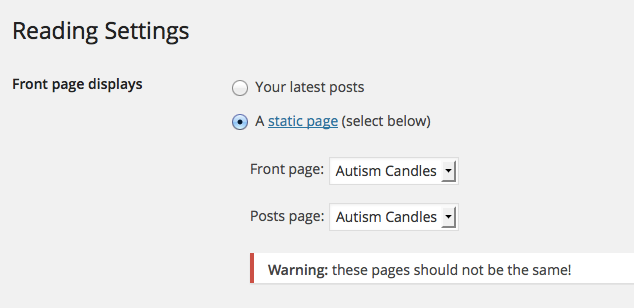
This may be causing your comments problem.
Try creating a new page to hold your blog posts and see if that solves the problem. Just create a new page, title it Blog, and leave the content blank. Under Settings > Reading, choose the Blog page from the dropdown menu next to “Posts page.”
Let me know if that solves the issue.
-
This seems to have worked and has resolved another issue as well.
I have setup three categories for the top menu. Is it possible, such as under the “Autism Awareness” menu option to have sub-categories?
-
An person in live chat helped with the rest and more. Thanks.
I have no further questions or concerns.
-


- The topic ‘Comment Box "Submit" option’ is closed to new replies.
 WordPress.com Forums