

comment embeds
-
I do not wish comment embeds to show directly in the comment, but rather to show only as a link. How can I disable the unwanted content. (I don’t wish to disable comment links, just the preview.)
The blog I need help with is: (visible only to logged in users)
-
Hi there,
Do you have a link to the page/post with the comment in question? I’m happy to take a closer look, and can answer you better based on seeing that.
Thanks for the additional info!
-
Hi! Thanks for responding. If you look at Curt Barnes’s comments here, you’ll see YouTubes showing up, rather than just the link to the YouTube: http://prufrocksdilemma.wordpress.com/2014/01/28/so-long-its-been-good-to-know-ya-in-memory-of-pete-seeger/
There were more of these, including links to things like amazon, where the book he was linking to showed a preview to an amazon page, but I figured out a work-around, by surrounding the link with parentheses. (You can see an example of the workaround at work in Curt’s 2d comment here: http://prufrocksdilemma.wordpress.com/2014/02/05/seeking-shostakovich-the-eighth-symphony/)
While the workaround is OK, I’d prefer something that didn’t require me to go in and edit the comment to put in the parentheses. Hope you can help, and thanks so much for trying!
PS: I have no complaints about Curt’s comments–I always love to get them. It’s just that I’d rather, generally, that links did not preview in the comments.
-
Gotcha, so you mean the video in this comment here? http://prufrocksdilemma.wordpress.com/2014/01/28/so-long-its-been-good-to-know-ya-in-memory-of-pete-seeger/#comment-2702
There is no global setting that will override that auto-embed behavior in comments, so if a reader leaves a URL like that in a comment, a video will automatically be displayed.
So, from that point, you will need to edit the comments to in some way *interrupt* that behavior. Adding Parentheses is not one that I had thought of, but when editing a comment, you can convert it to a link highlighting the text, and clicking on the “Link” button, as shown here:
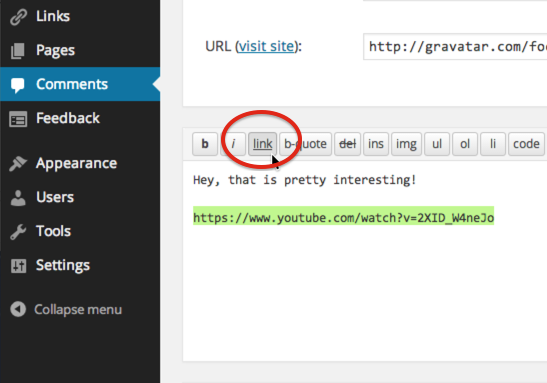
You’ll need to add the URL to the pop-up window and then save. Unlike parentheses, this will work every time.
You can see that I have done just that with the comment you made (linked above) where I have replaced the video with a hyperlink.
Hope that helps. Please let me know if you have any further questions.
-
Jerry, this is wonderful. Even though it means I must edit individually, what this approach allows for is both to fix the link to avoid the preview and set it to open in another page. I don’t know why I didn’t notice that feature before! Thank you so much.
-


- The topic ‘comment embeds’ is closed to new replies.
 WordPress.com Forums