

Comment question
-
How do I allow comments to be posted without having to approve each one?
The blog I need help with is: (visible only to logged in users)
-
Hi there,
You can change your “Before a comment appears” selection as described here:
http://en.support.wordpress.com/settings/discussion-settings/#before-a-comment-appears
If you deselect both options, the comment should appear without you having to approve it.
Let me know if you need anything else!
-
Thanks Jeremy, I appreciate your response. Both selections have been deselected for some time, so it seems like there might be something else going on. Any other ideas?
-
Hi Patricia!
I posted a test comment on one of your blog posts and my comment was approved immediately as shown here:
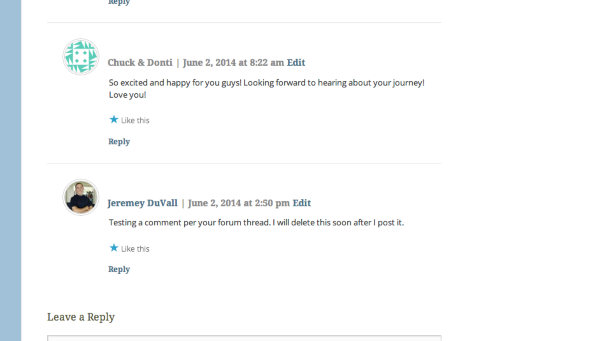
Just a note, you’ll still get an email notification of the comment, but no action is required on your part for the comment to be approved. Does that make sense? If you would like to disable the email notification, you can do so under Settings -> Discussion -> “E-mail me whenever”.
If you’re still having trouble, can you explain the issue in a bit more detail?
-
I noticed that comments weren’t being posted, so I went to look at comments from the dashboard and there were several waiting for approval. I approved them and they appeared. That’s about all I know. Thanks for your help.
-
Hey Patricia,
It’s possible that those were left before you switched the Discussion Settings to allow anyone to comment without approval. You should not receive any additional approval requests. Comments should be auto-approved. If you do receive requests to approve a comment, please let me know!
-
Thanks Jeremy. Could you do me another favor and leave a comment again? I want to see what happens. I’ll erase it after.
-
Done! You can see my comment here:
http://triciajohnsblog.wordpress.com/2014/05/31/time-to-go/comment-page-1/#comment-68
-
Jeremy, thank you. I think what was happening is that I would view comments in my mobile app and there would be a check mark with a hash mark through it. I thought I needed to click that to approve a comment but I think I was unapproving them without realizing it.
-
Ah! When you see the check mark with a slash through it, that means the comment has already been approved. Clicking that icon will unapprove the comment. When you see a normal check mark, that indicates the comment needs to be approved. Does that make a bit more sense?
-
-


- The topic ‘Comment question’ is closed to new replies.
 WordPress.com Forums