

Comments
-
What i want to do is make my About page have the FORMAT of the C&C post, smaller photos, wrap around text.
Ah – I’m sorry. I misunderstood your previous post. I thought you created that post as an example of what you wanted the About page content to be.
Can I just delete the entire About page and start with a fresh page that won’t have “phantom” spaces on it that I can’t fill? If I just go to pages and delete it will that solve my problem? Or will I be starting with the same “used” problem page?
I think it might help if we delete the About page entirely. Can you do that following the instructions here?
https://en.support.wordpress.com/pages/edit-pages-screen/#delete-pages
Then, can you try to create a new page titled “About” and enter the content you would like to see? If you have trouble, please let me know the specific text/picture on the page that you’re having trouble with.
-
I’m doing okay now with your help. I just finished a post and published it the way I wanted to. Now I’ll tackle the About page.
But I just checked my comments. I had two the top tow from blindtocolor and Lisa. I did reply to them. But I was never notified by you guys that I had comments on the posts. I’ve reported this in the past. Can you resolve issue once and for all?
thanks. -
I’m also not being notified of new followers. See my follow list. One was only an hour ago others weeks ago. I was never notified. What’s up with all these non notifications comments and followers. Please correct problem.
-
I’m doing okay now with your help. I just finished a post and published it the way I wanted to. Now I’ll tackle the About page.
Great! Let me know if you have any trouble.
But I just checked my comments. I had two the top tow from blindtocolor and Lisa. I did reply to them. But I was never notified by you guys that I had comments on the posts.
I’m also not being notified of new followers. See my follow list. One was only an hour ago others weeks ago. I was never notified. What’s up with all these non notifications comments and followers. Please correct problem.
I checked our email logs, and it looks like a comment notification was successfully sent to your email address one day ago with the subject line “[leebythesea] Please moderate: “Crack, Guns…Recycling?” Can you please check your trash, spam folders, etc for this email?
Regarding the follower notification, that email was sent 21 hours ago with the following subject line:
Subject: [leebythesea] REDACTED is now following your blog
Can you do the same and check spam/trash/etc for this one? We didn’t receive any error messages from your email server so these should have been delivered.
-
I just had a comment to my about page that said she was following me. I was not notified nor do I see a change in my follow number. Please see comment from Eileen Beatie.
-
-
Hi @leebythesea11,
The email notification for the comment was sent 22 hours ago and was successfully delivered to your inbox (we didn’t receive a rejection from your provider). Can you search your entire email folder for the following?
Please moderate: "About"Regarding your follower total, the user hasn’t completed the subscription process yet so your number will not change until they do so.
-
On my About page, I’ve placed links to my posts in the caption section of the photos.
How can I color the links to make them stand out? I’ve chosen the standard text color icon in the tool bar and tried it that way. It looks like the change was made in edit but when I go to view page the color hasn’t changed.
-
The simplest way would be to actually use custom CSS like this:
.post-3099 .wp-caption-text a {
  color: red;
}
That will change the links in image captions on the About page. You can adjust the color to the value you want (blue, black, white, etc). You could also use hex codes like these:
Then, copy and paste the code under Appearance -> Customize -> CSS.
-
Okay, I was able to make the color of my links in the captions blue. thanks.
Now how would I make the About, under my Home Page photo blue also? -
One more thing. Is there any way I can access, myself, a code like you provided me for changing the color of captions? Or other things? It would be great if I could and not have to ask and wait for a response.
Thanks,
Lee -
Howdy!
Now how would I make the About, under my Home Page photo blue also?
Add this CSS code:
.menu-primary .menu li a{
	color: blue;
}
One more thing. Is there any way I can access, myself, a code like you provided me for changing the color of captions? Or other things? It would be great if I could and not have to ask and wait for a response.
Yup! This code for changing the look and feel of content on your site is all in CSS. We have some starter material on learning how to write CSS here:
https://cssworkshop.wordpress.com/
After reading through that site, it’s really best to start playing around and trying to change the color of text or backgrounds on areas of your site. Experimentation is the best way to figure stuff out in CSS.
For reference, here’s how I figured out the code to use above.
I visited your site in my browser, and found the “About” you link you mentioned. I then right-clicked it and clicked Inspect Element to view it in Chrome’s developer tools. (Example)
This is available in other browsers as well. In Safari, I think you must enable it first under “Advanced Preferences”. But it’s ready-to-go in Chrome or Firefox.
But clicking that brought up this tool, where I could see how About was getting it’s current color of #7E676B .
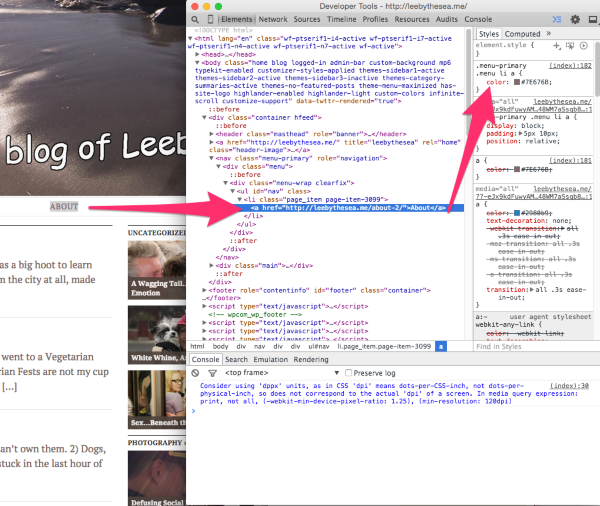
So in our custom CSS, we just using the same rule, but changing it from “color: #7E676B” to “color: blue;”
-Alex G.
-
So far so good with About.
Now, throughout all my blog posts I’d like to have the links I include be blue. Can you help? -
Sure thing. Try this out!
.main-content a{
	color: blue;
}
By the way, I took a look at your Customizer, and it looks like you’re missing a final curly brace for the last CSS code that’s in there already.
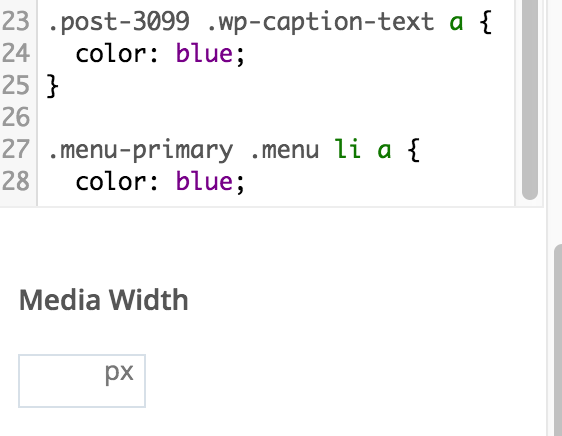
Make sure to add the final ‘}’ before adding this next bit. :)
-Alex G.
-
Hi there,
I just saw that a comment was made on my last post but I wasn’t notified by e-mail again. Not in junk either. Also, I see three followers were added to my list of followers since I last checked and I wasn’t notified about them either, not in junk.
In my recent blog post “A peek at Ass Backwards” I basically raved about WordPress tech support. And you guys do help me a lot. But this seems to keep happening. Can you check on things again.
Thanks,
Lee -
Since my last reply to you I got two more comments on “A Pup…” neither of which was I notified by email about. Not in junk either.
-
Hi Lee,
I checked our email logs for the last two days, and the notification emails were sent and marked as received by your email service for the following:
- Your post “A Pup, from Sand to Sea” on Apr 13 at 16:26:12 GMT
- A comment needing moderation for the post “A Pup, from Sand to Sea” on Apr 14 at 12:40:03 GMT
- A new follower on Apr 14 at 19:06:46 GMT
- A comment needing moderation for the post “A Peek at Ass-Backwards” on Apr 14 at 19:08:13 GMT
- A notice that a reader reblogged your post “A Peek at Ass-Backwards” on Apr 14 at 19:08:15 GMT
- A comment needing moderation for the post “A Peek at Ass-Backwards” on Apr 14 at 19:12:34 GMT
If your email provider offers a search function can you search all your folders for an email with this subject line:
[leebythesea] Please moderate: "A Pup, from Sand to Sea"-Alex G.
-
-
-
Could you add both WordPress.com and wp.com to the Allow List in your email preferences?
http://www.verizon.net/micro/webmail/help/webmail_help.htm#preferences
I apologize if this feels like redoing work in your email, but our logs show that the emails were all sent and that your email service marked them as received. It’s possible for some reason your email service is not delivering them to your inbox for some reason, but I can only really control the out-going part of it.
Keep us in your Allow List should override any other setting to make sure they arrive.


- The topic ‘Comments’ is closed to new replies.
 WordPress.com Forums